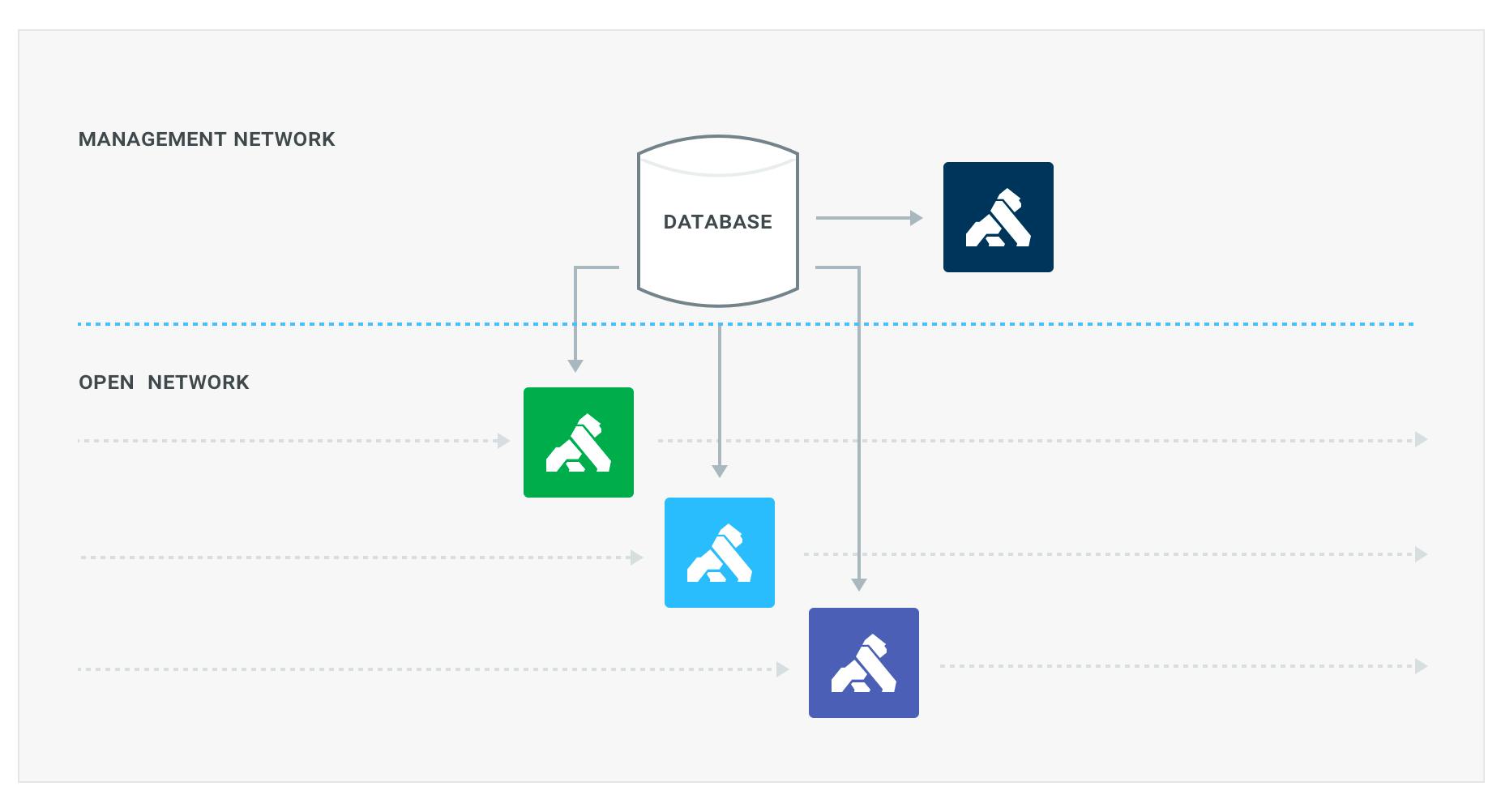
So what are those planes? The control plane is how we instrument the system (pushing configs, fetching logs), whereas the data plane is the traffic that is actually being proxied by the system.
Consider a factory. The factory has a conveyor belt, and on this belt the parts are added, the products assembled and finally packed and shipped. But to run this factory we need a lot more: logistics, work schedules, maintenance, quality reports, and what not. In this example the conveyor belt would be the data plane, where all the auxiliary stuff to enable the belt to deliver the products would be the control plane.
Kong works as a cluster of independent, stateless, nodes. All the Kong nodes in a given cluster are connected to the same database, from which the nodes get their configuration information. Up till now each Kong node would expose a port where it would serve traffic for the proxy (data plane), and another for configuration (the RESTful management API, the control plane).
With the new release we have refactored the way the ports are configured which allows for greater flexibility in infrastructure architecture and system control. This will enable the following uses:
- disable the proxy all together (making a node a control-plane only node)
- disable the management API all together (making a node a data-plane only node)
- define multiple ports for either the proxy or admin api (not explored on this post, but worth mentioning)
This now opens up the possibility to proxy API traffic through Kong via one network segment, while administering Kong via a different network segment, which provides better isolation of the components, without risking accidentally opening up the Kong admin API to the whole internet.
To achieve this we removed the following (default) settings:
## text
# Proxy
proxy_listen = 0.0.0.0:8000
proxy_listen_ssl = 0.0.0.0:8443
ssl = on
http2 = off

# Admin API
admin_listen = 127.0.0.1:8001
admin_listen_ssl = 127.0.0.1:8444
admin_ssl = on
admin_http2 = off
The format changed into a comma separated list of addresses with flags:
This format allows for multiple address/port combinations and flags to configure each of those. The new defaults, mimicking the exact same behavior of the old settings are:
Stop me if you’ve heard this one before, but there’s a lot of data out there — and the amount is only growing. Estimates typically show persistent data growth roughly at a 20% annual compounded rate. Capturing, storing, analyzing, and actioning data
Ahmed Koshok
# Why Your Kafka Event Streams Need an Event Gateway
You wouldn't expose a REST API without a gateway. What about Kafka?
Before we talk about an event gateway, it's worth grounding ourselves on what an event is. An event is simply a record of something that happened. In modern integration, there are
Warren Vella
# AI Agent Integration: Gartner Research Confirms Need for AI Control Layer
An AI control layer is the governance and observability infrastructure that sits between AI agents and enterprise applications, handling authentication, routing, rate limiting, and auditability to ensure secure, managed access. Unlike traditional in
Heather Halenbeck
# Scaling Down to Scale Up Using Kong’s API Gateway
This blog post is part two of a two-part series on how we broke down our monolith to scale our API management with Kong Gateway, the world's most popular open-source API gateway . ( Here's part one .) At NexJ , the pioneer of intelligent customer
Jelena Duma
# Kong's Named Leader in the 2026 Gartner® Magic Quadrant™ for API Management
We're thrilled to announce that Kong, the AI connectivity company, has been recognized as a Leader in the Gartner Magic Quadrant for API Management for the seventh year in a row. Plus, Kong was positioned furthest on the Completeness of Vision axis
There are two key concepts when a developer works with an API. The OpenAPI Spec describes how the API should work, and helps agents discover what is possible. The Collection and Requests help debug and verify how the endpoints currently function. P
Cameron HayGlass
# Kong API Gateway 3.16: Runtime control, API monetization, and FIPS 140-3
If you've run Kong at scale, you know the moment: a spike in 5xxs from one specific data plane node, a customer opening a ticket about intermittent failures, or a partner integration that fails calls no one else does. Debug-level logs would tell you
Zongmin Li
# Enabling Secure Data Exchange with Decentralized APIs
Stop me if you’ve heard this one before, but there’s a lot of data out there — and the amount is only growing. Estimates typically show persistent data growth roughly at a 20% annual compounded rate. Capturing, storing, analyzing, and actioning data
Ahmed Koshok
# Why Your Kafka Event Streams Need an Event Gateway
You wouldn't expose a REST API without a gateway. What about Kafka?
Before we talk about an event gateway, it's worth grounding ourselves on what an event is. An event is simply a record of something that happened. In modern integration, there are
Warren Vella
# AI Agent Integration: Gartner Research Confirms Need for AI Control Layer
An AI control layer is the governance and observability infrastructure that sits between AI agents and enterprise applications, handling authentication, routing, rate limiting, and auditability to ensure secure, managed access. Unlike traditional in
Heather Halenbeck
# Scaling Down to Scale Up Using Kong’s API Gateway
This blog post is part two of a two-part series on how we broke down our monolith to scale our API management with Kong Gateway, the world's most popular open-source API gateway . ( Here's part one .) At NexJ , the pioneer of intelligent customer
Jelena Duma
# Kong's Named Leader in the 2026 Gartner® Magic Quadrant™ for API Management
We're thrilled to announce that Kong, the AI connectivity company, has been recognized as a Leader in the Gartner Magic Quadrant for API Management for the seventh year in a row. Plus, Kong was positioned furthest on the Completeness of Vision axis
There are two key concepts when a developer works with an API. The OpenAPI Spec describes how the API should work, and helps agents discover what is possible. The Collection and Requests help debug and verify how the endpoints currently function. P
Cameron HayGlass
# Kong API Gateway 3.16: Runtime control, API monetization, and FIPS 140-3
If you've run Kong at scale, you know the moment: a spike in 5xxs from one specific data plane node, a customer opening a ticket about intermittent failures, or a partner integration that fails calls no one else does. Debug-level logs would tell you
Zongmin Li
# Enabling Secure Data Exchange with Decentralized APIs
Stop me if you’ve heard this one before, but there’s a lot of data out there — and the amount is only growing. Estimates typically show persistent data growth roughly at a 20% annual compounded rate. Capturing, storing, analyzing, and actioning data
Ahmed Koshok
# Why Your Kafka Event Streams Need an Event Gateway
You wouldn't expose a REST API without a gateway. What about Kafka?
Before we talk about an event gateway, it's worth grounding ourselves on what an event is. An event is simply a record of something that happened. In modern integration, there are
Warren Vella
# AI Agent Integration: Gartner Research Confirms Need for AI Control Layer
An AI control layer is the governance and observability infrastructure that sits between AI agents and enterprise applications, handling authentication, routing, rate limiting, and auditability to ensure secure, managed access. Unlike traditional in
Heather Halenbeck
# Scaling Down to Scale Up Using Kong’s API Gateway
This blog post is part two of a two-part series on how we broke down our monolith to scale our API management with Kong Gateway, the world's most popular open-source API gateway . ( Here's part one .) At NexJ , the pioneer of intelligent customer
Jelena Duma
# Kong's Named Leader in the 2026 Gartner® Magic Quadrant™ for API Management
We're thrilled to announce that Kong, the AI connectivity company, has been recognized as a Leader in the Gartner Magic Quadrant for API Management for the seventh year in a row. Plus, Kong was positioned furthest on the Completeness of Vision axis
There are two key concepts when a developer works with an API. The OpenAPI Spec describes how the API should work, and helps agents discover what is possible. The Collection and Requests help debug and verify how the endpoints currently function. P
Cameron HayGlass
# Kong API Gateway 3.16: Runtime control, API monetization, and FIPS 140-3
If you've run Kong at scale, you know the moment: a spike in 5xxs from one specific data plane node, a customer opening a ticket about intermittent failures, or a partner integration that fails calls no one else does. Debug-level logs would tell you
Zongmin Li
## Ready to see Kong in action?
Get a personalized walkthrough of Kong's platform tailored to your architecture, use cases, and scale requirements.