With Kong 1.0 users are now able to control TCP (Transport Control Protocol) traffic. Learn about how we added TCP support, and how you can try it out.
TCP traffic powers email, file transfer, ssh, and many other common types of traffic that can't be handled by a layer 7 proxy. Our expansion to layer 4 will enable you to connect even more of your services using Kong.
## Why now?
When we were designing the ability to deploy [Kong as a service mesh](https://konghq.com/products/kong-enterprise/kong-mesh)Kong as a service mesh, we wanted to build a system that could connect all our users' services, running on any infrastructure, written in any language, and architected in any pattern. Part of fulfilling this promise meant moving down the Open Systems Interconnection (OSI) stack to cover services that communicate using protocols other than HTTP. We wanted Kong to be able to handle all types of TCP traffic when deployed either as an API gateway or in a mesh pattern. With our sponsorship of OpenResty's stream support, we were able to add user-facing support for TCP traffic to Kong.
## How does it work?
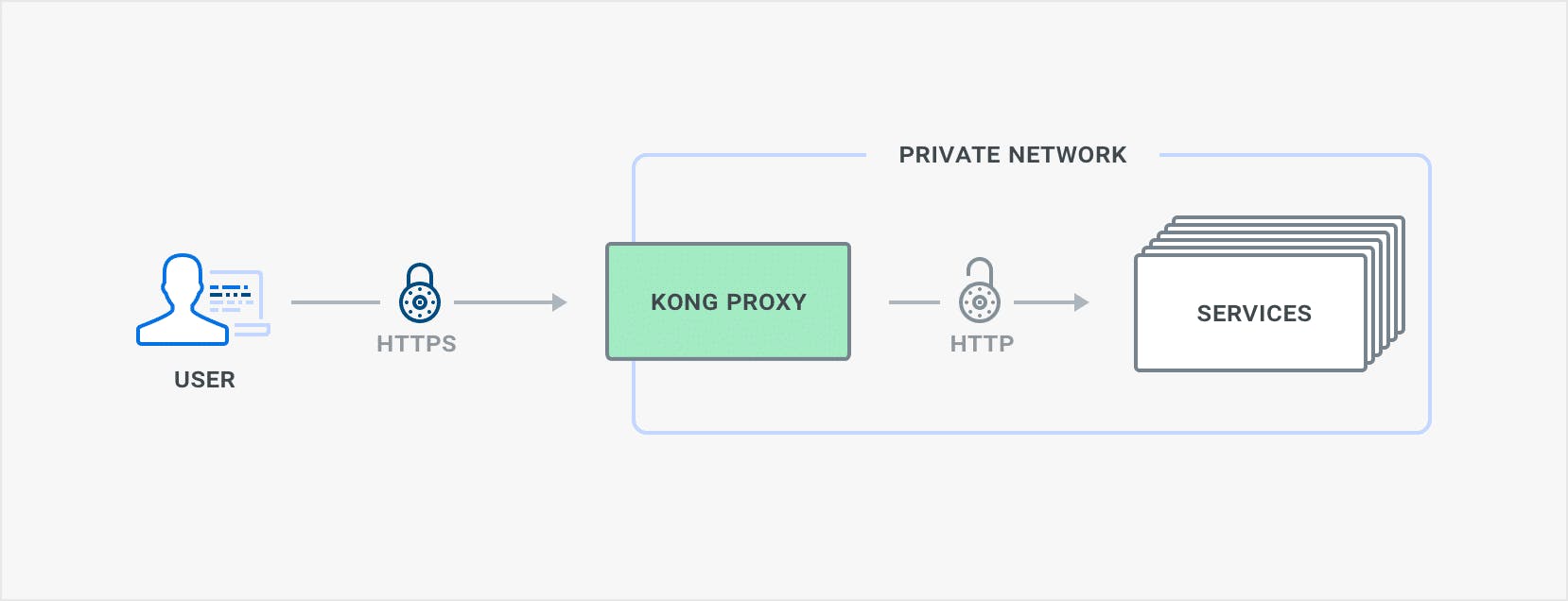
Our new [stream_listen configuration option](https://docs.konghq.com/1.0.x/configuration/#stream_listen)stream_listen configuration option allows users to select the IPs and ports where Kong's stream mode should listen for TCP traffic. Kong automatically terminates Transport Layer Security (TLS) for incoming TLS traffic, and depending on service configuration you can have Kong encrypt outbound connections with TLS or not. Using Kong's Server Name Indication (SNI) and certificate entities, users can now also configure their own TLS certificates. One of the major use cases for Kong's TCP support is TLS termination.
Kong's extensibility with plugins is a big reason that users choose Kong over other API Gateways or service meshes. TCP traffic handling is still in its early days, and Kong 1.0 didn't ship with any TCP-supporting plugins. But, users are already able to write their own custom plugins that apply to TCP traffic. Writing a TCP plugin is a little different to a traditional Kong HTTP plugin. Instead of "rewrite", "access", "header" and "body" phases, TCP plugins will have a "preread" phase.
## What are the Gotchas?
TCP support requires some customizations that Kong has made for OpenResty. If you're compiling your own OpenResty from source, apply Kong's [openresty-patches](https://github.com/Kong/openresty-patches)openresty-patches to be able to use this new functionality. Kongs packages and images already come with these patches applied.
- Start your kong with the stream_listen configuration option, selecting the port you want to listen on. You may choose to do this with either the config file or via environment variables.
- Configure a service with either a ‘tcp' or ‘tls' protocol field. If you select ‘tcp', then traffic will be sent to your upstream as plain traffic. If you select ‘tls' then kong will encrypt the outgoing traffic with TLS. This should be familiar to users of Kong where they had the existing choice of ‘http' vs ‘https' for the protocol field.
- Configure a route for your service based on ‘sources' ‘destinations' and/or ‘snis'.
# Start up your normal Postgres database and run kong migrations
# See https://docs.konghq.com/install/docker/ for more information
docker network create kong-net
docker run -d --name kong-database \
    --network=kong-net \
    -e "POSTGRES_USER=kong" \
    -e "POSTGRES_DB=kong" \
    postgres:11
docker run --rm \
    --network=kong-net \
    -e "KONG_PG_HOST=kong-database" \
    kong:1.0.3-alpine kong migrations bootstrap

# Start kong with stream_listen
docker run \
    --network=kong-net \
    -e "KONG_PG_HOST=kong-database" \
    -e "KONG_PROXY_ACCESS_LOG=/dev/stdout" \
    -e "KONG_ADMIN_ACCESS_LOG=/dev/stdout" \
    -e "KONG_PROXY_ERROR_LOG=/dev/stderr" \
    -e "KONG_ADMIN_ERROR_LOG=/dev/stderr" \
    -e "KONG_ADMIN_LISTEN=0.0.0.0:8001" -p 8001:8001 \
    -e "KONG_STREAM_LISTEN=0.0.0.0:5555" -p 5555:5555 \
    kong:1.0.3-alpine

# Add a service and route
curl localhost:8001/services -d name=tcpbin-echo -d url=tcp://52.20.16.20:30000
curl localhost:8001/services/tcpbin-echo/routes -d protocols=tls -d snis=tlsbin-example

# Try out the service (it'll do a TLS handshake then echo your input)
openssl s_client -connect localhost:5555 -servername tlsbin-example
## What's next for TCP support?
Here are just a few of the improvements to TCP support that you can look forward to in future versions of Kong.
At the moment Kong will unconditionally try to terminate TLS if the traffic looks like a valid TLS ClientHello. We want to make this configurable on a per-route basis, which will include the ability to terminate or not based on SNI.
In the future, the Kong Plugin Development Kit (PDK) will include more support for TCP data. Currently, to write many types of TCP plugins you need to delve into sparsely documented internal structures. We will slowly be exposing more fields and making it easier to write your own Kong TCP plugins. We'll also be updating any appropriate Kong-supported plugins to work with TCP.
If you're a plugin maintainer and want to add TCP support, or if you have any questions about TCP support in Kong, please get in touch with us through our community forum, [Kong Nation](https://discuss.konghq.com)Kong Nation.
You wouldn't expose a REST API without a gateway. What about Kafka?
Before we talk about an event gateway, it's worth grounding ourselves on what an event is. An event is simply a record of something that happened. In modern integration, there are
Warren Vella
# Kong's Named Leader in the 2026 Gartner® Magic Quadrant™ for API Management
We're thrilled to announce that Kong, the AI connectivity company, has been recognized as a Leader in the Gartner Magic Quadrant for API Management for the seventh year in a row. Plus, Kong was positioned furthest on the Completeness of Vision axis
There are two key concepts when a developer works with an API. The OpenAPI Spec describes how the API should work, and helps agents discover what is possible. The Collection and Requests help debug and verify how the endpoints currently function. P
Cameron HayGlass
# Kong API Gateway 3.16: Runtime control, API monetization, and FIPS 140-3
If you've run Kong at scale, you know the moment: a spike in 5xxs from one specific data plane node, a customer opening a ticket about intermittent failures, or a partner integration that fails calls no one else does. Debug-level logs would tell you
Zongmin Li
# A Unified Gateway for APIs + Agentic Applications on VMware VKS with Kong Konnect
Built on top of Kong API Gateway, the Kong AI Gateway is designed to address key challenges in enterprise AI adoption. Modern AI applications rarely rely on a single model; instead, they orchestrate multiple GenAI providers, agent frameworks, Age
Anika Suri
# Building a Secure, Scalable AI Infrastructure with Kong and Akamai: A Technical Introduction
Together, the following components represent the three layers of the new AI platform: AI Gateway: Kong AI Gateway (including MCP support) controls both GenAI and MCP flow and orchestrates the existing services like Vector Databases, Event Streaming,
Marco Raffaelli
# Beyond Static Routing: Modernizing API Logic with Conditional Policy Execution
Imagine you have a single Service, order-api . You want to apply a strict rate limit to most traffic, but you want to bypass that limit—or apply a different one—if the request contains a specific X-App-Priority: High header. Previously, you had t
Hugo Guerrero
# Why Your Kafka Event Streams Need an Event Gateway
You wouldn't expose a REST API without a gateway. What about Kafka?
Before we talk about an event gateway, it's worth grounding ourselves on what an event is. An event is simply a record of something that happened. In modern integration, there are
Warren Vella
# Kong's Named Leader in the 2026 Gartner® Magic Quadrant™ for API Management
We're thrilled to announce that Kong, the AI connectivity company, has been recognized as a Leader in the Gartner Magic Quadrant for API Management for the seventh year in a row. Plus, Kong was positioned furthest on the Completeness of Vision axis
There are two key concepts when a developer works with an API. The OpenAPI Spec describes how the API should work, and helps agents discover what is possible. The Collection and Requests help debug and verify how the endpoints currently function. P
Cameron HayGlass
# Kong API Gateway 3.16: Runtime control, API monetization, and FIPS 140-3
If you've run Kong at scale, you know the moment: a spike in 5xxs from one specific data plane node, a customer opening a ticket about intermittent failures, or a partner integration that fails calls no one else does. Debug-level logs would tell you
Zongmin Li
# A Unified Gateway for APIs + Agentic Applications on VMware VKS with Kong Konnect
Built on top of Kong API Gateway, the Kong AI Gateway is designed to address key challenges in enterprise AI adoption. Modern AI applications rarely rely on a single model; instead, they orchestrate multiple GenAI providers, agent frameworks, Age
Anika Suri
# Building a Secure, Scalable AI Infrastructure with Kong and Akamai: A Technical Introduction
Together, the following components represent the three layers of the new AI platform: AI Gateway: Kong AI Gateway (including MCP support) controls both GenAI and MCP flow and orchestrates the existing services like Vector Databases, Event Streaming,
Marco Raffaelli
# Beyond Static Routing: Modernizing API Logic with Conditional Policy Execution
Imagine you have a single Service, order-api . You want to apply a strict rate limit to most traffic, but you want to bypass that limit—or apply a different one—if the request contains a specific X-App-Priority: High header. Previously, you had t
Hugo Guerrero
# Why Your Kafka Event Streams Need an Event Gateway
You wouldn't expose a REST API without a gateway. What about Kafka?
Before we talk about an event gateway, it's worth grounding ourselves on what an event is. An event is simply a record of something that happened. In modern integration, there are
Warren Vella
# Kong's Named Leader in the 2026 Gartner® Magic Quadrant™ for API Management
We're thrilled to announce that Kong, the AI connectivity company, has been recognized as a Leader in the Gartner Magic Quadrant for API Management for the seventh year in a row. Plus, Kong was positioned furthest on the Completeness of Vision axis
There are two key concepts when a developer works with an API. The OpenAPI Spec describes how the API should work, and helps agents discover what is possible. The Collection and Requests help debug and verify how the endpoints currently function. P
Cameron HayGlass
# Kong API Gateway 3.16: Runtime control, API monetization, and FIPS 140-3
If you've run Kong at scale, you know the moment: a spike in 5xxs from one specific data plane node, a customer opening a ticket about intermittent failures, or a partner integration that fails calls no one else does. Debug-level logs would tell you
Zongmin Li
# A Unified Gateway for APIs + Agentic Applications on VMware VKS with Kong Konnect
Built on top of Kong API Gateway, the Kong AI Gateway is designed to address key challenges in enterprise AI adoption. Modern AI applications rarely rely on a single model; instead, they orchestrate multiple GenAI providers, agent frameworks, Age
Anika Suri
# Building a Secure, Scalable AI Infrastructure with Kong and Akamai: A Technical Introduction
Together, the following components represent the three layers of the new AI platform: AI Gateway: Kong AI Gateway (including MCP support) controls both GenAI and MCP flow and orchestrates the existing services like Vector Databases, Event Streaming,
Marco Raffaelli
# Beyond Static Routing: Modernizing API Logic with Conditional Policy Execution
Imagine you have a single Service, order-api . You want to apply a strict rate limit to most traffic, but you want to bypass that limit—or apply a different one—if the request contains a specific X-App-Priority: High header. Previously, you had t
Hugo Guerrero
## Ready to see Kong in action?
Get a personalized walkthrough of Kong's platform tailored to your architecture, use cases, and scale requirements.