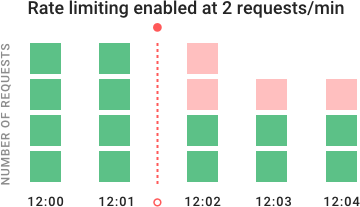
In the example chart, you can see how rate limiting blocks requests over time. The API was initially receiving four requests per minute, shown in green. When we enabled rate limiting at 12:02, the system denied additional requests, shown in red.
## Why is rate limiting used?
Rate limiting is very important for public APIs where you want to maintain a good quality of service for every consumer, even when some users take more than their fair share. Computationally-intensive endpoints are particularly in need of rate limiting — especially when served by auto-scaling, or by pay-by-the-computation services like [AWS Lambda](https://docs.konghq.com/hub/kong-inc/aws-lambda)AWS Lambda. You also may want to rate limit API technologies that serve sensitive data because this could limit the data exposed if an attacker gains access in some unforeseen event.
Rate limiting can be used to accomplish the following:
- **Avoid resource starvation:** Rate limiting can improve the availability of services and help avoid friendly-fire denial-of-service (DoS) attacks.
- **Cost management:** Rate limiting can be used to enforce cost controls, (for example) preventing surprise bills from experiments or misconfigured resources .
- **Manage policies and quotas:** Rate limiting allows for the fair sharing of a service with multiple users.
- **Control flow:** For APIs that process massive amounts of data, rate limiting can be used to control the flow of that data. It can allow for the merging of multiple streams into one service or the equally distribution of a single stream to multiple workers.
- **Security**: Rate limiting can be used as defense or mitigation against some common attacks.
## **What kind of attacks can rate limiting prevent?**
Rate limiting can be critical in protecting against a variety of bot-based attacks, including:
- DoS and DDoS (distributed denial-of-service) attacks
- Brute force and credential stuffing attacks
- Web scraping or site scraping
## How do you enable rate limiting?
There are many different ways to enable rate limiting, and we will explore the pros and cons of varying rate limiting algorithms. We will also explore the issues that come up when scaling across a cluster. Lastly, we'll show you an example of how to quickly set up rate limiting using Kong Gateway, which is the most popular [open-source API gateway](https://konghq.com/products/kong-gateway)open-source API gateway.
[Leaky bucket](https://en.wikipedia.org/wiki/Leaky_bucket)Leaky bucket (closely related to [token bucket](https://en.wikipedia.org/wiki/Token_bucket)token bucket) is an algorithm that provides a simple, intuitive approach to rate limiting via a queue, which you can think of as a bucket holding the requests. When registering a request, the system appends it to the end of the queue. Processing for the first item on the queue occurs at a regular interval or first in, first out (FIFO). If the queue is full, then additional requests are discarded (or leaked).
This algorithm's advantage is that it smooths out bursts of requests and processes them at an approximately average rate. It's also easy to implement on a single server or load balancer and is memory efficient for each user, given the limited queue size.
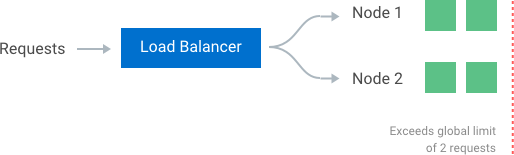
However, a burst of traffic can fill up the queue with old requests and starve more recent requests from being processed. It also provides no guarantee that requests get processed in a fixed amount of time. Additionally, if you load balance servers for fault tolerance or increased throughput, you must use a policy to coordinate and enforce the limit between them. We will come back to the challenges of distributed environments later.
### **Fixed Window**
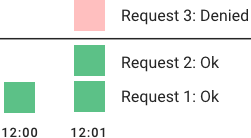
The system uses a window size of n seconds (typically using human-friendly values, such as 60 or 3600 seconds) to track the **fixed window** algorithm rate. Each incoming request increments the counter for the window. It discards the request if the counter exceeds a threshold. The current timestamp floor typically defines the windows, so 12:00:03, with a 60-second window length, would be in the 12:00:00 window.
This algorithm's advantage is that it ensures more recent requests get processed without being starved by old requests. However, a single burst of traffic that occurs near the boundary of a window can result in the processing of twice the rate of requests because it will allow requests for both the current and next windows within a short time. Additionally, if many consumers wait for a reset window, they may stampede your API at the same time at the top of the hour.
### **Sliding Log**
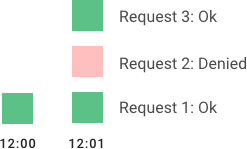
**Sliding Log** rate limiting involves tracking a time-stamped log for each consumer's request. The system stores these logs in a time-sorted hash set or table. It also discards logs with timestamps beyond a threshold. When a new request comes in, we calculate the sum of logs to determine the request rate. If the request would exceed the threshold rate, then it is held.
The advantage of this algorithm is that it does not suffer from the boundary conditions of fixed windows. Enforcement of the rate limit will remain precise. Since the system tracks the sliding log for each consumer, you don't have the stampede effect that challenges fixed windows. However, it can be costly to store an unlimited number of logs for every request. It's also expensive to compute because each request requires calculating a summation over the consumer's prior requests, potentially across a cluster of servers. As a result, it does not scale well to handle large bursts of traffic or denial of service attacks.
### **Sliding Window**
**Sliding Window** is a hybrid approach that combines the fixed window algorithm's low processing cost and the sliding log's improved boundary conditions. Like the fixed window algorithm, we track a counter for each fixed window. Next, we account for a weighted value of the previous window’s request rate based on the current timestamp to smooth out bursts of traffic. For example, if the current window is 25% through, we weigh the previous window's count by 75%. The relatively small number of data points needed to track per key allows us to scale and distribute across large clusters.
We recommend the **sliding window** approach because it gives the flexibility to scale rate limiting with good performance. The rate windows are an intuitive way to present rate limit data to API consumers. It also avoids the starvation problem of the leaky bucket and the bursting problems of fixed window implementations.
## 3 Tips to Supercharge Dev Efficiency: Streamline Operations with Konnect
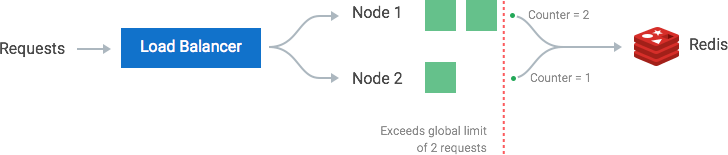
The simplest way to enforce the limit is to set up sticky sessions in your load balancer so that each consumer gets sent to exactly one node. The disadvantages include a lack of fault tolerance and scaling problems when nodes get overloaded.
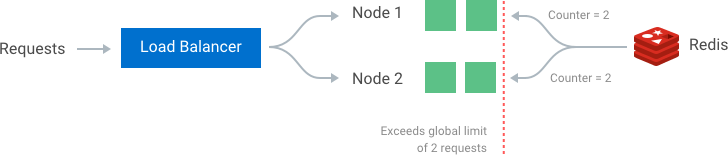
A better solution that allows more flexible load-balancing rules is to use a centralized data store such as Redis or[ Cassandra](https://konghq.com/blog/using-instaclustr-and-cassandra-with-kong) Cassandra. A centralized data store will collect the counts for each window and consumer. The two main problems with this approach are increased latency making requests to the data store and race conditions, which we will discuss next.
### **Race Conditions**
One of the most extensive problems with a centralized data store is the potential for [race conditions](https://en.wikipedia.org/wiki/Race_condition)race conditions in [high concurrency](https://en.wikipedia.org/wiki/Concurrency_(computer_science))high concurrency request patterns. This issue happens when you use a naïve "get-then-set" approach, wherein you retrieve the current rate limit counter, increment it, and then push it back to the datastore. This model's problem is that additional requests can come through in the time it takes to perform a full cycle of read-increment-store, each attempting to store the increment counter with an invalid (lower) counter value. This allows a consumer to send a very high rate of requests to bypass rate limiting controls.
One way to avoid this problem is to put a "**lock**" around the key in question, preventing any other processes from accessing or writing to the counter. A lock would quickly become a significant performance bottleneck and does not scale well, mainly when using remote servers like Redis as the backing datastore.
A better approach is to use a "**set-then-get**" mindset, relying on atomic operators that implement locks in a very performant fashion, allowing you to quickly increment and check counter values without letting the atomic operations get in the way.
### **Optimizing for Performance**
The increased [latency](https://konghq.com/blog/observability-kubernetes-kong)latency is another disadvantage of using a centralized data store when checking the rate limit counters. Unfortunately, even checking a fast data store like Redis would result in milliseconds of additional latency for every request.
Make checks locally **in memory **to make these rate limit determinations with minimal latency. To make local checks, relax the rate check conditions and use an eventually consistent model. For example, each node can create a data sync cycle that will synchronize with the centralized data store. Each node periodically pushes a counter increment for each consumer and window to the datastore. These pushes atomically update the values. The node can then retrieve the updated values to update its in-memory version. This cycle of converge → diverge → reconverge among nodes in the cluster is eventually consistent.
The periodic rate at which nodes converge should be configurable. Shorter sync intervals will result in less divergence of data points when spreading traffic across multiple nodes in the cluster (e.g., when sitting behind a round robin balancer). Whereas longer sync intervals put less read/write pressure on the datastore and less overhead on each node to fetch new synced values.
## **Quickly set up rate limiting with Kong API Gateway**
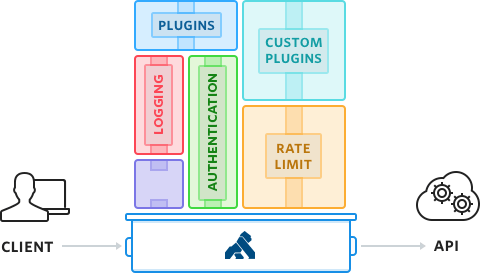
Kong Gateway sits in front of your APIs and is the main entry point to your upstream APIs. While processing the request and the response, Kong Gateway will execute any plugin that you have decided to add to the API.
Kong API Gateway's rate limiting plug-in is highly configurable. It:
- Offers flexibility to define multiple rate limit windows and rates for each API and consumer
- Includes support for local memory, Redis, Postgres, and Cassandra backing datastores
- Offers a variety of data synchronization options, including synchronous and eventually consistent models
The next step is [adding an API](https://konghq.com/blog/set-up-kong-gateway)adding an API on Kong Gateway using the admin API, which can be done by setting up a Route and a Service entity. We will use [httpbin](https://httpbin.org)httpbin, a free testing service for APIs, as our example upstream service,. The get URL will mirror back my request data as JSON. We also assume Kong Gateway is running on the local system at the default ports.
Now Kong Gateway is aware that every request sent to "/test" should be proxied to httpbin. We can make the following request to Kong Gateway on its proxy port to test it:
Looking good! We have added an API on Kong Gateway, and we added rate-limiting in just two HTTP requests to the admin API.
It defaults to rate limiting by IP address using fixed windows and synchronizes across all nodes in your cluster using your default datastore. For other options, including rate limiting per consumer or using another datastore like Redis, please see the [documentation](https://getkong.org/plugins/rate-limiting)documentation.
## **Better performance with advanced rate limiting and Konnect**
The [Advanced Rate Limiting plugin](https://docs.konghq.com/hub/kong-inc/rate-limiting-advanced)Advanced Rate Limiting plugin adds support for the sliding window algorithm for better control and performance. The sliding window prevents your API from being overloaded near window boundaries, as explained in the sections above. For low latency, it uses an in-memory table of the counters and can synchronize across the cluster using asynchronous or synchronous updates. This gives the latency of local thresholds and is scalable across your entire cluster.
So, what exactly is Kong Insomnia? Kong Insomnia is your all-in-one platform for designing, testing, debugging, and shipping APIs at speed. Built for developers who need power without bloat, Insomnia helps you move fast whether you’re working solo,
Juhi Singh
# Unpacking Distributed Applications: What Are They? And How Do They Work?
Distributed architectures have become an integral part of modern digital landscape. With the proliferation of cloud computing, big data, and highly available systems, traditional monolithic architectures have given way to more distributed, scalable,
Paul Vergilis
# Day 0 Service Mesh: Simplifying Microservices Management
The acceleration of microservices and containerized workloads has revolutionized software delivery at scale. However, these distributed architectures also introduce significant complexity around networking, security, and observability. As developmen
Domain-driven designs are popular in organizations that have complex domain models and wish to organize engineering around them. REST-based architectures are a common choice for implementing the API entry point into these domains. REST-based solu
We looked at service design considerations in the first part of this blog series . In this next part, I'd like to share some best practices for API versioning - a topic that comes up quite often with every customer as it is one of the key concerns
Vikas Vijendra
# Intelligent Model Routing: Kong AI Gateway Applies NVIDIA NeMo Switchyard Across Model Traffic
As AI adoption scales, applications evolve into complex systems of agents, orchestration layers, and context servers. Infrastructure lags behind — struggling with authentication, cost control, and data security across a provider list that change
Grajesh Chandra
# Enforce API Standards with Custom Linting in Kong Insomnia 13
To follow along, you’ll need: Insomnia 13 or later An Insomnia project with an API design document An OpenAPI 3.x specification Note: In Insomnia 13, custom linting supports Spectral rulesets using the top-level rules and extends properties. Custom
Juhi Singh
# 6 Reasons Why Kong Insomnia Is Developers' Preferred API Client
So, what exactly is Kong Insomnia? Kong Insomnia is your all-in-one platform for designing, testing, debugging, and shipping APIs at speed. Built for developers who need power without bloat, Insomnia helps you move fast whether you’re working solo,
Juhi Singh
# Unpacking Distributed Applications: What Are They? And How Do They Work?
Distributed architectures have become an integral part of modern digital landscape. With the proliferation of cloud computing, big data, and highly available systems, traditional monolithic architectures have given way to more distributed, scalable,
Paul Vergilis
# Day 0 Service Mesh: Simplifying Microservices Management
The acceleration of microservices and containerized workloads has revolutionized software delivery at scale. However, these distributed architectures also introduce significant complexity around networking, security, and observability. As developmen
Domain-driven designs are popular in organizations that have complex domain models and wish to organize engineering around them. REST-based architectures are a common choice for implementing the API entry point into these domains. REST-based solu
We looked at service design considerations in the first part of this blog series . In this next part, I'd like to share some best practices for API versioning - a topic that comes up quite often with every customer as it is one of the key concerns
Vikas Vijendra
# Intelligent Model Routing: Kong AI Gateway Applies NVIDIA NeMo Switchyard Across Model Traffic
As AI adoption scales, applications evolve into complex systems of agents, orchestration layers, and context servers. Infrastructure lags behind — struggling with authentication, cost control, and data security across a provider list that change
Grajesh Chandra
# Enforce API Standards with Custom Linting in Kong Insomnia 13
To follow along, you’ll need: Insomnia 13 or later An Insomnia project with an API design document An OpenAPI 3.x specification Note: In Insomnia 13, custom linting supports Spectral rulesets using the top-level rules and extends properties. Custom
Juhi Singh
# 6 Reasons Why Kong Insomnia Is Developers' Preferred API Client
So, what exactly is Kong Insomnia? Kong Insomnia is your all-in-one platform for designing, testing, debugging, and shipping APIs at speed. Built for developers who need power without bloat, Insomnia helps you move fast whether you’re working solo,
Juhi Singh
# Unpacking Distributed Applications: What Are They? And How Do They Work?
Distributed architectures have become an integral part of modern digital landscape. With the proliferation of cloud computing, big data, and highly available systems, traditional monolithic architectures have given way to more distributed, scalable,
Paul Vergilis
# Day 0 Service Mesh: Simplifying Microservices Management
The acceleration of microservices and containerized workloads has revolutionized software delivery at scale. However, these distributed architectures also introduce significant complexity around networking, security, and observability. As developmen
Domain-driven designs are popular in organizations that have complex domain models and wish to organize engineering around them. REST-based architectures are a common choice for implementing the API entry point into these domains. REST-based solu
We looked at service design considerations in the first part of this blog series . In this next part, I'd like to share some best practices for API versioning - a topic that comes up quite often with every customer as it is one of the key concerns
Vikas Vijendra
# Intelligent Model Routing: Kong AI Gateway Applies NVIDIA NeMo Switchyard Across Model Traffic
As AI adoption scales, applications evolve into complex systems of agents, orchestration layers, and context servers. Infrastructure lags behind — struggling with authentication, cost control, and data security across a provider list that change
Grajesh Chandra
# Enforce API Standards with Custom Linting in Kong Insomnia 13
To follow along, you’ll need: Insomnia 13 or later An Insomnia project with an API design document An OpenAPI 3.x specification Note: In Insomnia 13, custom linting supports Spectral rulesets using the top-level rules and extends properties. Custom
Juhi Singh
## Ready to see Kong in action?
Get a personalized walkthrough of Kong's platform tailored to your architecture, use cases, and scale requirements.