The simplistic approach to solving all these issues is to move all the configurations to the GitOps model. Then, move all the configs to a VCS repository and follow the PR model to apply all the changes to any environment. To do this, you must have:
- All the configurations present in VCS for easy consumption
- A PR approval mechanism in place to verify all the configurations
- A way to revert the commit and re-apply mistakes during reviews
Combining the benefits of GitOps and Terraform as IAC gives us the following advantages over the conventional manual curl calls:
- A state lock so that no two people make changes on the same objects
- Easy-to-identify changes introduced as part of the apply, making a more informed decision
- Using terraform apply to fix any mistakes
## Demo: Kong Configs Using Terraform
For this demo, I'll be doing the following:
- Use a VCS repo to push the code that will create a service, route, upstream and the targets for this service.
- Apply the Kong configurations via Terraform.
- Make a change, analyze the diffs and apply the changes.
This code is required for creating a service called base-svc, which will forward all the requests to the target base-svc.cluster.local:8001 for the requests matching route https://basesvc.example.com/ or http://basesvc.example.com.
### **3. Run Terraform Init for initializing the backend and the provider.**
Successful Terraform Init
If your Terraform provider configuration is correct, then you will get the above success message.
### **4. Run Terraform Plan for planning the changes done by the code.**
Terraform Plan Output
`
If you have followed everything until now, you will get a similar output of the plan that will show you all the resources that are getting created.
### **5. Run Terraform Apply for applying all these configurations on Kong.**
Successful Apply
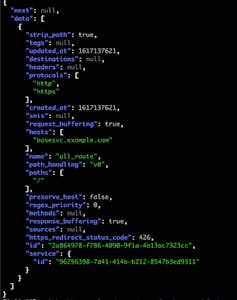
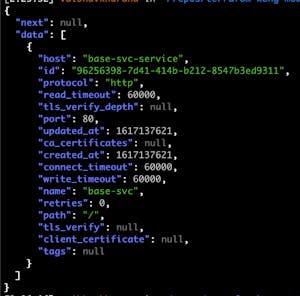
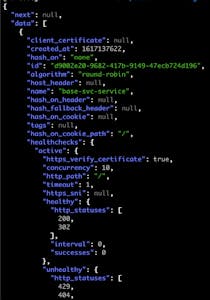
### **6. Verify the changes via the Admin API curl calls:**
For example, I added another host header in the above configuration and planned again. The below shows that I added another host, base1.svc.example.com, in my route config. The system will update it in place.
In the demo above, I did the Terraform plan and applied it from my local machine. That might work for smaller teams, but that will not be something you'll want with a big team. For achieving a true GitOps model, you can use [Atlantis](https://www.runatlantis.io)Atlantis for Terraform planning and apply it directly from the PR.
Plan via Atlantis
## Summary
In this article, I configured a Kong Gateway service using the module with minimal code and no hassle by ensuring that all configurations exist in a VCS repo. This solved issues like audit, approvals, reverts, etc., thus helping me follow the GitOps model. Along with Atlantis, this gives me a way to make sure that all the changes to Kong configurations are on track, audited and have clear visibility on the changes made as part of a PR.
The pace of the industry today is pressuring software developers to build, test, and release software more frequently than ever. To achieve this pace, teams have built two core processes into their workflow: Continuous Integration and Continuous Dep
We're pleased to announce the launch of Standard Webhooks! Kong has been part of the Technical Committee of this standard with other great companies like Svix (the initiator of the project), Ngrok, Zapier, Twillio, Lob, Mux, and Supabase. This was
Vincent Le Goff
# How to Streamline API Development with Consistent API Controls Across Teams
This post is part of a series on becoming a secure API-first company. For a deeper dive, check out the eBook Leading Digital Transformation: Best Practices for Becoming a Secure API-First Company . The growth of APIs isn't just rapid — it's a seism
In this Kong Konnect tutorial, you'll learn how to leverage the platform to manage your API ecosystem from a single easy-to-use interface. We’ll run through how to: Use Konnect Runtime Manager to set up your own Kong Gateway runtime instance i
In today's cloud ecosystem the demands for high functioning and high performance observability, security and networking functionality for applications and their network traffic are as high as ever.
Historically a great deal of this kind of functio
Shane Utt
# Optimize Your API Gateway with Chaos Engineering
As engineers and architects, we automatically build resilience into platforms as far as possible. But what about the unknown failures? What about the unknown behavior of your platform? The philosopher, Socrates, once said "You don’t know what you do
In this Kongcast episode , Henrik Blixt, Product Manager for Argo at Intuit, gives an introduction to Argo, an open source tool for Kubernetes and incubating project of CNCF. Check out the transcript and video from our conversation below, and be su
The pace of the industry today is pressuring software developers to build, test, and release software more frequently than ever. To achieve this pace, teams have built two core processes into their workflow: Continuous Integration and Continuous Dep
We're pleased to announce the launch of Standard Webhooks! Kong has been part of the Technical Committee of this standard with other great companies like Svix (the initiator of the project), Ngrok, Zapier, Twillio, Lob, Mux, and Supabase. This was
Vincent Le Goff
# How to Streamline API Development with Consistent API Controls Across Teams
This post is part of a series on becoming a secure API-first company. For a deeper dive, check out the eBook Leading Digital Transformation: Best Practices for Becoming a Secure API-First Company . The growth of APIs isn't just rapid — it's a seism
In this Kong Konnect tutorial, you'll learn how to leverage the platform to manage your API ecosystem from a single easy-to-use interface. We’ll run through how to: Use Konnect Runtime Manager to set up your own Kong Gateway runtime instance i
In today's cloud ecosystem the demands for high functioning and high performance observability, security and networking functionality for applications and their network traffic are as high as ever.
Historically a great deal of this kind of functio
Shane Utt
# Optimize Your API Gateway with Chaos Engineering
As engineers and architects, we automatically build resilience into platforms as far as possible. But what about the unknown failures? What about the unknown behavior of your platform? The philosopher, Socrates, once said "You don’t know what you do
In this Kongcast episode , Henrik Blixt, Product Manager for Argo at Intuit, gives an introduction to Argo, an open source tool for Kubernetes and incubating project of CNCF. Check out the transcript and video from our conversation below, and be su
The pace of the industry today is pressuring software developers to build, test, and release software more frequently than ever. To achieve this pace, teams have built two core processes into their workflow: Continuous Integration and Continuous Dep
We're pleased to announce the launch of Standard Webhooks! Kong has been part of the Technical Committee of this standard with other great companies like Svix (the initiator of the project), Ngrok, Zapier, Twillio, Lob, Mux, and Supabase. This was
Vincent Le Goff
# How to Streamline API Development with Consistent API Controls Across Teams
This post is part of a series on becoming a secure API-first company. For a deeper dive, check out the eBook Leading Digital Transformation: Best Practices for Becoming a Secure API-First Company . The growth of APIs isn't just rapid — it's a seism
In this Kong Konnect tutorial, you'll learn how to leverage the platform to manage your API ecosystem from a single easy-to-use interface. We’ll run through how to: Use Konnect Runtime Manager to set up your own Kong Gateway runtime instance i
In today's cloud ecosystem the demands for high functioning and high performance observability, security and networking functionality for applications and their network traffic are as high as ever.
Historically a great deal of this kind of functio
Shane Utt
# Optimize Your API Gateway with Chaos Engineering
As engineers and architects, we automatically build resilience into platforms as far as possible. But what about the unknown failures? What about the unknown behavior of your platform? The philosopher, Socrates, once said "You don’t know what you do
In this Kongcast episode , Henrik Blixt, Product Manager for Argo at Intuit, gives an introduction to Argo, an open source tool for Kubernetes and incubating project of CNCF. Check out the transcript and video from our conversation below, and be su
Kaitlyn Barnard
## Ready to see Kong in action?
Get a personalized walkthrough of Kong's platform tailored to your architecture, use cases, and scale requirements.