Blog
  • AI Gateway
  • AI Security
  • AIOps
  • API Security
  • API Gateway
|
    • API Management
    • API Development
    • API Design
    • Automation
    • Service Mesh
    • Insomnia
    • View All Blogs
  1. Home
  2. Blog
  3. Engineering
  4. Kong Gateway Tutorial: Running With a GUI in <15 Minutes
Engineering
April 8, 2021
8 min read

Kong Gateway Tutorial: Running With a GUI in <15 Minutes

Manny Khadilkar

In this Kong Gateway tutorial, you'll learn how to:

  1. Download and install Kong
  2. Add a service
  3. Add a route
  4. Add the key authentication plugin
  5. Add the proxy cache plugin
  6. Test plugins using Insomnia

Keep in mind that these instructions are a starting point. You may need to change some of the steps to harden your environment when running in production. For more detailed information, visit our Kong Gateway documentation.

Note: The remainder of this guide will walk through a self-managed deployment of Kong Gateway. If you want to run Kong Gateway as a part of a production-ready API platform, you can get started with Konnect for free in under 5 minutes.

Why Use Kong Gateway?

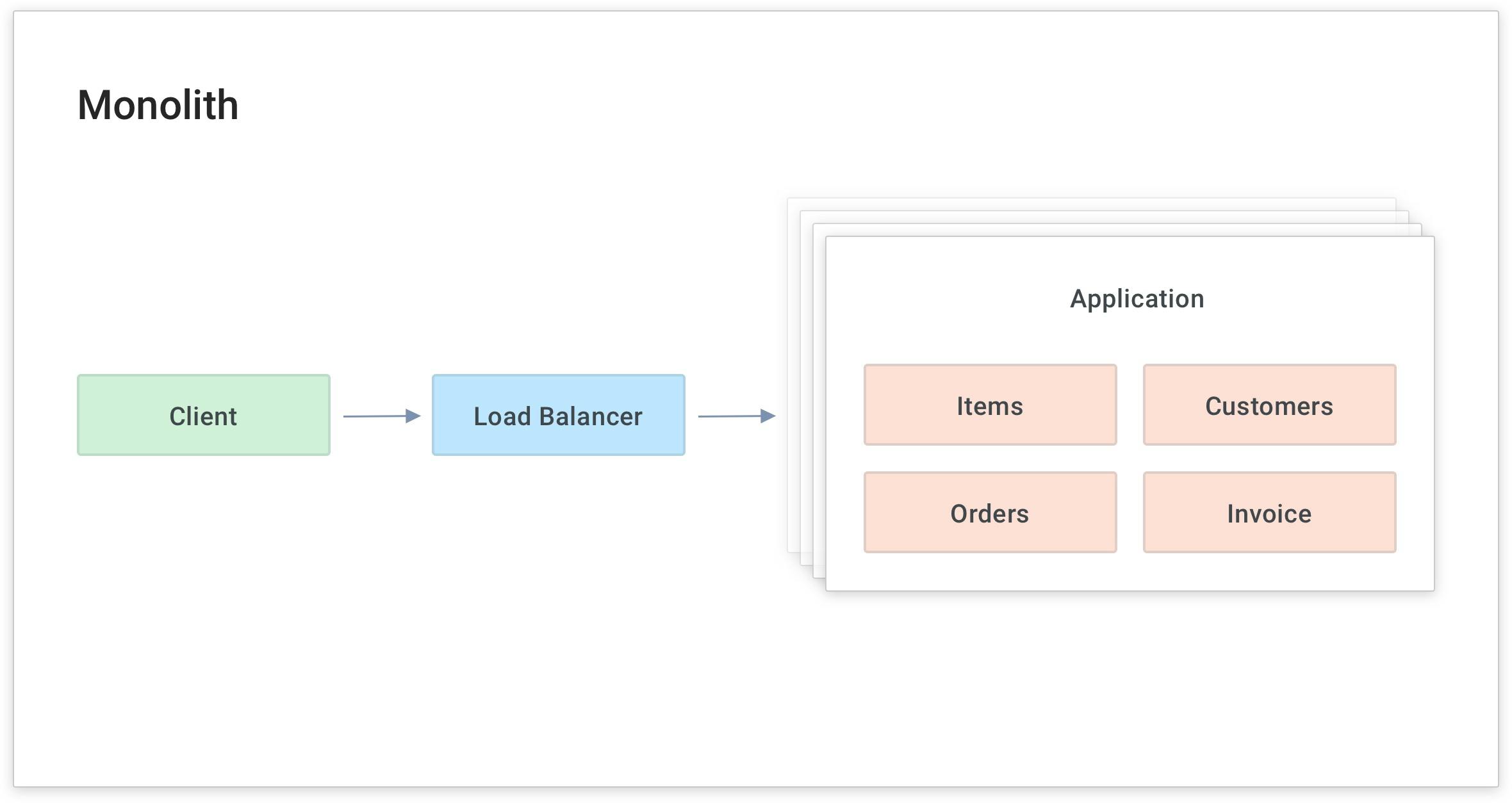
One of the reasons that companies like UnitedHealth Group/Optum deploy Kong Gateway is to modernize a monolithic application and make it more scalable.

For example, in the application diagram below, if I wanted to scale up the "Items" service to handle more load, I would have to scale up the whole application. Instead, I want to break the application into smaller pieces called modular services or microservices. Then I can scale each service as needed, distribute the service close to its data source and focus on building that service's business logic.

Monolithic Application Example

As I build and migrate to the new service, I need to abstract the actual upstream location from the client (on the left in the above diagram) without the client knowing that I'm modifying the service.

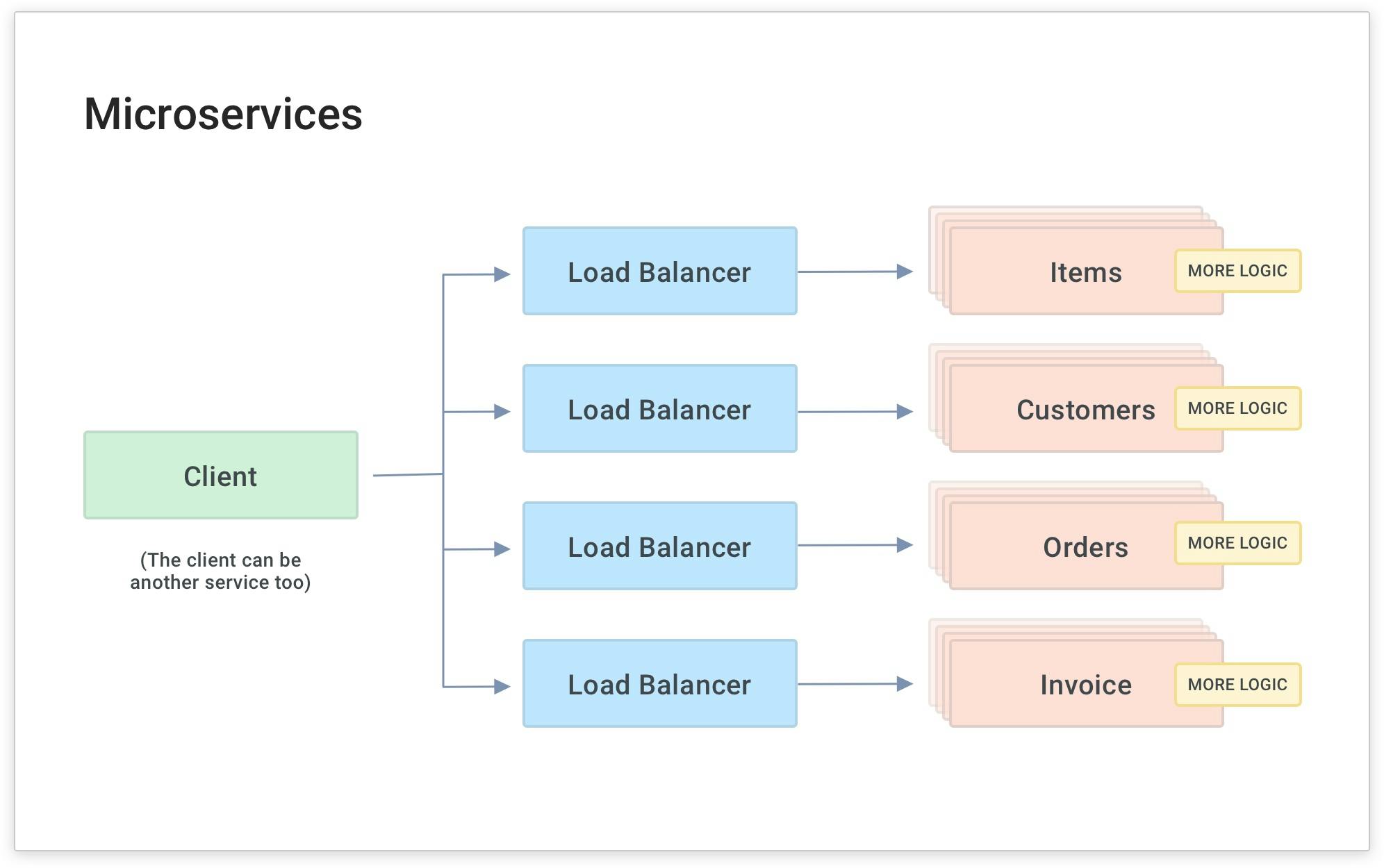
As you do this for many services, you'll need to abstract each service and build common code into each service. Over time, this will require multiple load balancers, and your team will have to maintain many different libraries of the same common code for your microservices.

Microservices Example

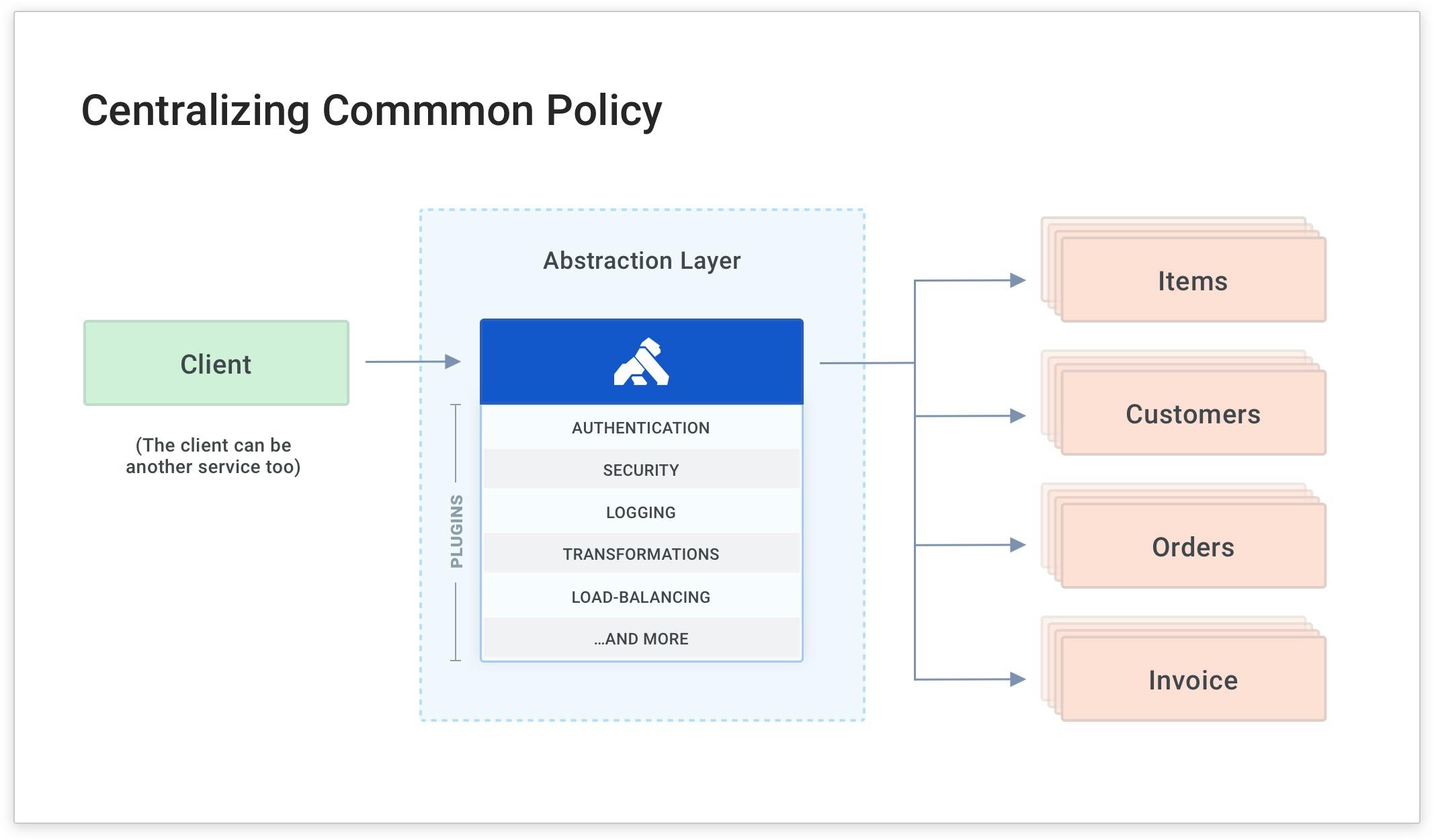
Kong Gateway can simplify this approach by being the abstraction layer that routes clients to your existing upstream service while building a new service. It also applies a common policy for each request and response no matter where the target service is. The benefit of this is that you gain architectural freedom and modernize your application without impacting your clients.

Kong Gateway Tutorial: Centralizing Common Policy

Download and Install Kong Gateway

To start, install Kong Gateway in your preferred environment. Kong Gateway works with many different environments, including Docker, Kubernetes and CentOS. In my example, I'm running on Amazon Linux 2. Feel free to follow along if you're doing the same. If not, skip ahead once you've installed Kong Gateway.

Install Kong Gateway on Amazon Linux 2

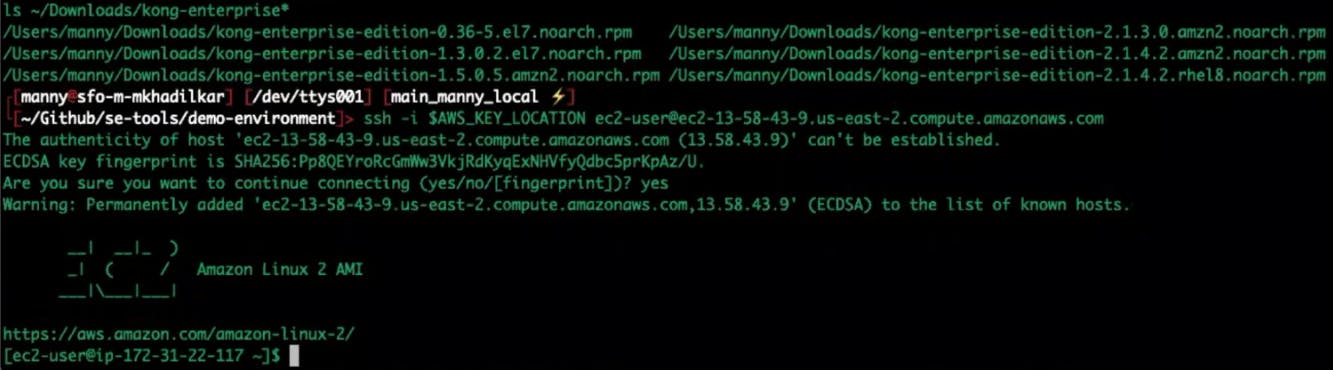
Connect to your EC2 instance over SSH to install Kong Gateway.

Connect EC2 Instance via SSH to install Kong Gateway

Use SCP to copy your Kong installation to the EC2 system.

Copy Kong Installation to EC2

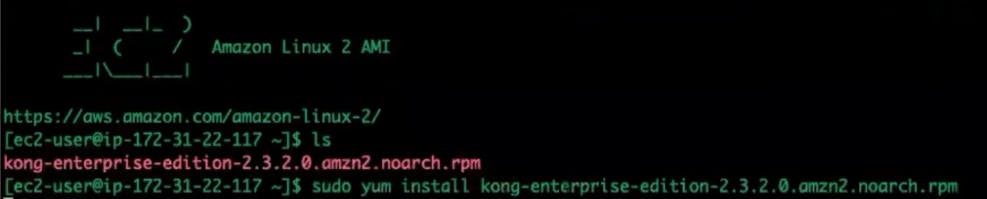
Yum install Kong Gateway on the EC2 instance.

Yum Install Kong Gateway on EC2

Install PostgreSQL.

Initialize the database, enable the service and start PostgreSQL.

Create a Kong user.

Kong Gateway Tutorial: Create User

Note: Modify your PostgreSQL configuration to allow MD5 connections if you're on PostgreSQL 9.6, as specified in the Kong documentation.

Change the pg_user, password and database to correspond to your Postgres configuration.

Change the pg_user, password and database to correspond to your Postgres configuration

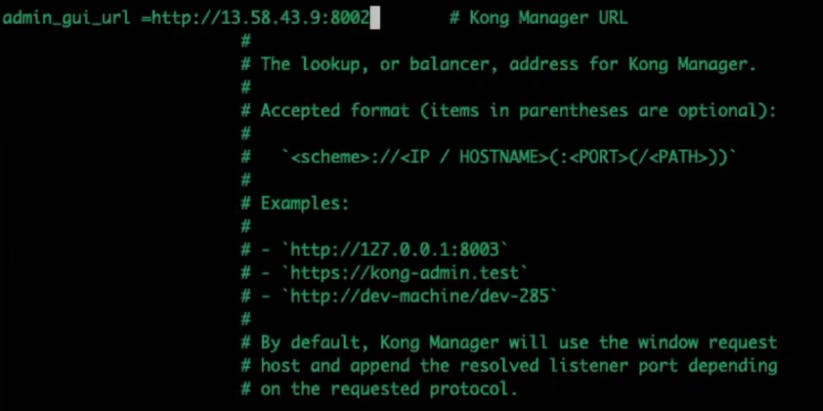
Change the admin_gui_url configuration.

In my example, I'll point it to the Kong Manager URL using my EC2's public IP address and admin GUI port.

Kong Gateway Tutorial: Admin GUI URL Configuration

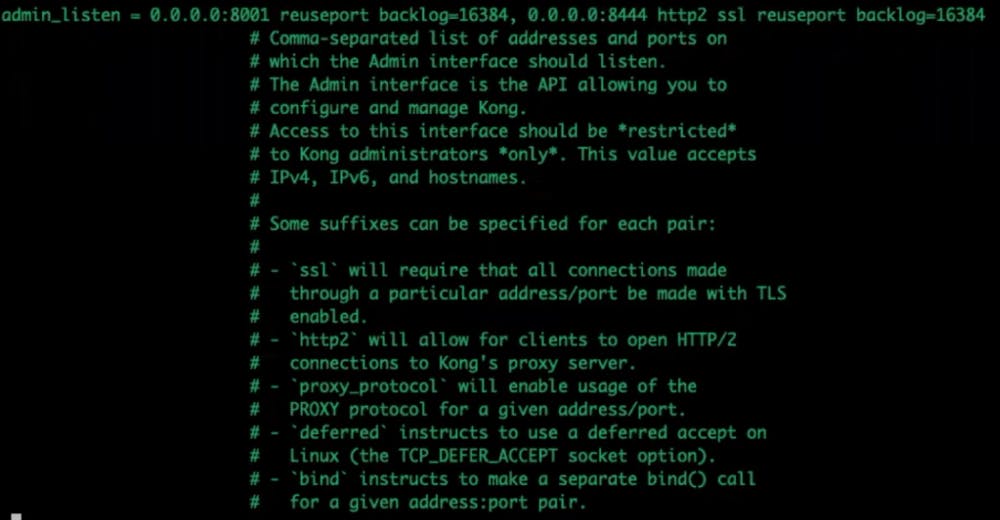
Modify admin_listen to listen to all network interfaces for admin API requests.

Modify Admin Listen

Run the bootstrap command to start Kong, and bootstrap the PostgreSQL database.

Kong Gateway Tutorial: Start Bootstrap Postgres

Note: the Kong_Password is something you can templatize and keep in a secure vault.

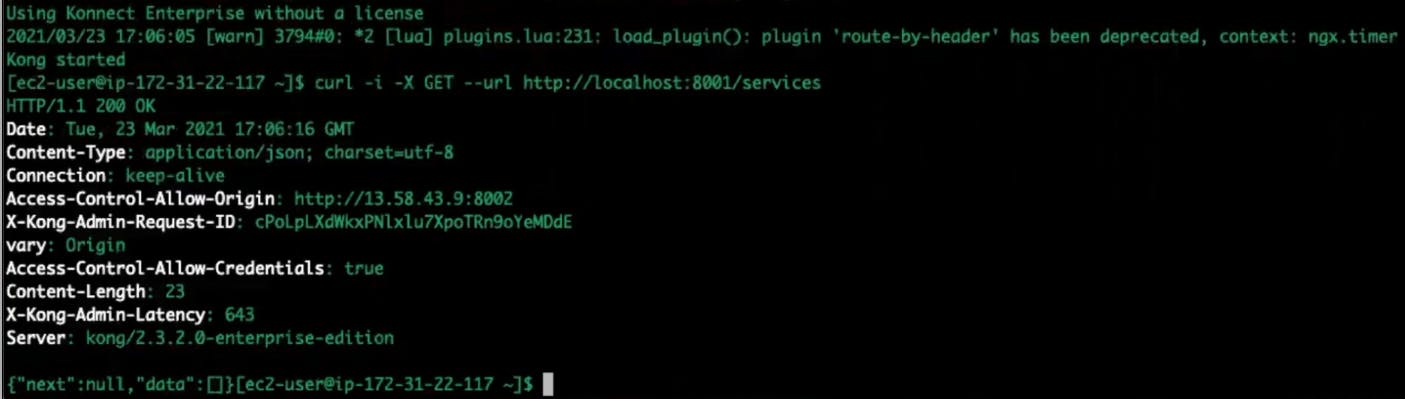
Start Kong.

Kong will be running without a license. You can send an HTTP request to the admin port and see all the services.

Kong Gateway Tutorial Start

Navigate to Kong Manager.

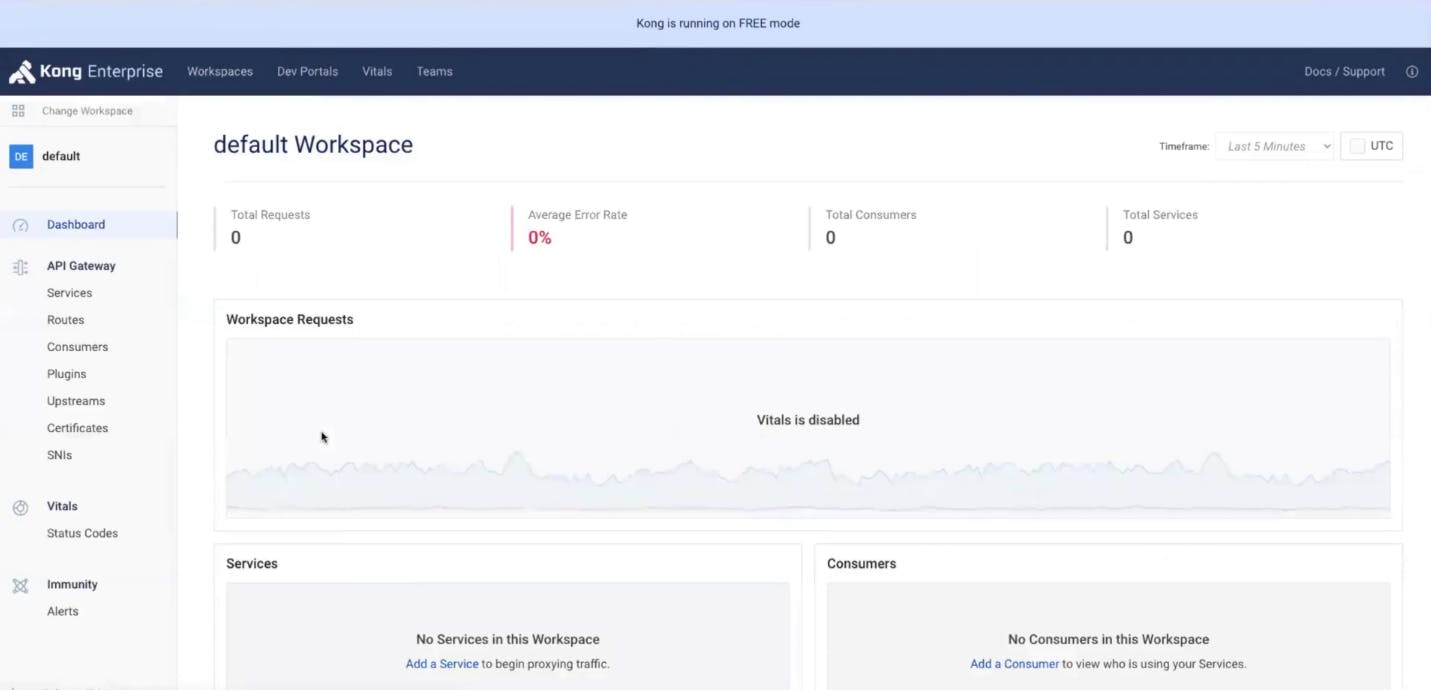
If you navigate to the Kong node's public IP and use port 8002 for Kong Manager, you should see the Kong Manager user interface. Through the Kong Manager GUI, you can add services, routes and plugins.

Kong Manager Free GUI

Add a Service

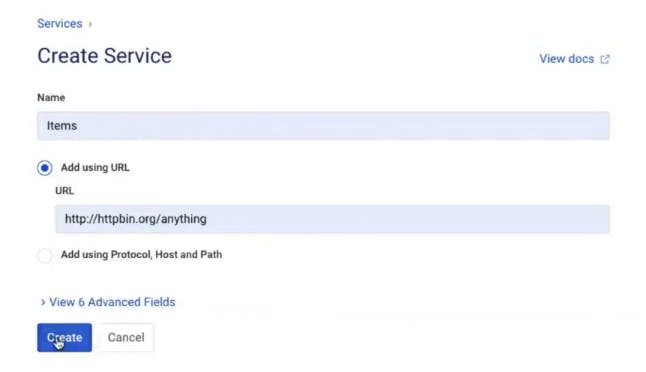
To configure a service in Kong Manager, click on "Services” in the menu on the left-hand side of the screen. Then create a new service and give it a URL to specify the service location. In my example, I’m building a service called "Items" that routes to the service location at http://httpbin.org/anything.

Kong Gateway Tutorial: Create a Service

Suppose you want to expose this service on the Kong host machine at the path /items. If you navigate http://<kong-host>:8000/items, you should see the message "no route matched with those values." That's because I still have to tell Kong to expose the service to the client using a route.

Add a Route

In Kong Manager, click on the "Items" service you created above. This service needs a corresponding route to tell Kong how to expose this service to clients. Click “Add a Route.” Give the route a name (items-route). In my example, I'll tell Kong to route anything that matches the "/items" path to this service. There are many other parameters that you can use to match the incoming requests to Kong.
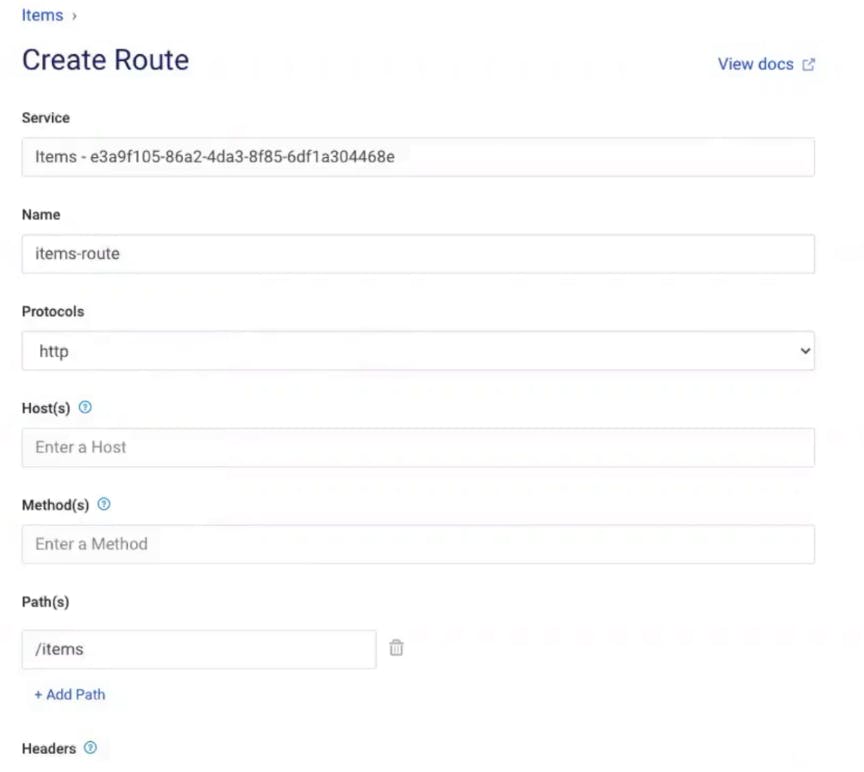
Kong Gateway Tutorial: Create a Route

Now, if you go back to your browser client and refresh the screen (with http://<konghost>:8000/items in the address bar), you should see that Kong is routing to the http://httpbin.org/anything endpoint that I specified for the Items service.

Kong Gateway Tutorial: Browser Testing

Great, I’m are successfully using Kong to abstract our upstream service from our client and exposing it on the /items path. Now I can create/modify a new upstream service and route the client to it whenever I’m are ready.

Add a Plugin

Microservices Example

As you do this with more and more services (and microservices), your developers will inevitably write common code for each service to handle functionality that's common to many services. In the above diagram, the yellow boxes represent common functionality like API authentication, rate limiting and caching. These are all things that your services need to perform. If they're built into each service separately, they'll have to be built and maintained by each development team. This is a source of overhead and complexity because each team will spend time maintaining a common layer of code for each microservice that gets built.

The easy way to abstract these policies from your development teams is to have Kong Gateway apply microservice logic for you.

This way, your developers can build the business logic and fun stuff (rather than the common, tedious code like authentication).

In our example, Kong Gateway is already abstracting the "Items" service and routing the client's request to the service on the /items path. Next, I'll show you how to add a common policy for authentication using a plugin. Kong plugins enable you to enforce policies without having to write code in the service itself.

Next, I'll show you how to add a KeyAuth plugin and a consumer so you can protect your service with an API key.

Add the Kong Gateway Key Authentication Plugin

In Kong Manager, under your service, go to the "Add a Plugin" button. Then, find and enable the "Key Authentication" plugin.

In my example, I'm going to use the defaults, but note that you can change the scope and specify the API key name that you want to use.
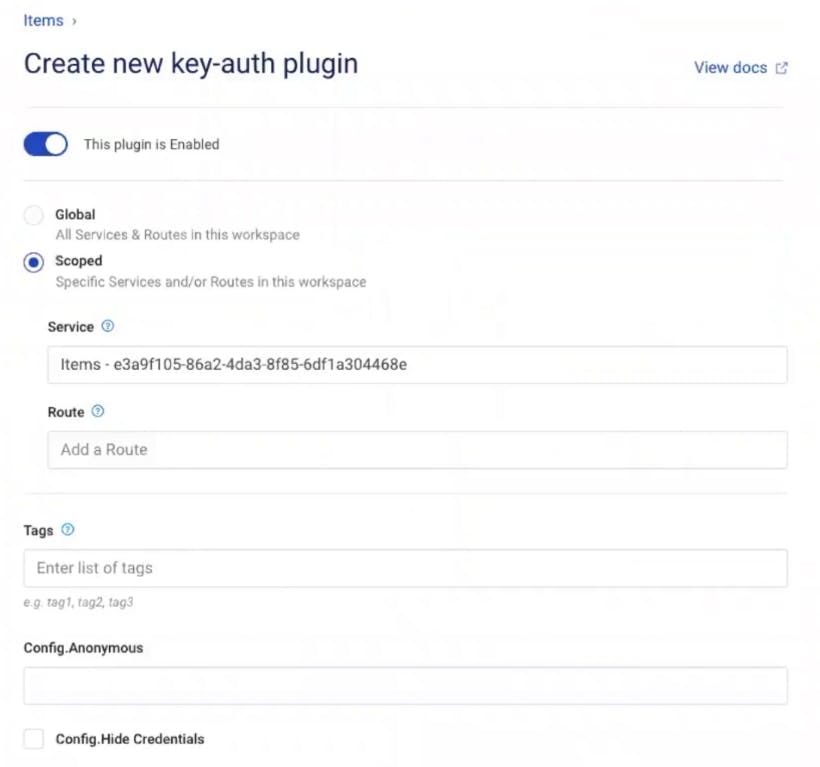
Kong Gateway Tutorial: Key Auth Plugin

In your browser, refresh your endpoint. You should get the error message "No API keys found in request." The error message means Kong is enforcing key authentication on your endpoint. This is exactly what I want!

Add a Kong Gateway Consumer

To authenticate this request (so Kong accepts it), I need to add a consumer to Kong Gateway and assign that consumer an API key for authentication.

Create a consumer using the menu on the left in Kong Manager. Give the consumer a username and custom_id. You can use the custom_id to store an existing unique ID for the consumer if you want to map Kong with users in your existing identity store.

Add a Key to the Consumer

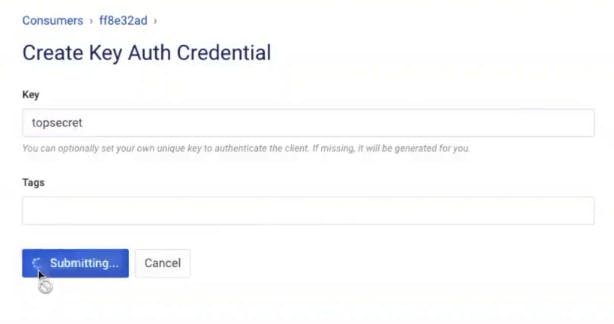
Click on the Credentials tab for the Consumer and add a key authentication credential so Kong Gateway can identify the consumer. As long as Kong can identify my consumer with an API key, it will allow the request to pass through.

Kong Gateway Tutorial: Key Auth Credential

Test Key Authentication in Insomnia

Let’s test this plugin using Insomnia, Kong's open source API design, debugging and testing tool.

Install Insomnia if you haven't already.

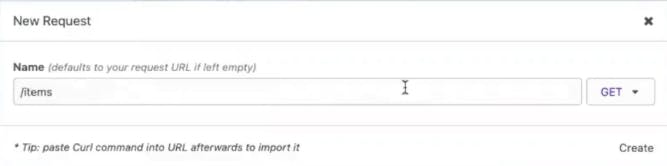
Insomnia New Request

Create a new request in Insomnia called /items.

Copy and paste your URL.

Send the same request you sent before in the browser (NOTE: your IP address will be different below). You should still see the "No API key was found in the request message."

Insomnia Key Auth Test No API Key Found

With Insomnia, you can easily add a new header called API Key. Make sure the name matches the API key value you created earlier for your consumer.

Insomnia Create a New Header

Once you send this request, you should be able to access the upstream API. Excellent, now your service is protected, and your client can authenticate with an API key.

Add the Kong Gateway Proxy Cache Plugin

Another functionality you can abstract to Kong Gateway is caching. It’s best practice to protect your services with caching. This way, when you have duplicate requests coming to your services, they won’t get bombarded by the same requests again and again. Kong Gateway will cache the incoming request and then send the response back to the client without sending it to your upstream service.

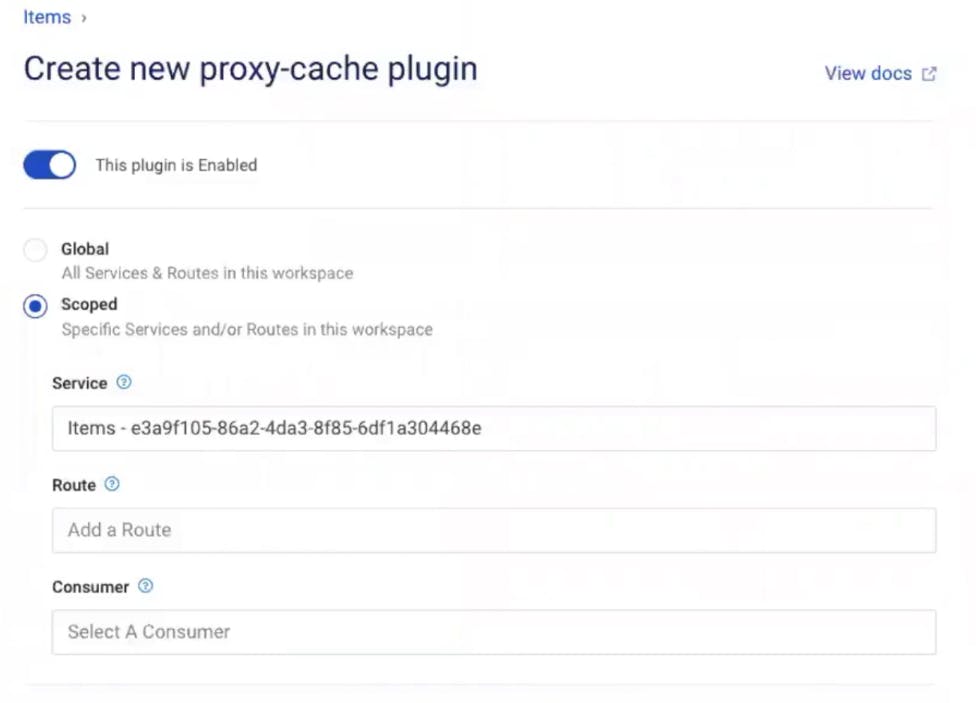
In Kong Manager, go back to your service. Click "Add a Plugin" again. Find and enable the proxy cache plugin. Note that you can configure the plugin to store your cache in memory, Kong's database or Redis. Press create once you have all of your settings configured (I am using the defaults).

Kong Gateway Tutorial: Set Up Proxy Cache Plugin

Test Proxy Caching in Insomnia

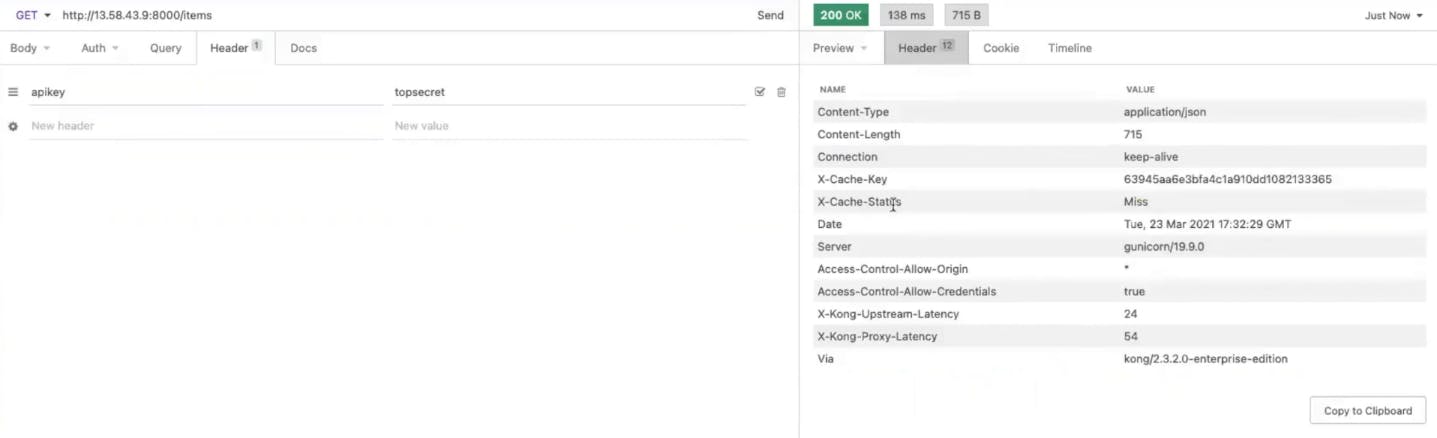
Back in Insomnia, clear your responses and make the request again. You should now receive a cache status of "miss." Take note of the latency headers coming back from Kong.

Insomnia Test Proxy Cache

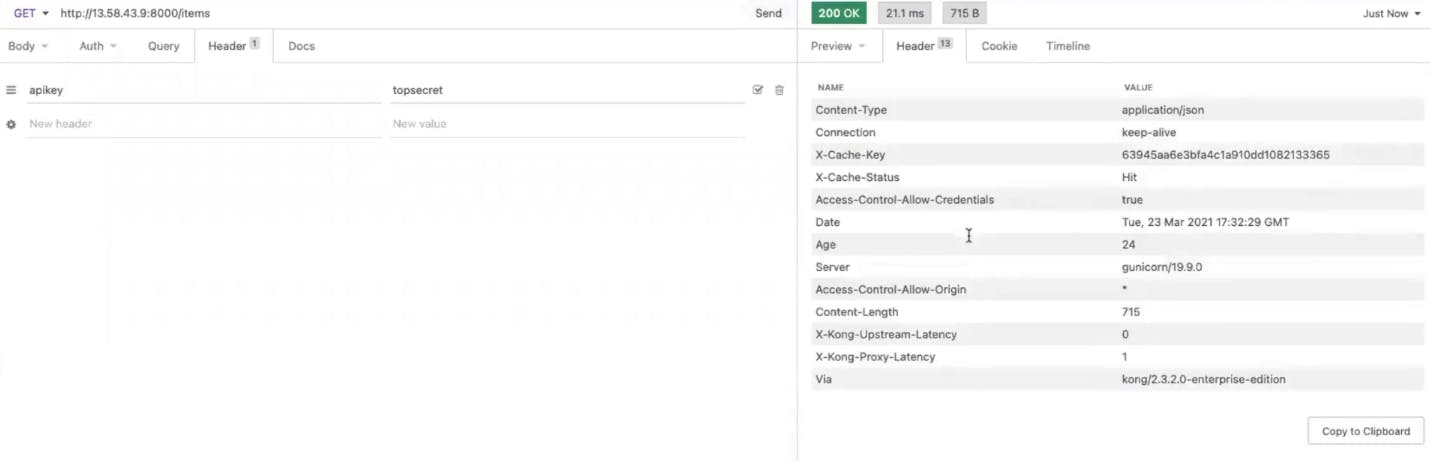
If you send this request again, you should get a cache hit. That means Kong Gateway doesn’t have to send the request to the upstream. It responds immediately. That makes the upstream latency zero.

Insomnia Test Proxy Cache Hit

Proxy caching is very helpful because as you build many microservices, you'll want to cut down the latency and response times for each request since these will add up to slow down your client's experience.

Thanks for Following Along!

To recap, in this Kong Gateway tutorial, I installed Kong on an AWS 2 Linux machine. Then I configured Kong to route traffic to my upstream microservice, httpbin.org. Next, I exposed that service through Kong Gateway on a path called "Items." Finally, I applied key authentication and caching functionality as plugins to avoid building or maintaining that functionality into my microservices.

Have questions or want to stay in touch with the Kong community? Join us wherever you hang out:

⭐ Star us on GitHub

🐦 Follow us on Twitter

🌎 Join the Kong Community

🍻 Join our Meetups

❓ ️Ask and answer questions on Kong Nation

💯 Apply to become a Kong Champion

Now that you've successfully set up Kong Gateway, you may find these other tutorials helpful:

  • Creating Your First Custom Lua Plugin for Kong Gateway
  • Getting Started With Kuma Service Mesh
  • 4 Steps to Authorizing Services With the Kong Gateway OAuth2 Plugin
  • How to Convert JSON to XML SOAP and Back
  • Kong API Gateway on Kubernetes with Pulumi
  • JWT Authentication for Microservices: API Gateway Tutorial
  • Using Kong Kubernetes Ingress Controller as an API Gateway
  • APM With Prometheus and Grafana on Kubernetes Ingress
  • Kubernetes Ingress gRPC Example With a Dune Quote Service

3 Tips to Supercharge Dev Efficiency: Streamline Operations with Konnect

Watch Now
API GatewayKong GatewayTutorials

More on this topic

Videos

Kong Builders Nov 16- Introducing Kong Gateway Operator

Videos

Kong Builders - July 22 - Running Kong Gateway on Red Hat OpenShift

See Kong in action

Accelerate deployments, reduce vulnerabilities, and gain real-time visibility. 

Get a Demo
Topics
API GatewayKong GatewayTutorials
Share on Social
Manny Khadilkar

Recommended posts

Kong-plement Your ServiceHub With a Dev Portal

Kong Logo
EngineeringAugust 5, 2021

Two of the best (in my opinion) features in Konnect are the ServiceHub and Dev Portal. However, they're also two of the most misunderstood. Aren't they the same thing? Why would you need a ServiceHub vs. Dev Portal? Well, I'm glad you asked! The r

Michael Heap

Kong Konnect EKS Marketplace Add-on for Kong Gateway Data Planes

Kong Logo
EngineeringDecember 7, 2023

Today, we’re excited to release the Kong Konnect EKS Marketplace add-on as a means to deploy your Kong Gateway dataplanes in AWS. The add-ons are a step forward in providing fully managed Kubernetes clusters. It is here to simplify the post-procurem

Danny Freese

Gateway API: From Early Years to GA

Kong Logo
EngineeringNovember 7, 2023

In the Kubernetes world, the Ingress API has been the longstanding staple for getting access to your Services from outside your cluster network. Ingress has served us well over the years and can be found present in several dozen different implementa

Shane Utt

Governing GraphQL APIs with Kong Gateway

Kong Logo
EngineeringOctober 20, 2023

Modern software design relies heavily on distributed systems architecture, requiring all APIs to be robust and secure. GraphQL is no exception and is commonly served over HTTP, subjecting it to the same management concerns as any REST-based API. In

Rick Spurgeon

Using Kong Gateway to Adapt SOAP Services to the JSON World

Kong Logo
EngineeringSeptember 6, 2023

While JSON-based APIs are ubiquitous in the API-centric world of today, many industries adapted internet-based protocols for automated information exchange way before REST and JSON became popular. One attempt to establish a standardized protocol sui

Hans Hübner

Securing your Services and Applications with Styra Declarative Authorization Service (DAS) & Kong Gateway Enterprise

Kong Logo
EngineeringSeptember 26, 2022

Jeff Broberg, William Seaton and Peter Sullivan from Styra also contributed to this post API Gateway Authentication (AuthN) and Authorization (AuthZ) are important ways to control the data that is allowed to be transmitted using your APIs. Basically

Claudio Acquaviva

Kong API Gateway on Kubernetes with Pulumi

Kong Logo
EngineeringMarch 15, 2022

The Kong Laboratory – Kong API Gateway The quest for resilience and agility has driven us into the modern age of microservices. Bringing services to market on a microservice architecture demands the utilization of sprawling technology offerings and

Kat Morgan

Ready to see Kong in action?

Get a personalized walkthrough of Kong's platform tailored to your architecture, use cases, and scale requirements.

Get a Demo
Powering the API world

Increase developer productivity, security, and performance at scale with the unified platform for API management, AI gateways, service mesh, and ingress controller.

Sign up for Kong newsletter

    • Platform
    • Kong Konnect
    • Kong Gateway
    • Kong AI Gateway
    • Kong Insomnia
    • Developer Portal
    • Gateway Manager
    • Cloud Gateway
    • Get a Demo
    • Explore More
    • Open Banking API Solutions
    • API Governance Solutions
    • Istio API Gateway Integration
    • Kubernetes API Management
    • API Gateway: Build vs Buy
    • Kong vs Postman
    • Kong vs MuleSoft
    • Kong vs Apigee
    • Documentation
    • Kong Konnect Docs
    • Kong Gateway Docs
    • Kong Mesh Docs
    • Kong AI Gateway
    • Kong Insomnia Docs
    • Kong Plugin Hub
    • Open Source
    • Kong Gateway
    • Kuma
    • Insomnia
    • Kong Community
    • Company
    • About Kong
    • Customers
    • Careers
    • Press
    • Events
    • Contact
    • Pricing
  • Terms
  • Privacy
  • Trust and Compliance
  • © Kong Inc. 2025