**Local-first: your data stays with you: **Insomnia stores everything on your machine by default. No forced cloud sync, no account needed just to send a request. This is helpful if privacy or working in a regulated environment is a priority for you
**Free for teams + Git-based sync: **Postman’s free plan is now mostly for solo use, with team features behind a paywall. Insomnia, on the other hand, offers free unlimited cloud collaboration, so teams can work together without restrictions. It also supports small teams collaborating for [free using Git sync](https://insomnia.rest/pricing)free using Git sync. You can connect your own Git repos (GitHub, GitLab, etc.) and manage your API work just like code, with branches, pull requests, and full version control.
**Lightweight and faster: **Insomnia generally uses less memory and feels faster. If you’re running other dev tools, this can make a noticeable difference
**More cost-effective: **Insomnia offers a free and open-source version, along with paid plans, often making it more affordable than Postman. For example, need external vault integration to retrieve secret values automatically when sending requests? This is available out-of-the-box with Insomnia Enterprise, whereas Postman charges an additional $29/user/month.
## Step-by-step Postman to Insomnia migration guide
This guide walks through every step: exporting from Postman, importing into Insomnia, verifying your data, and understanding how scripts translate between the two tools.
- Your Postman collections and environments ready for export
*📌 Important: Multi-project import is turned off by default in Insomnia and is primarily available for Enterprise users. To enable Bulk Import access, contact your Customer Success Manager (CSM) or Account Executive. Once enabled, you'll see the "Bulk Import Projects" option in the import dialog. *
To begin the import process in Insomnia, you must first export your projects from Postman. If you have already exported the projects, you can proceed directly to the Import section.
### Export your data from Postman
You have two options for exporting: the Postman UI or a CLI-based approach.
**Option A: Export via the Postman UI**
Click your avatar in the Postman header, then click Settings. Click the Account tab, then Export Data.
Exporting from the Postman UI can be slow and tedious, especially if you have dozens of workspaces. You may need to request the export, wait for it to finish, and then wait for an email to download your files.
For large-scale migrations, the command-line approach is far more efficient. Using the Postman Exporter, you can bypass the manual UI and export all workspaces into a local folder instantly.
# Install the Postman Exporternpminstall -g postman-exporter
# Export all collections from a workspacenpx organize-postman-export export --api-key YOUR_POSTMAN_API_KEY
*Replace **`your_postman_api_key`** with your actual API key. This will dump all collections and environments into a local folder, ready for import.*
You can choose whichever method you prefer. Either way, importing them into Insomnia will be quick and easy.
### Import into Insomnia
Now that you have your exported files, let's bring them into Insomnia. Navigate to Preferences → Data → Import Projects.
Select the folder containing all your Postman exports. Click Import.
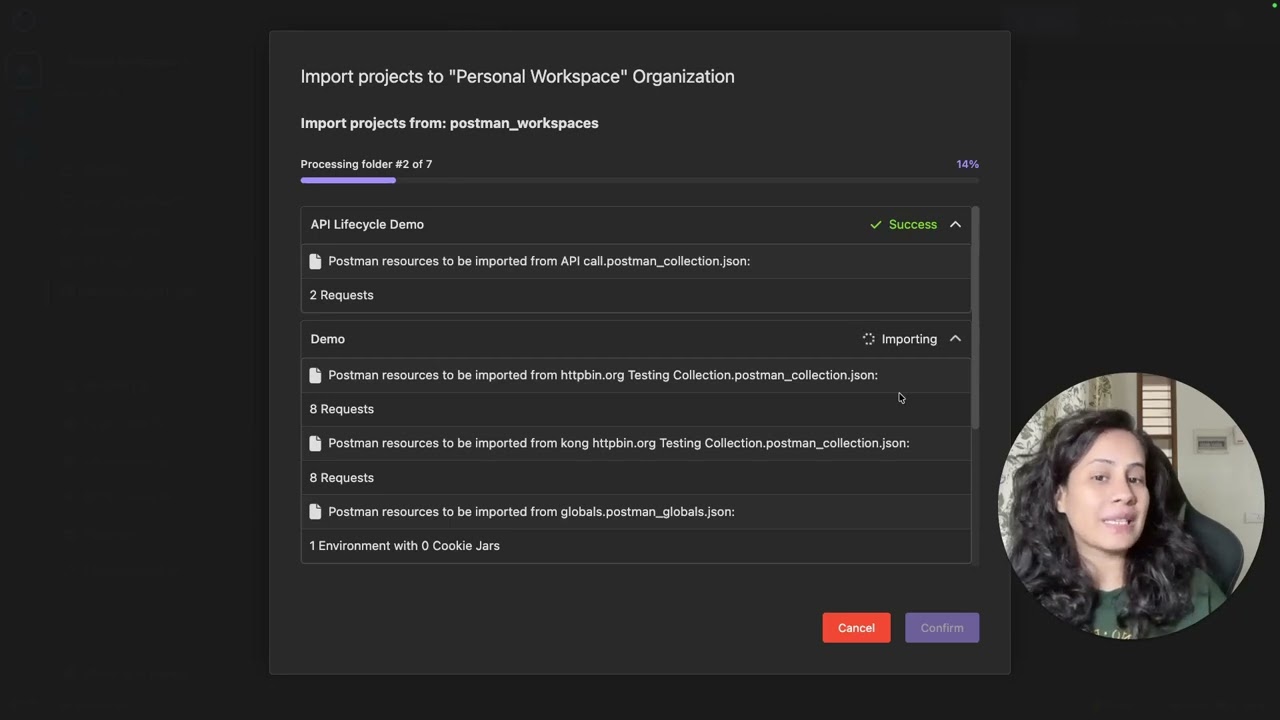
Insomnia will scan the directory, provide a preview of all collections and environments, and upon confirmation, import everything automatically.
Each Postman workspace maps to a dedicated Project within Insomnia, preserving your organizational structure.
### Verify the Migration
- After importing your data into Insomnia, it’s essential to review everything to ensure the migration from Postman was successful.
- Start by opening the imported project and verifying that all collections, folders, and requests are present and structured as expected.
- Next, check your environment variables by selecting the imported environment from the dropdown in the request panel and confirming that all variables and their values have been carried over correctly.
- To validate functionality, send a test request, preferably one that relies on environment variables and ensure that the variables resolve properly and the response is as expected
**Review Script Compatibility:** One of the most powerful features of Insomnia's import is automatic script conversion.
When Insomnia imports Postman collections that contain pre-request scripts or test scripts, it automatically converts the Postman-specific syntax (e.g., `pm.environment.set()`, `pm.environment.get()`) into Insomnia's native scripting format.
Example — Postman syntax:
// Test the 200 success status code for correct authenticationpm.test("Status code is 200 (Authentication Successful)",function(){ pm.response.to.have.status(200);});pm.test("Authenticated field is true",function(){var jsonData = pm.response.json(); pm.expect(jsonData.authenticated).to.be.true;});
After import — Insomnia equivalent:
// Test the 200 success status code for correct authenticationinsomnia.test("Status code is 200 (Authentication Successful)",function(){ insomnia.response.to.have.status(200);});insomnia.test("Authenticated field is true",function(){var jsonData = insomnia.response.json(); insomnia.expect(jsonData.authenticated).to.be.true;});
*💡 Pro Tip: Insomnia handles approximately 95% of script conversions automatically. However, it's always a good idea to do a quick manual review of complex scripts to ensure everything looks correct. Edge cases with advanced Postman sandbox APIs may need manual adjustments.*
## Conclusion
That’s it! Simple and straightforward. By following this guide, you can move your entire Postman setup to Insomnia and start testing right away.
Migrating to Insomnia is a smart step toward a smoother API workflow. It offers a clean interface, solid collaboration features, and flexible extensions. You can switch easily without losing your collections, environments, scripts, or workflows. Once you get used to it, Insomnia can help you work faster and manage APIs more efficiently.
Give it a try and see why more developers are choosing tools that fit the way they work. Get started for free!
API Fortress is a continuous testing platform for APIs. We've been a friend to Kong since the beginning. In this guest blog post, we explain how our company uses Kong to facilitate the process of virtualizing APIs. Why Mock APIs? As more companies
After 12 months of hard work, we’re excited to announce the biggest release of Kong Insomnia that we have ever seen: Kong Insomnia 8.0, significantly rebuilt from the ground up and available today in GA. You can get started for free on insomnia.res
Free collaboration with Postman — a myth On March 1st, 2026, Postman discontinued free collaboration for small teams. Now , Git or Cloud-native collaboration requires a Team plan starting at $19 per person per month. That means even a 3-person team
So, what exactly is Kong Insomnia? Kong Insomnia is your all-in-one platform for designing, testing, debugging, and shipping APIs at speed. Built for developers who need power without bloat, Insomnia helps you move fast whether you’re working solo,
In this article, we're going to build a fun and simple gRPC server in Node.js. Then we'll demonstrate how to use Insomnia to make gRPC requests on our server. First, let's briefly cover some core tech concepts. If you're already familiar with the ba
API endpoints are like the doors to a web service. Through these endpoints, we can enter and talk to a web service and be shown where and how we can gain access to whatever it is the server has. This process allows separate pieces of software to swa
Introducing Insomnia Today we are excited to welcome Insomnia to the team at Kong! Insomnia has been on our radar at Kong for quite some time. I was first introduced to Insomnia and Greg in the early days of the project, and I am proud to have bee