# From Kong Konnect to Insomnia: A Developer Workflow for Testing Gateway APIs
Juhi Singh
Tech PMM, Kong
As API ecosystems grow, developers and platform teams often work in separate environments. Platform teams manage APIs, gateways, and governance centrally, while developers recreate those configurations locally for testing and debugging. Over time, this can lead to configuration drift, inconsistent workflows, and security gaps.
To explore the new integration, I'll build a realistic API platform workflow using Konnect, Kong Gateway, and Insomnia.
By the end of this tutorial, I'll have:
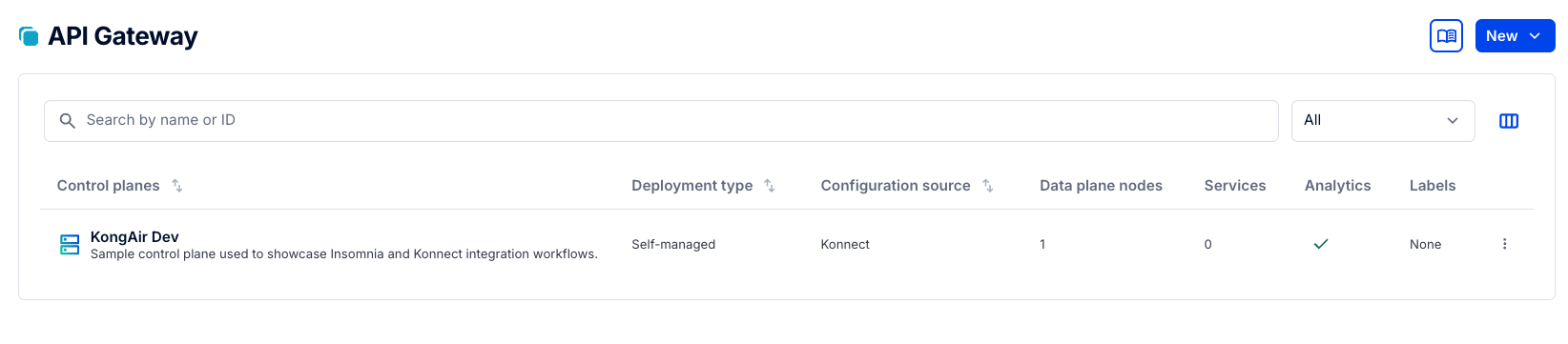
A Konnect Control Plane (KongAir Dev)
A local Kong Gateway Data Plane connected to Konnect
A Gateway Service with multiple Routes
API key authentication and consumer-based access control
Gateway policies for rate limiting, request transformation, and maintenance handling
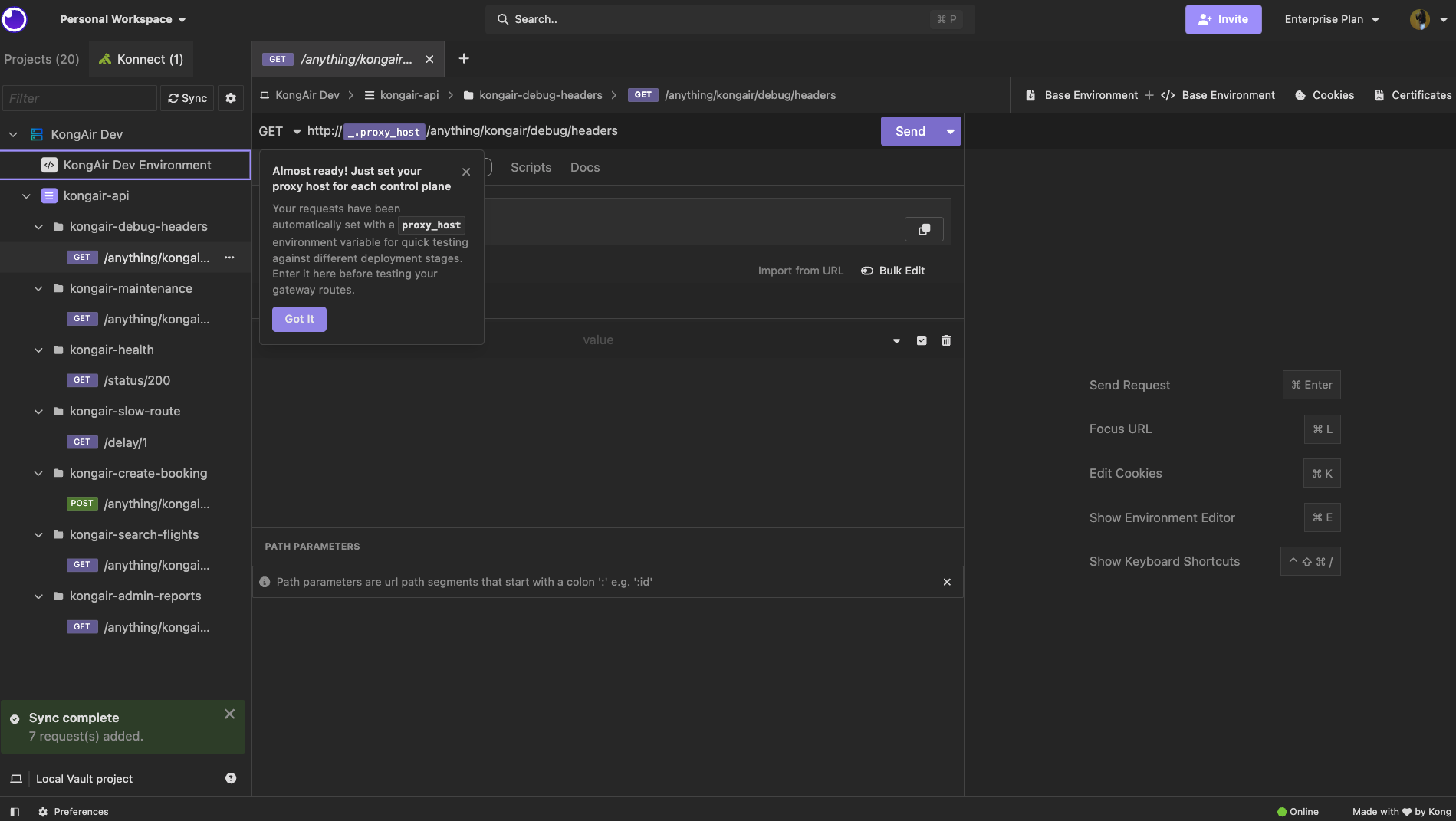
An Insomnia collection synced directly from Konnect
I'll then use Insomnia to validate real-world API scenarios, including authentication, authorization, rate limiting, request transformations, and Gateway-generated responses.
Choose Your Starting Point
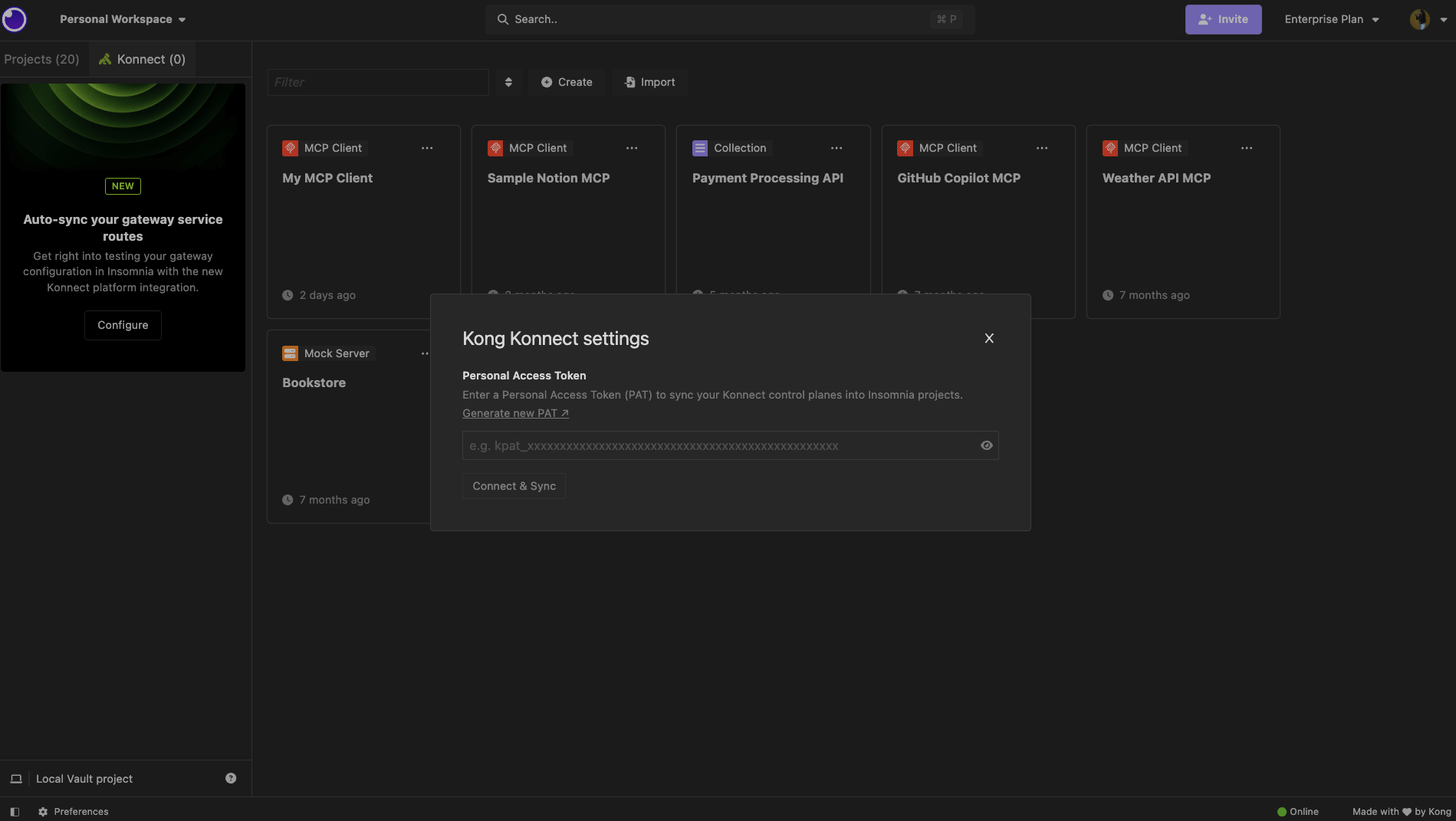
If you already have Gateway Services and Routes configured in Konnect, you can skip the local setup and jump directly to the Step 6 Connect Insomnia to Konnect section.
This creates the Control Plane in Konnect and starts a local Kong Gateway Data Plane. Next, set the environment variables I’ll use for the rest of the tutorial:
Before switching to Insomnia, I like to run one quick command to confirm that the Gateway configuration is active.
## javascript
curl -i "$KONNECT_PROXY_URL/status/200"
Expected response:
## javascript
HTTP/1.1200OK
That confirms the request is flowing through the local Kong Gateway Data Plane to the upstream service. At this point, the configuration is ready to sync into Insomnia.
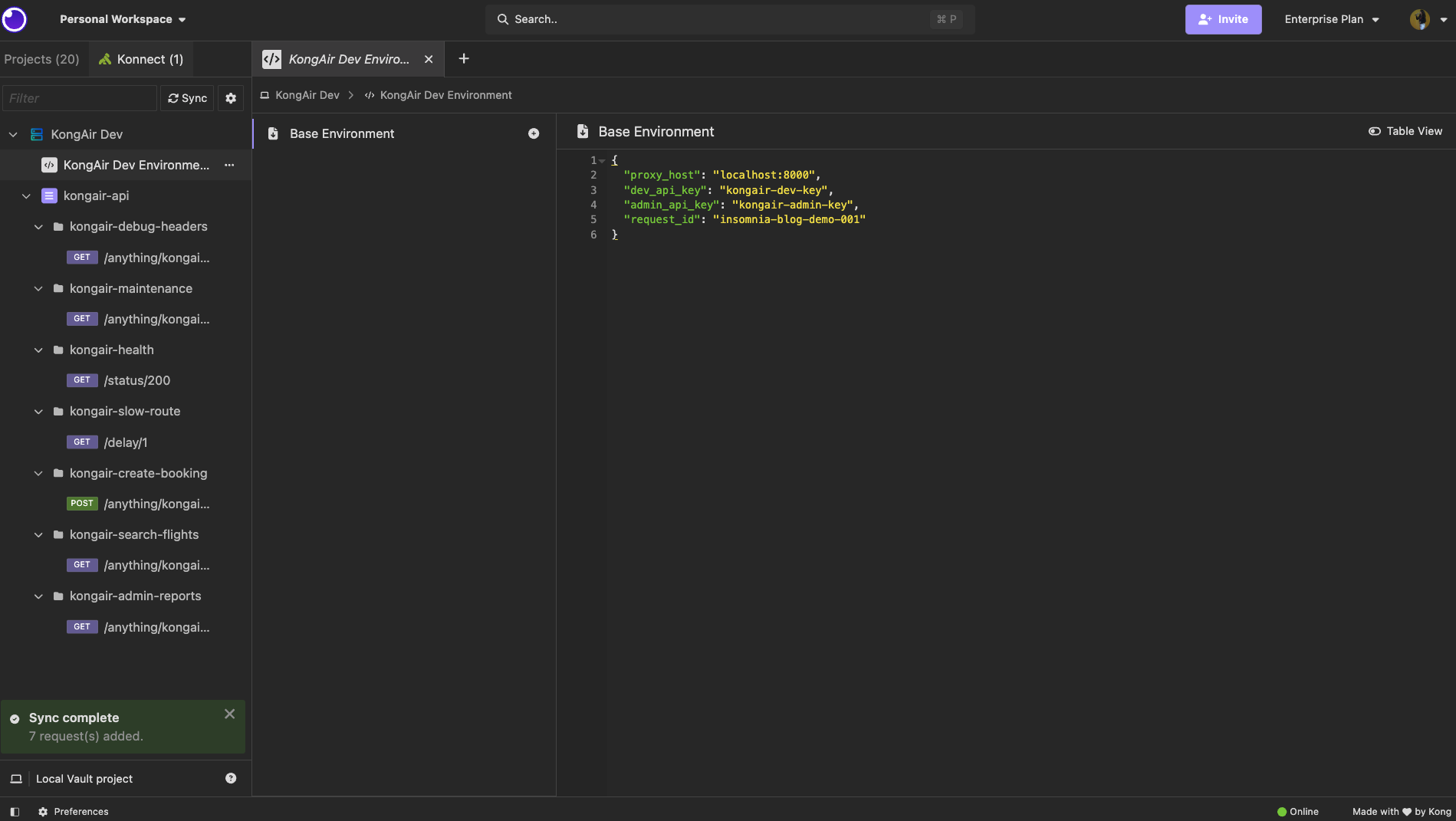
The synced requests use proxy_host to reach the local Gateway proxy. The API keys are stored as environment values so I don’t need to hardcode credentials in each request.
Manually updated Environment values
Note: Insomnia syncs Routes from Konnect, but authentication values such as app registrations, API keys, or tokens are not populated automatically yet. For this walkthrough, I added those values manually in the environment. These local additions are preserved across future syncs, so I can pull in new Konnect changes later without losing environment values, headers, or authentication details I added for testing.
Step 8: Test synced Routes in Insomnia
With the kongair-api Routes synced from Konnect and the environment values configured, I can now test the API directly from Insomnia. This is where the Konnect integration becomes especially useful: I’m not manually recreating requests or copying paths from the Gateway configuration. The Routes, methods, and request structure are already available in Insomnia, and I only need to add the environment-specific values such as the proxy host and API keys.
For testing, I’ll validate a few common Gateway scenarios: a public health check, a protected Route returning 401 without an API key, a successful request with the developer key, an admin-only Route returning 403 with the wrong key, a successful admin request, rate limiting, request transformation, and a Gateway-generated maintenance response.
**This content contains a video which can not be displayed in Agent mode**
These tests show how Insomnia can be used to debug real Kong Konnect-managed Gateway behavior, including routing, authentication, authorization, plugins, and policies, from one synced workspace.
**1. What is Insomnia and how does it connect to Kong Konnect?**
Kong Insomnia is a full API lifecycle platform for designing, testing, debugging, and mocking APIs. Its native integration with Kong Konnect lets developers sync Gateway configurations directly into their testing workspace. This unified workflow eliminates the need to switch between separate tools for API design, testing, and Gateway management, keeping everything in a single environment.
**2. What is the difference between a Konnect control plane and a data plane?**
A Konnect control plane is the management layer where you configure Gateway services, routes, and plugins. A data plane is the runtime component that processes actual API traffic using those configurations. The control plane pushes configuration to data planes, which means you can manage policies centrally while traffic flows through distributed nodes closer to your consumers.
**3. What is decK and how is it used with Kong Konnect?**
decK is a declarative CLI tool that manages Kong Gateway configurations as YAML files. With Kong Konnect, decK lets you define services, routes, and plugins in version-controlled files and sync them to a control plane in a single command. This approach supports GitOps workflows, making Gateway configuration reproducible, auditable, and easy to roll back when needed.
**4. How do you sync Gateway routes from Kong Konnect to Insomnia?**
You connect Kong Insomnia to your Konnect account through the built-in integration, then select the control plane and service you want to work with. Insomnia pulls the associated routes and generates request entries in your workspace automatically. From there, you can configure environment variables, add authentication headers, and start testing each route without manual setup.
**5. Can Insomnia preserve local environment values after syncing from Konnect?**
Yes. When you sync Gateway configurations from Konnect, Kong Insomnia merges the incoming route and service data without overwriting your local environment variables. This means base URLs, API keys, tokens, and other values you have configured locally remain intact across syncs, so you do not need to reconfigure your testing environment each time the Gateway definition changes.
**6. How do you test API key authentication through Kong Gateway?**
After enabling the Key Authentication plugin on a Gateway service or route, you add the required API key header or query parameter to your request in Kong Insomnia. Sending the request routes it through the Gateway, which validates the key before forwarding traffic to the upstream service. This lets you verify that authentication policies are enforced correctly before promoting changes to production.
**7. What Gateway policies can you test using Insomnia with Konnect?**
You can test any plugin-based policy configured on your Kong Gateway, including rate limiting, API key authentication, request transformation, IP restriction, and response caching. Kong Insomnia's integration with Konnect surfaces these configurations in your workspace, so you can validate each policy's behavior against live or proxied Gateway endpoints without leaving your testing environment.
You invested in Kong Konnect. You centralized your API governance, locked down your routing, enforced your security policies, and gave your organization a single source of truth for every API in your estate. That work is done, and it is working. So
Haley Giuliano
# Insomnia 13: Native Kong Konnect Integration for Real-Time API Testing
Have you ever…. Copied an API spec out of Kong Konnect, or where you manage your APIs, pasted it into your API client, and immediately wondered if it’s the latest version? Sent an email to your platform team with the subject line “ which endpoint sh
Haley Giuliano
# Hello World: Meet the Engineers Behind Kong Konnect
Today we’re launching the Kong Konnect Engineering Tech Blog, dedicated to exploring the technology challenges and solutions we’ve encountered. The objective? To offer valuable technical content that enables our readers to broaden their engineering
Danny Freese
# Insomnia 13.1: Smarter Git Sync for Your API Testing Workflow and More
A Git Sync experience that fits your API testing workflow, not the other way around. Insomnia 13.1 now reads your .gitconfig, syncing the native git credentials you’ve already configured, so now you just need to connect once, and you’re all set. Fr
Haley Giuliano
# Local Previews and Agent-Driven Authoring for Your Konnect Dev Portal
What it is
The Konnect Dev Portal Toolkit is a free extension published by Kong Inc. on the Visual Studio Code Marketplace (ID konghq.vscode-konnect-dev-portal-toolkit) and on Open VSX.
Konnect Developer Portals are how teams publish API document
Adam DeHaven
# Enforce API Standards with Custom Linting in Kong Insomnia 13
To follow along, you’ll need: Insomnia 13 or later An Insomnia project with an API design document An OpenAPI 3.x specification Note: In Insomnia 13, custom linting supports Spectral rulesets using the top-level rules and extends properties. Custom
Juhi Singh
# Introducing the Insomnia AI Runner: Accelerate and secure GenAI traffic to one or more LLMs
Today with the release of Insomnia 10 , we are quite stoked to also announce a brand new offering in Insomnia, the AI Runner, a managed SaaS service that provides developers with the ability to accelerate and secure LLM traffic for their applicatio
Marco Palladino
# Why Your API Gateway Should Be Your Testing Environment
You invested in Kong Konnect. You centralized your API governance, locked down your routing, enforced your security policies, and gave your organization a single source of truth for every API in your estate. That work is done, and it is working. So
Haley Giuliano
# Insomnia 13: Native Kong Konnect Integration for Real-Time API Testing
Have you ever…. Copied an API spec out of Kong Konnect, or where you manage your APIs, pasted it into your API client, and immediately wondered if it’s the latest version? Sent an email to your platform team with the subject line “ which endpoint sh
Haley Giuliano
# Hello World: Meet the Engineers Behind Kong Konnect
Today we’re launching the Kong Konnect Engineering Tech Blog, dedicated to exploring the technology challenges and solutions we’ve encountered. The objective? To offer valuable technical content that enables our readers to broaden their engineering
Danny Freese
# Insomnia 13.1: Smarter Git Sync for Your API Testing Workflow and More
A Git Sync experience that fits your API testing workflow, not the other way around. Insomnia 13.1 now reads your .gitconfig, syncing the native git credentials you’ve already configured, so now you just need to connect once, and you’re all set. Fr
Haley Giuliano
# Local Previews and Agent-Driven Authoring for Your Konnect Dev Portal
What it is
The Konnect Dev Portal Toolkit is a free extension published by Kong Inc. on the Visual Studio Code Marketplace (ID konghq.vscode-konnect-dev-portal-toolkit) and on Open VSX.
Konnect Developer Portals are how teams publish API document
Adam DeHaven
# Enforce API Standards with Custom Linting in Kong Insomnia 13
To follow along, you’ll need: Insomnia 13 or later An Insomnia project with an API design document An OpenAPI 3.x specification Note: In Insomnia 13, custom linting supports Spectral rulesets using the top-level rules and extends properties. Custom
Juhi Singh
# Introducing the Insomnia AI Runner: Accelerate and secure GenAI traffic to one or more LLMs
Today with the release of Insomnia 10 , we are quite stoked to also announce a brand new offering in Insomnia, the AI Runner, a managed SaaS service that provides developers with the ability to accelerate and secure LLM traffic for their applicatio
Marco Palladino
# Why Your API Gateway Should Be Your Testing Environment
You invested in Kong Konnect. You centralized your API governance, locked down your routing, enforced your security policies, and gave your organization a single source of truth for every API in your estate. That work is done, and it is working. So
Haley Giuliano
# Insomnia 13: Native Kong Konnect Integration for Real-Time API Testing
Have you ever…. Copied an API spec out of Kong Konnect, or where you manage your APIs, pasted it into your API client, and immediately wondered if it’s the latest version? Sent an email to your platform team with the subject line “ which endpoint sh
Haley Giuliano
# Hello World: Meet the Engineers Behind Kong Konnect
Today we’re launching the Kong Konnect Engineering Tech Blog, dedicated to exploring the technology challenges and solutions we’ve encountered. The objective? To offer valuable technical content that enables our readers to broaden their engineering
Danny Freese
# Insomnia 13.1: Smarter Git Sync for Your API Testing Workflow and More
A Git Sync experience that fits your API testing workflow, not the other way around. Insomnia 13.1 now reads your .gitconfig, syncing the native git credentials you’ve already configured, so now you just need to connect once, and you’re all set. Fr
Haley Giuliano
# Local Previews and Agent-Driven Authoring for Your Konnect Dev Portal
What it is
The Konnect Dev Portal Toolkit is a free extension published by Kong Inc. on the Visual Studio Code Marketplace (ID konghq.vscode-konnect-dev-portal-toolkit) and on Open VSX.
Konnect Developer Portals are how teams publish API document
Adam DeHaven
# Enforce API Standards with Custom Linting in Kong Insomnia 13
To follow along, you’ll need: Insomnia 13 or later An Insomnia project with an API design document An OpenAPI 3.x specification Note: In Insomnia 13, custom linting supports Spectral rulesets using the top-level rules and extends properties. Custom
Juhi Singh
# Introducing the Insomnia AI Runner: Accelerate and secure GenAI traffic to one or more LLMs
Today with the release of Insomnia 10 , we are quite stoked to also announce a brand new offering in Insomnia, the AI Runner, a managed SaaS service that provides developers with the ability to accelerate and secure LLM traffic for their applicatio
Marco Palladino
## Ready to see Kong in action?
Get a personalized walkthrough of Kong's platform tailored to your architecture, use cases, and scale requirements.

 KongAir Dev Control Plane
 Insomnia<>Konnect
 Konnect configuration synced with Insomnia
 Manually updated Environment values


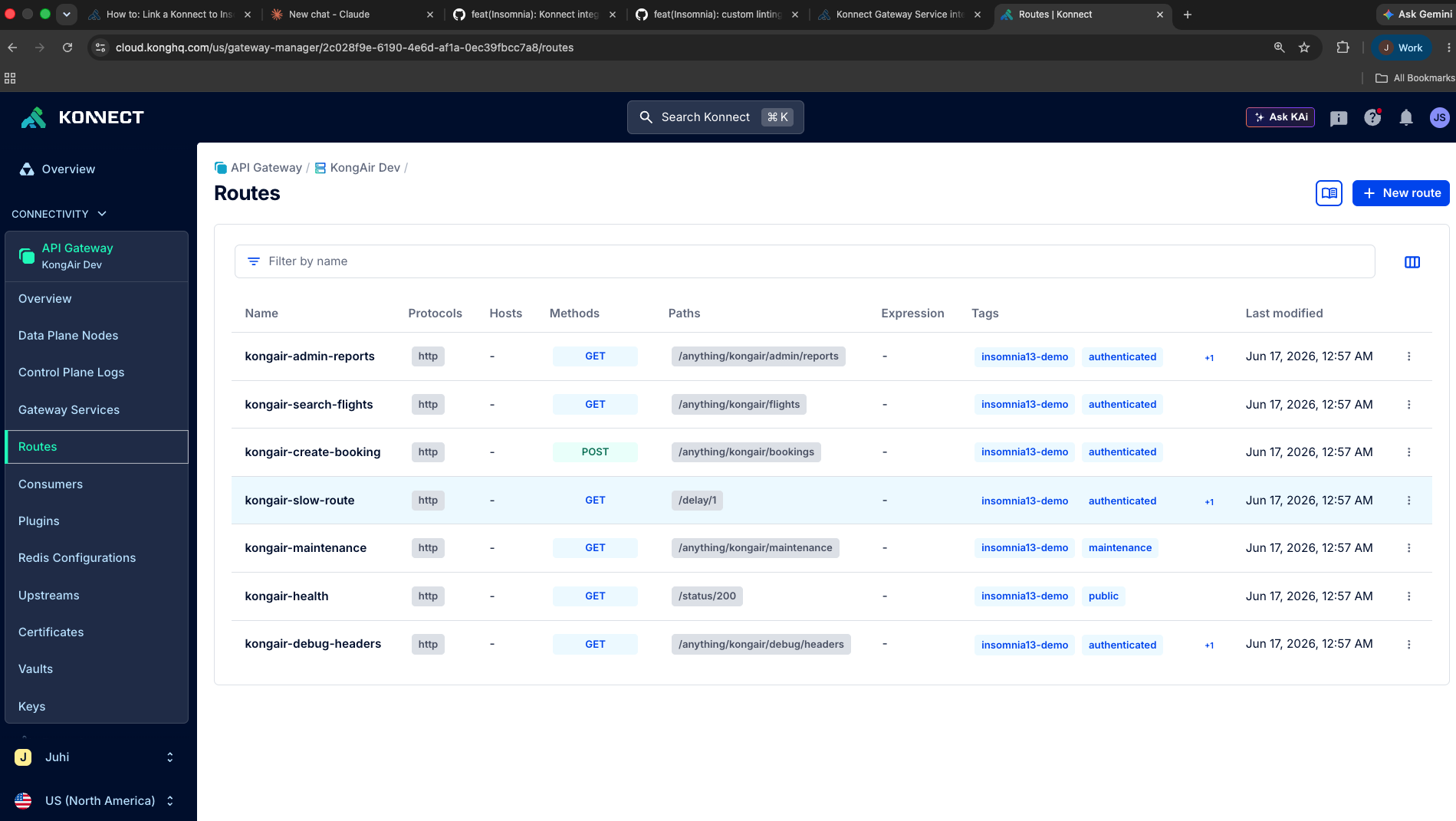Routes in Konnect](https://assets.prd.mktg.konghq.com/images/2026/06/6a396b63-image6-2.png)
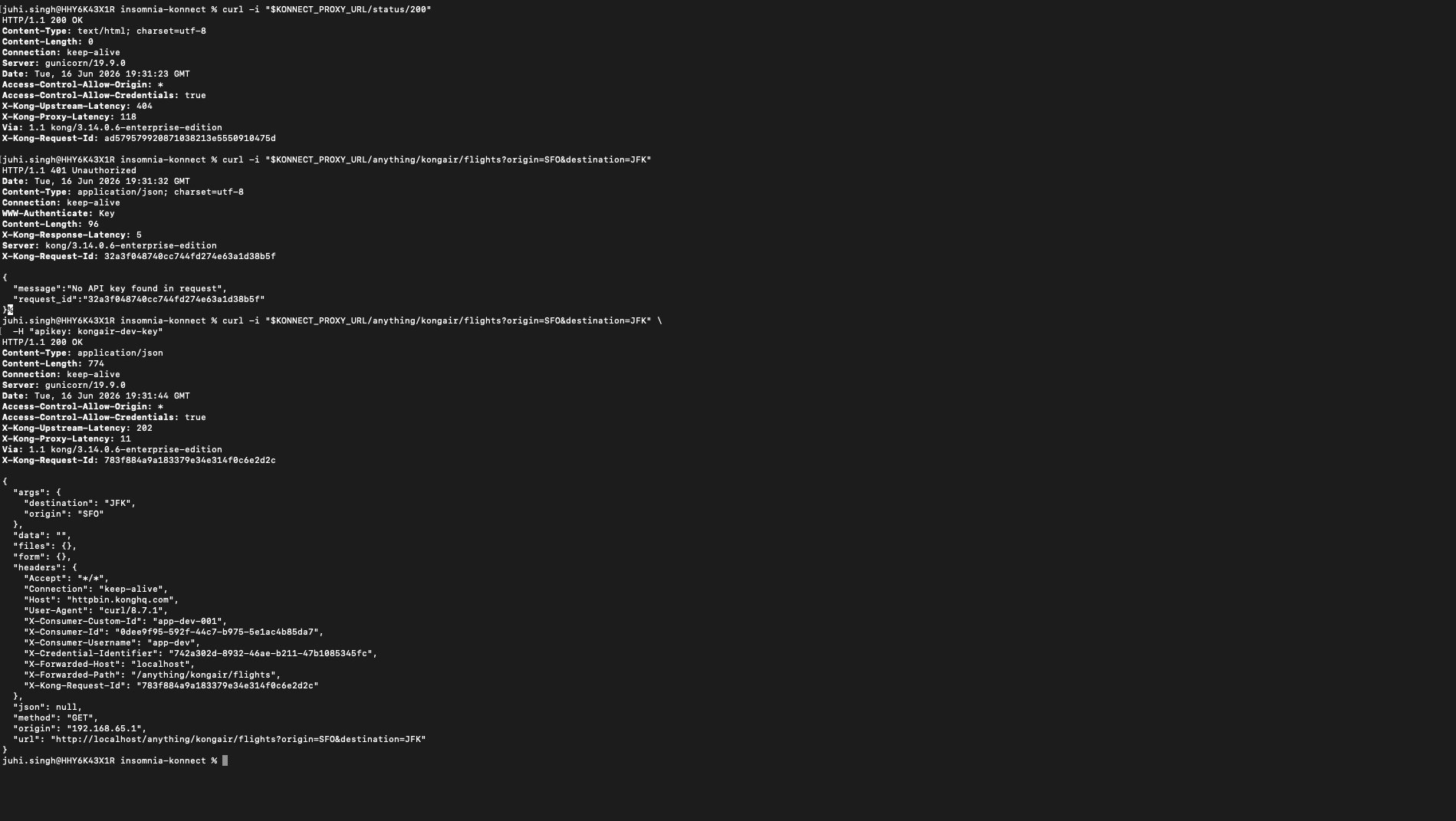Getaway sanity check](https://assets.prd.mktg.konghq.com/images/2026/06/6a396b88-image7-2.png)