The CLI case is real
Let's start with the strongest version of the CLI argument.
For well-known tools baked into model training data (e.g., git, grep, curl, jq, docker, kubectl, gh, etc.), CLIs are highly effective for agent workflows. The model already knows the flags and the output formats. And debuggability is unmatched: the agent's action reduces to a plain-text command with raw stdout/stderr, which you can inspect, rerun, and iteratively refine using the exact same interfaces developers already rely on. There's no hidden execution layer. Just a linear, fully observable interaction between input and output.
For local workflows, CLI tools are faster, leaner, and more predictable than anything involving an MCP server connection. The feedback loop is tight, the tool surface is well understood, and the model can iterate quickly without waiting on network round trips. This holds whether it's a solo developer scaffolding a side project or a team of engineers refactoring a shared monorepo.
Skills extend this advantage beyond well-known CLI tools by giving models additional knowledge on demand. Not just what a tool does, but how and when to use it in context. It's structured guidance that loads only when the agent needs it, keeping the context window lean and free from unnecessary bloat.
And this isn't a take purely upheld by individuals. Google recently shipped the [Google Workspace CLI](https://github.com/googleworkspace/cli)Google Workspace CLI, a single CLI covering Drive, Gmail, Calendar, Sheets, Docs, Chat, and Admin, shipping with over 100 agent skills. Notably, Google initially built a full MCP server for this tool. Then they [deliberately removed it](https://github.com/googleworkspace/cli/pull/275)deliberately removed it, likely because 200-400 dynamically generated tools consumed 40,000 to 100,000 tokens just in tool definitions.
For this use case, Google clearly favors CLI + skills as the better architecture.
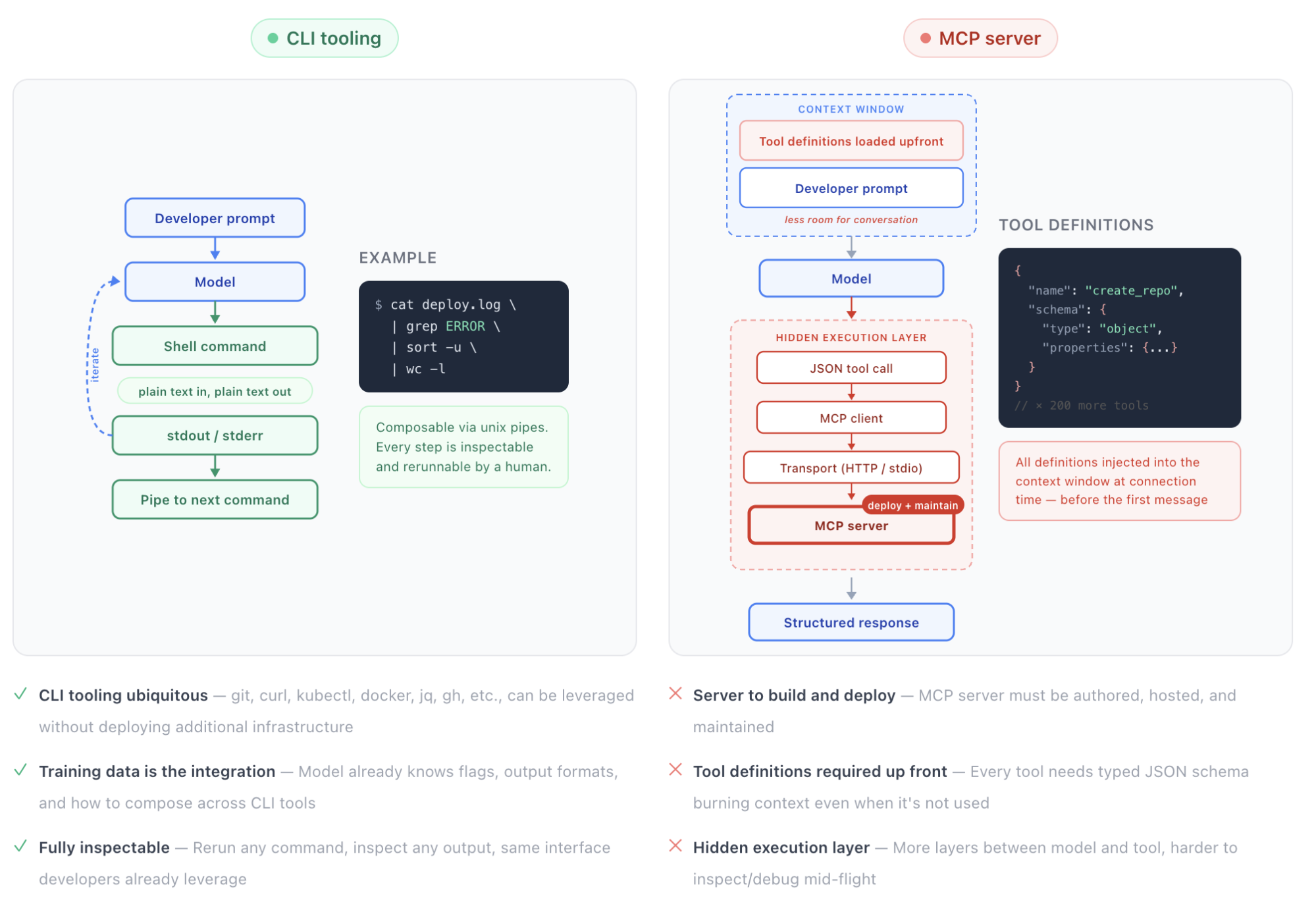
CLI vs MCP feedback loop
What changes when you zoom out
The case for the CLI is built on a specific set of assumptions: developers are interacting with their own data, managing their own credentials, and nobody needs to answer the question "what are our agents actually doing across 15 teams?" When those assumptions hold, CLIs are a clear winner. When you zoom out to the organizational level, or when agents start acting on behalf of other users, new requirements appear that CLIs don't address and that introduce real risk.
Auth: who is your agent acting for?
The simplest version of the agent-and-tools story is straightforward. You run gh auth login, the agent inherits your personal token, and it acts with your permissions on your data. For your own workflows, this is clean and effective.
But consider a different scenario: you're building an internal developer platform where agents help engineers across your org manage infrastructure. An engineer on the payments team asks the agent to update a Kubernetes deployment. The agent needs to authenticate as that engineer, with that engineer's access scoped to the payments namespace, not the entire cluster. Now multiply that across 40 engineers, each interacting with different services, each with different access levels.
CLI workflows don’t provide a standardized, protocol-level mechanism for per-request delegation. The agent holds one set of credentials. To act on behalf of different users with different scopes, you'd need to build a token management layer, handle credential swapping per request, manage refresh cycles, and enforce scope boundaries, all in application code. No small lift.
MCP over HTTP standardizes on OAuth 2.1, which means auth delegation is handled at the protocol level rather than reinvented per tool. Each user can grant specific access to the agent, see what they've authorized, and revoke it. But notably, global governance can still take place at the organization level. Most enterprises already have a central identity provider with SSO (Okta, Entra ID, etc.) and can leverage MCP spec extensions like [Enterprise-Managed Authorization](https://modelcontextprotocol.io/extensions/auth/enterprise-managed-authorization)Enterprise-Managed Authorization to allow developers to authenticate with their corporate identity and have the security team centrally manage policy-driven access to all MCP servers.
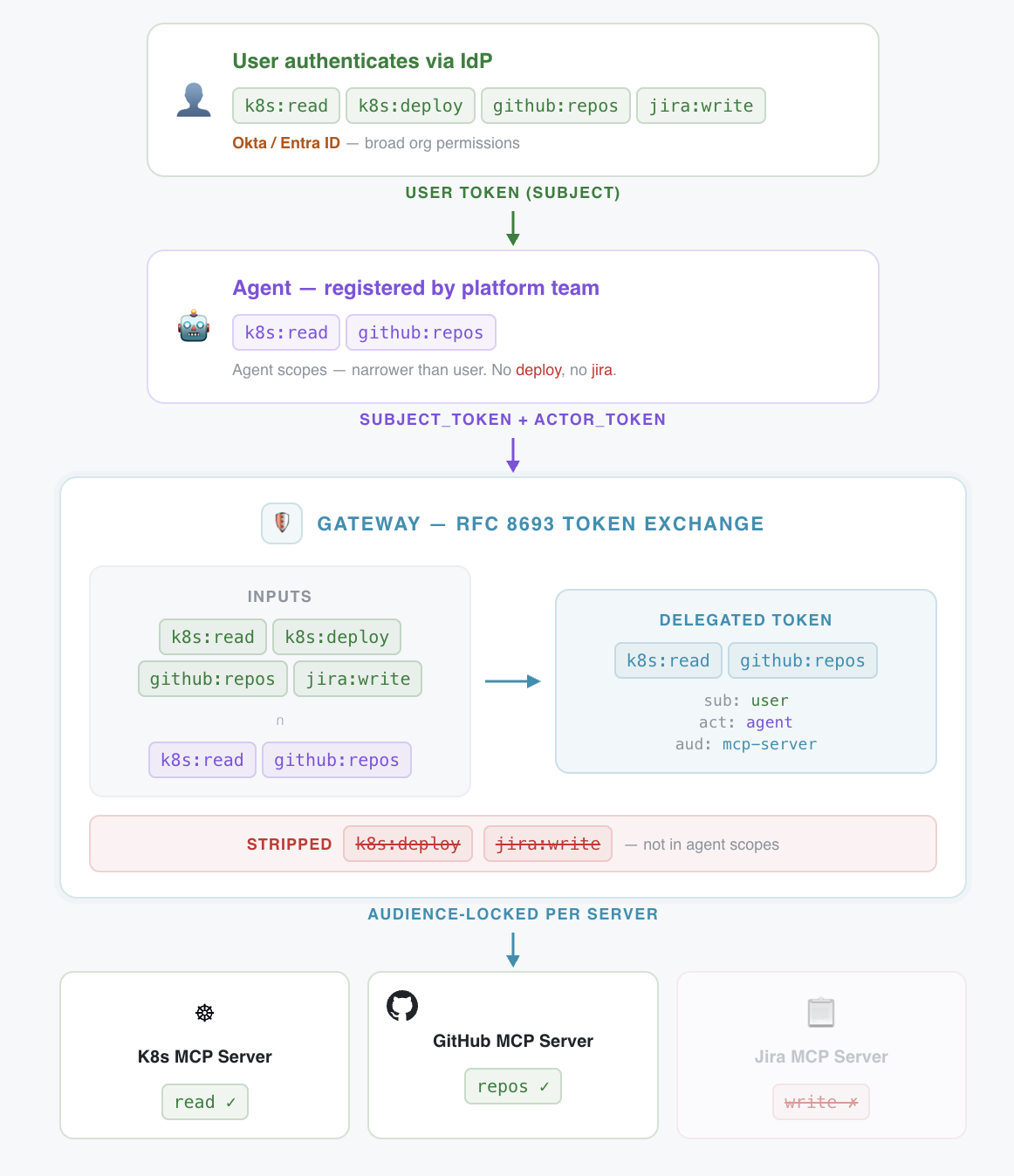
Scoped auth delegation via token exchange
Access control at machine speed
Even once it's established who the agent is acting for, we still need to limit what the agent can actually do. With CLI-based agents today, this is primarily handled through user-level approval. Claude Code, Cursor, and most coding assistants prompt the user before executing shell commands, and the user approves or denies each operation. It's a human-in-the-loop model.
This works reasonably well for an individual developer making deliberate, periodic tool calls. It breaks down fast at organizational scale. Agents execute operations at machine speed; the consent model that worked for decades of web applications strains under the volume. Approval fatigue sets in. Developers start auto-approving. And there's no centralized control; each developer manages their own permission rules locally, which means the platform team has zero visibility into what agents are allowed to do across the org. A single misconfigured permission on one developer's machine can expose production infrastructure.
MCP tools combined with a gateway support scoped permissions enabling centralized, policy-driven access control. The platform team defines what agents can and can't do, policies are enforced at execution time, and the protocol's elicitation capability preserves human confirmation for high-stakes operations. Routine calls execute under policy; destructive or sensitive actions still surface to a human. It's not "approve everything" or "approve nothing."
Observability: structured attribution, not shell history
The CLI camp rarely talks about telemetry, and for good reason: when you're the only user, you don't need it. Platform teams do. Which tools are agents calling? How often? What's the error rate? What's the cost? What's the blast radius when an agent misconfigures a production route? How do you trace and audit the entire lifecycle of an agent workflow?
These aren't paranoid questions. They're table stakes for any enterprise putting agents into real workflows. MCP over HTTP gives you a single plane where all agent-tool interactions are logged, metered, and auditable with a structured, queryable record ("User X in Org Y authorized Agent Z to call this tool at this time with these parameters"). CLI interactions typically lack centralized, structured observability unless additional telemetry tooling is built, distributed and configured on individual developer machines.
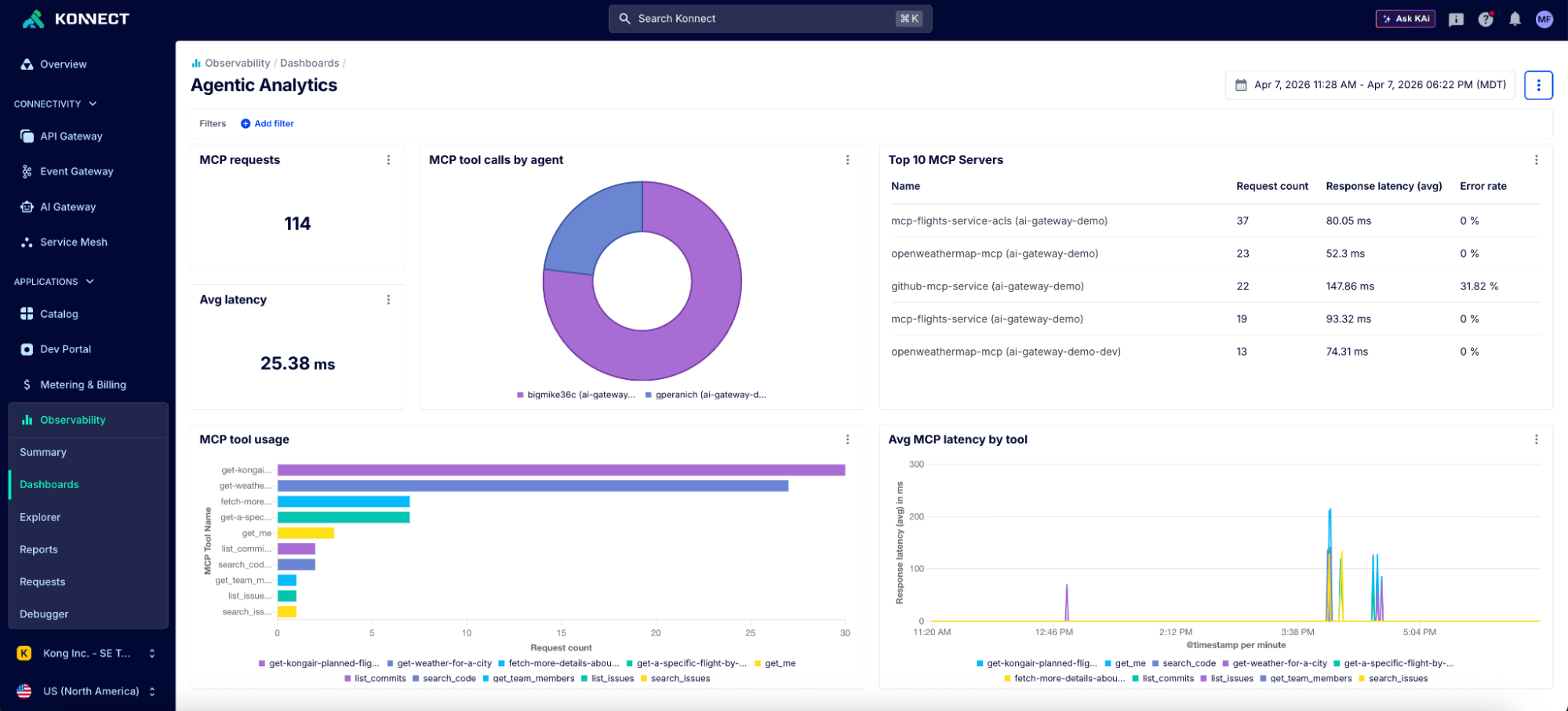
Kong Konnect MCP dashboard
Typed schemas: a contract the model can trust
There's a more foundational advantage that often gets overlooked in the CLI-vs-MCP debate. MCP tools provide typed JSON schemas: every tool definition includes parameter types, required fields, and descriptions. This gives the model a machine-readable contract for how to call a tool correctly. If a tool expects an integer for a port number, the schema ensures invalid inputs are rejected before execution by the MCP runtime and returns structured errors that are consistent format across tools. This allows the model to iteratively correct any failed tool calls, turning schema enforcement into a feedback loop rather than a one-time check.
CLI tools don't have this. Everything is strings and exit codes. For well-known CLIs like git or kubectl, the model's training data fills the gap; it already knows the flags and expected formats. But for enterprise-specific tools, internal CLIs, or less common utilities, hallucinated flags are a real and common failure mode.
The common pushback here is that skills can bridge this gap, and they do help. A well-written SKILL.md for an internal CLI gives the model procedural guidance on how to use it correctly. But the difference is enforcement. A skill file is like a code comment describing a function's expected inputs; helpful, but easy to ignore and impossible to enforce. A typed schema is like runtime type validation with a strict contract; the contract is structured, machine-readable, and consistently enforceable. Both have a place, but they operate at fundamentally different levels of assurance.
Centralized procedural knowledge that stays current
This is the most underappreciated advantage of MCP over HTTP, and it's where the skills-vs-MCP comparison gets interesting.
Skills are powerful. But they're static files in repos. They need to be distributed, versioned, and manually synced across every agent frontend and every developer environment. When an org wide procedure changes (e.g., revised compliance requirement, slide deck structure), every copy of that skill file needs updating. This works well within a single repo or on one developer’s machine. It breaks down when 15 teams are running different agents against dozens of services with their own procedures and conventions.
MCP prompts and resources solve this differently. They're server-delivered. The MCP server is the single source of truth for procedural knowledge (how to use a tool, what the org's conventions are, what safety guardrails apply) and for documentary knowledge like current schemas and policies. Every agent that connects gets the current version automatically, regardless of which IDE, CLI, or chat interface they're using.
And as models get better at working directly from existing documentation like OpenAPI specs, the need for hand-crafted functional guidance ("call these five endpoints with these parameters in this order") is diminishing. What remains durable is procedural knowledge: how we deploy, what requires approval, the compliance checklist for production changes, etc. That's the governance layer worth centralizing, and it's what MCP prompts and resources are well-positioned to distribute.
So it's not skills vs MCP. It's MCP as a different means of distributing knowledge.
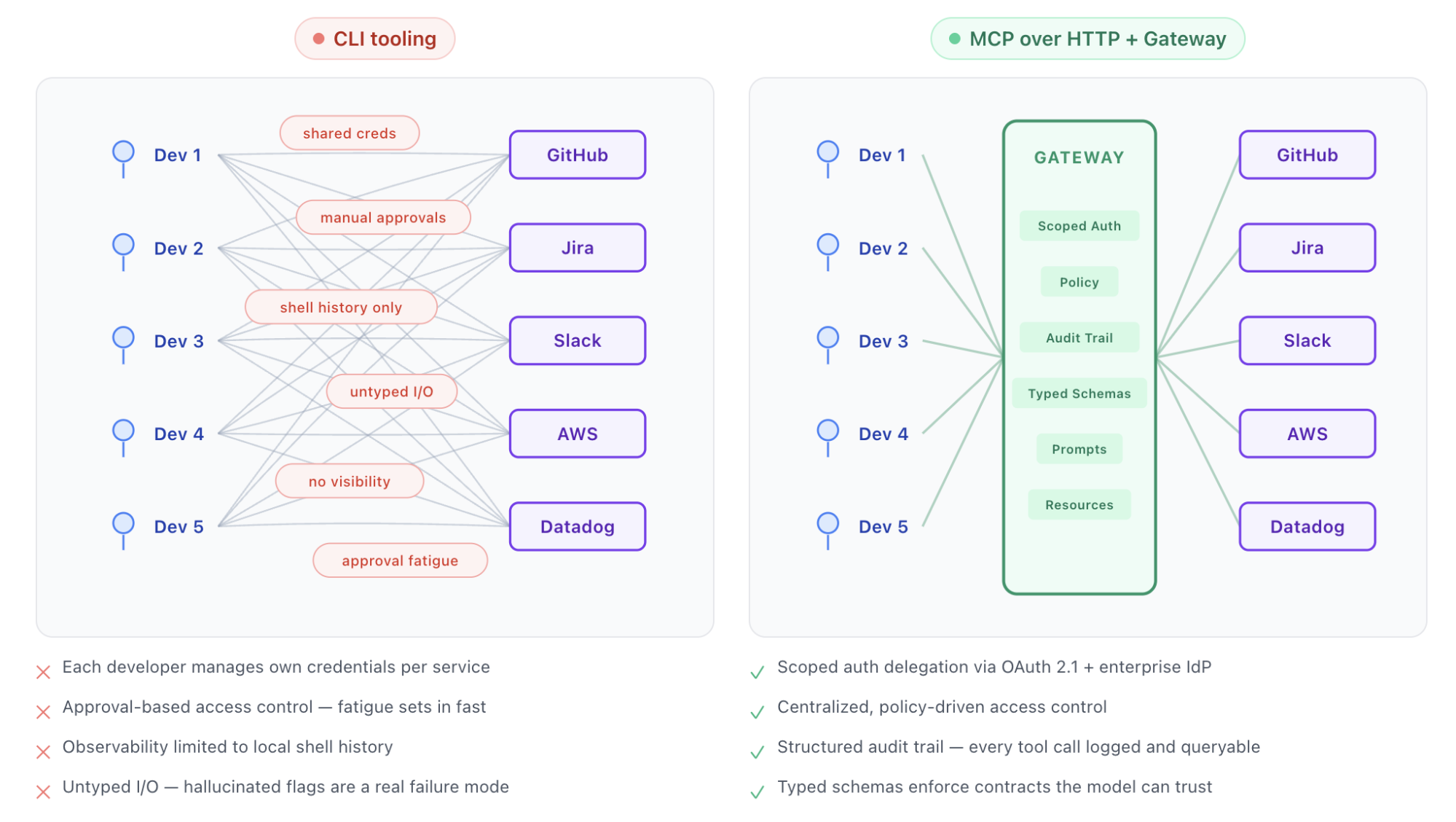
Agent-to-service connectivity at org scale
The three waves of MCP server design
None of the above is an argument against CLIs broadly. It's an argument against CLIs as a panacea for all agentic woes.
But there is a broad and fair criticism against MCP: context bloat. Connecting a handful of MCP servers can consume tens of thousands of tokens before the agent has even received a prompt. That's not a theoretical concern; it's the most common reason practitioners reach for CLIs instead.
So how did we get here? The answer is a story about how MCP server design has evolved in response to what we've learned about how models actually work with tools. Each wave made sense when it emerged. Each one became an anti-pattern as models and tooling matured.
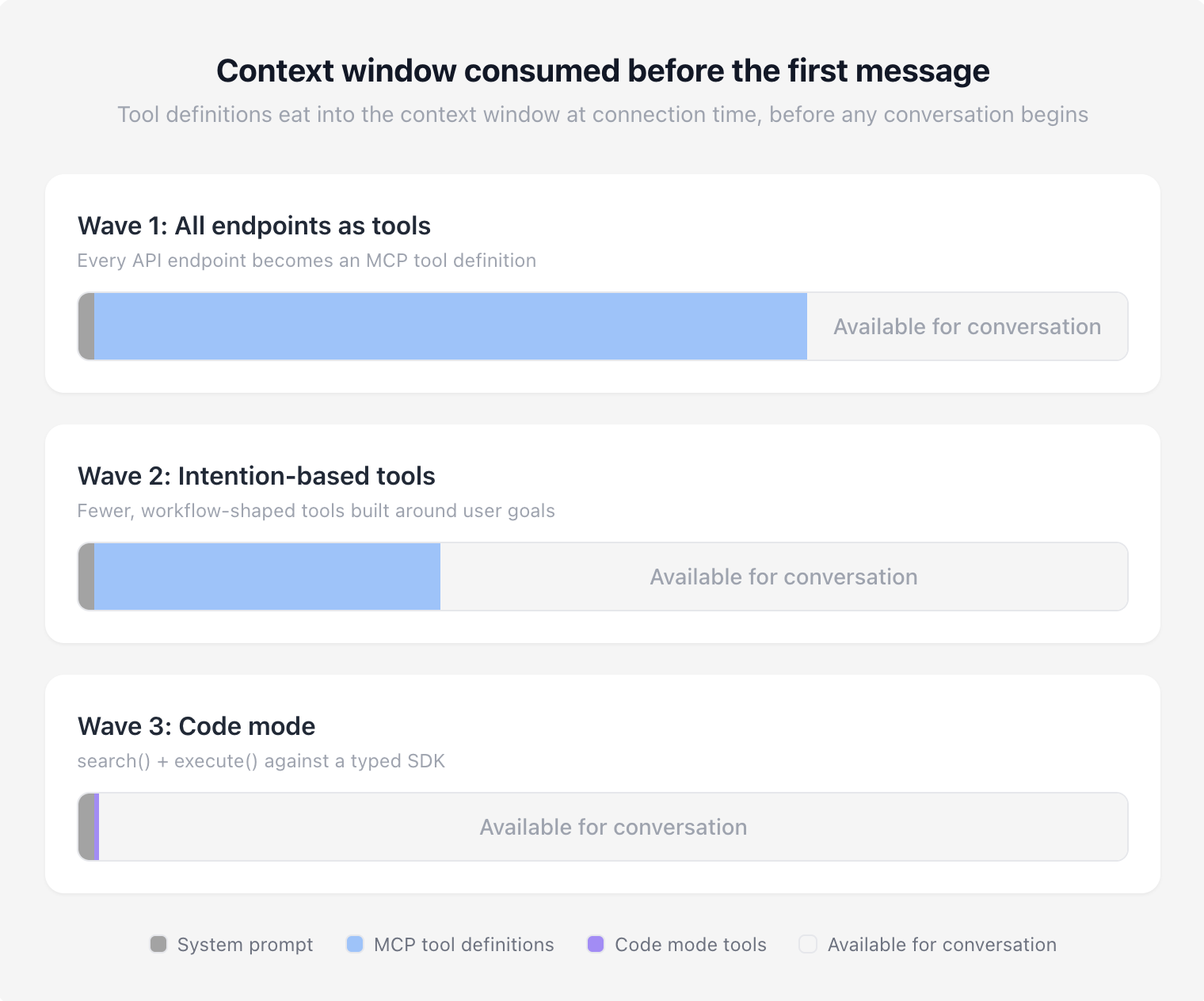
Context window comparisons with different approaches to MCP
When MCP first gained traction, the instinct was sensible: standardize on a single integration pattern between a growing ecosystem of agents and existing tools. Every API endpoint becomes an MCP tool. One protocol, one integration surface, discoverable by any agent.
The problem became clear fast. Exposing hundreds of fine-grained tools overwhelmed context windows and tanked model tool selection. The Google Workspace CLI story is a clean illustration: 200-400 tools, 40k-100k tokens burned on definitions alone. Research from Speakeasy showed tool selection accuracy degrades past roughly 30 tools, with their benchmarks showing severe degradation by the time toolsets grew past 100 tools.
The first wave had the right instinct, but it didn't account for how models actually process and select from large toolsets. Giving a model 400 tools is like handing someone a 400-page menu and expecting quick, deterministic choices.
The correction swung in the other direction: stop thinking like a developer exposing API surfaces and start thinking like an LLM consumer. Instead of four tools for individual pieces of a deployment pipeline, one tool that deploys end-to-end. Instead of granular CRUD operations, high-level tools shaped around what users actually ask for.
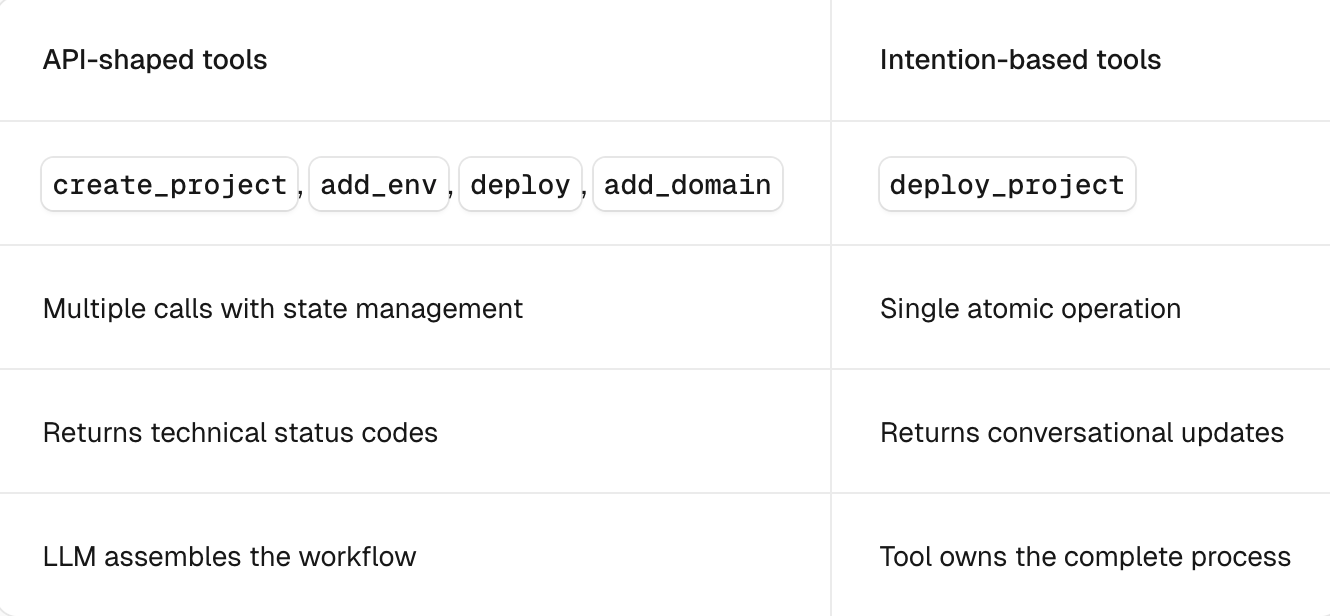
Table comparing Wave 1 vs Wave 2 tool design, credit [Vercel](https://vercel.com/blog/the-second-wave-of-mcp-building-for-llms-not-developers)Vercel
This was a genuine improvement. Fewer tools meant better selection accuracy, less wasted context, and less orchestration overhead, and it worked well. For a while.
But workflow-driven tools hit their own ceiling. They encode the workflow author's assumptions about what the user wants. They're rigid when the model needs to compose operations in a sequence nobody anticipated. And they still require someone to predict and pre-build every workflow an agent might need.
To make matters worse, this new gold standard was an ideal that most MCP servers fell woefully short of. The ask to have well-structured forms of this new integration layer was far too much for most enterprises that still struggle to have well-documented REST APIs. It simply wasn't realistic as most MCP server implementations targeted the bare minimum.
And intention-based tools still didn't solve the context bloat problem. Most end users connect to a multitude of MCP servers and inject tool definitions irrelevant to the problem or task at hand. For more autonomous agents, there was still no means to dynamically inject context from these servers and tools relevant to the task.
Hence the pendulum swinging hard towards CLIs and progressive disclosure as the solution.
But as models got more capable, stronger at multi-step reasoning, better at writing and executing code, a different question started forming: why are we pre-packaging workflows when the model can compose them on the fly?
The first attempt to solve context bloat dynamically was tool search. Instead of injecting every tool definition into the context window upfront, tool search lets the agent query for relevant tools on demand. The results were promising: Anthropic's tool search reduced agent token overhead by up to 85%, and filtering-based approaches like Redis's implementation took accuracy from 42% to 85% while cutting context from 23k tokens to 450.
But tool search has its own limitations. Models still struggle to effectively leverage tools they've never encountered before, even when search surfaces them. At scale, Stacklok's benchmark of 2,792 tools showed Anthropic's tool search accuracy dropping to 34%. Tool search reduces the blast radius of context bloat but doesn't eliminate the underlying problem: models choosing from large, unfamiliar toolsets.
Code mode takes a different approach entirely. Instead of choosing from a menu of pre-built tools, the model writes code against a typed SDK. Code mode collapses the MCP interface to a handful of meta-tools (typically search, read, and execute) and gives the model a programming environment. Loops, conditionals, error handling, multi-step compositions; all expressed in code rather than tool calls.
The benchmarks support the shift. Cloudflare compressed a 2,500+ endpoint API into roughly 1,000 tokens via search() and execute(), a fixed cost regardless of API size. Sideko testing showed code mode using 58% fewer tokens than raw MCP and collapsing 19 LLM round trips down to 4, outperforming both raw MCP and CLI on multi-step tasks.
Critically, code mode preserves the MCP governance advantages we discussed earlier. In Cloudflare's implementation, the generated code executes in an isolated V8 sandbox. The sandbox can only interact with the outside world through bindings to connected MCP servers, which are proxy objects backed by Workers RPC. Credentials are injected at the binding layer; the sandboxed code never sees raw API keys or tokens. Every call still routes through the MCP server, which means auth delegation, scoped permissions, and structured audit trails all remain intact. You get CLI-level token efficiency with MCP-level governance.
But of course, there are still challenges. Code mode needs a secure, trusted sandbox to execute generated code. It introduces a new attack surface (prompt injection could produce malicious code, and the execution environment needs hardening), but these are solvable problems. Sandboxing is well-understood infrastructure.
The broader point is that this progression isn't over. Wave 1 wasn't wrong; it just belonged to a moment. So did Wave 2. Code mode is the current frontier, and it too will evolve as models do. Best practices in MCP server design have shifted this fast precisely because models have emergent capabilities that only become apparent through widespread real-world use, not from benchmarks or controlled tests.
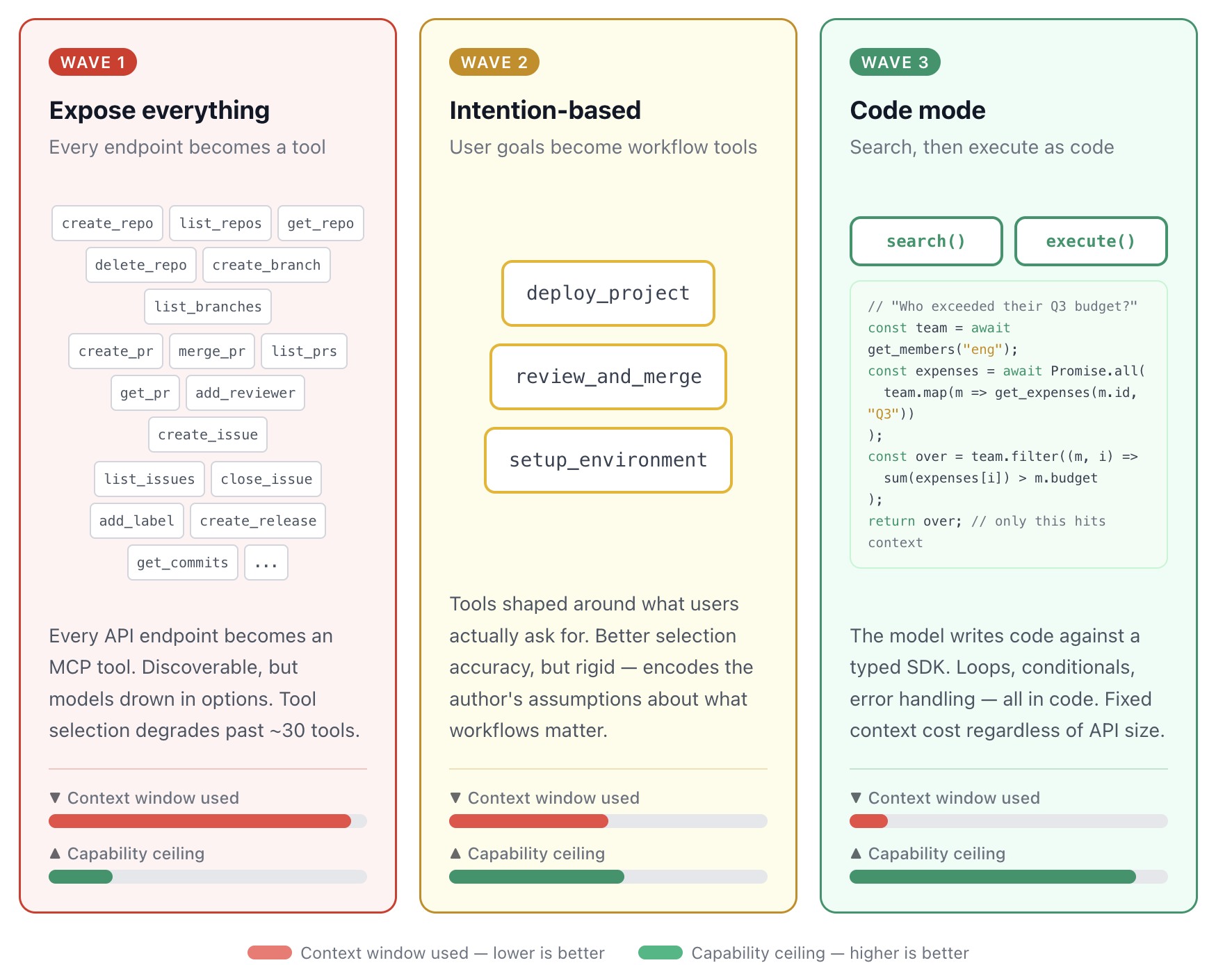
The three waves of MCP server design: from tool explosion to model-driven composition
The models won't wait
Which is exactly why the death knell cycle is so counterproductive. At some point this year, I’m sure everything from Claude Code to skills will be declared dead. Someone else will write the rebuttal. The cycle generates engagement; it doesn't generate clarity. And meanwhile, the models keep advancing. They're writing better code, reasoning through longer operation chains, and the human continues to get pushed further outside the loop.
A boon for speed but a potential nightmare for governance at the enterprise level.
The best way to cut through all the noise and form a coherent strategy isn't to pick a side. It's to clearly define the problem you're actually solving.
If you're wrapping a well-known API in an MCP server purely for the sake of standardization, stop. Let the agent use the CLI directly. If you're building a new MCP server today, consider code mode before you design 100 individual tools. If you're a platform team with no visibility into what your agents are doing across teams, that's the urgent problem, and it doesn't care whether the interface is CLI or MCP.
Define the problem. Build an infrastructure layer that adapts as models do. And if you want to learn more about how Kong can help and is advancing the frontier with Context Mesh, our approach to a unified context layer, [reach out to our team](https://konghq.com/contact-sales)reach out to our team.