# How and Why to Migrate from Kong Open Source to Kong Konnect
Jerry Hency
Kong Konnect is a powerful SaaS-based API lifecycle management platform that provides a fast path for people looking to get started with Kong API Gateway. For existing users of Kong’s open-source gateway, it offers a way to rapidly take advantage of a scalable, highly-available architecture while upgrading to an Enterprise-class feature set and support options. Today we will drill down the benefits of Konnect as well as provide a step-by-step example of migrating an open-source Kong gateway configuration onto Konnect.
Benefits of Konnect
Konnect was designed to provide three primary benefits to complement the existing capabilities of the Kong Gateway:
Simplify the operation of running Kong Gateway instances - By providing SaaS hosted Control planes through the concept of a Runtime Group. A Runtime Group is effectively a virtual Kong Gateway control plane provided as a service with 99.99% SLA. Konnect Runtime Groups can be provisioned in seconds via a single UI click or API call.
Enable governance of multiple Kong Gateway deployments across different teams, geographies, clouds, or environments at scale - The Konnect Runtime Manager combined with Konnect’s powerful Authorization capabilities enable multiple teams within an organization to access their Kong Gateway environments with just the right level of access, while central teams can have a full view of all deployments for governance purposes.
Provide a Services Catalog (called Service Hub), API Portal, and API Analytics capabilities as a service. With Konnect, all of these capabilities are available for all Kong Gateway deployments with zero additional operational complexity.
There are many reasons users of Kong’s open source gateway should consider migrating to Konnect to achieve a production-ready, highly-available, distributed API gateway in a very rapid time frame.
Migrating from Kong Open Source to Konnect
At Kong, we’ve made migrating from Kong’s OSS Gateway to Konnect very straightforward. All it takes is three (3) steps:
Extract the configuration from the existing OSS Gateway
Sync the configuration to a Konnect Runtime group
Register your gateway with Konnect
The remainder of this blog post walks you through an example. Follow along!
Kong provides decK, a command line tool that can manage gateway configuration declaratively using simple YAML files. Gateway configuration can be exported from, or imported to the gateway and diff and sync options are available. For more information on decK, see the [documentation](https://docs.konghq.com/deck/latest/)documentation.
With decK downloaded and installed, let’s export the current running configuration of the gateway into a yaml file using the following command. In our case, both decK and the Kong Admin API are running on the same system.
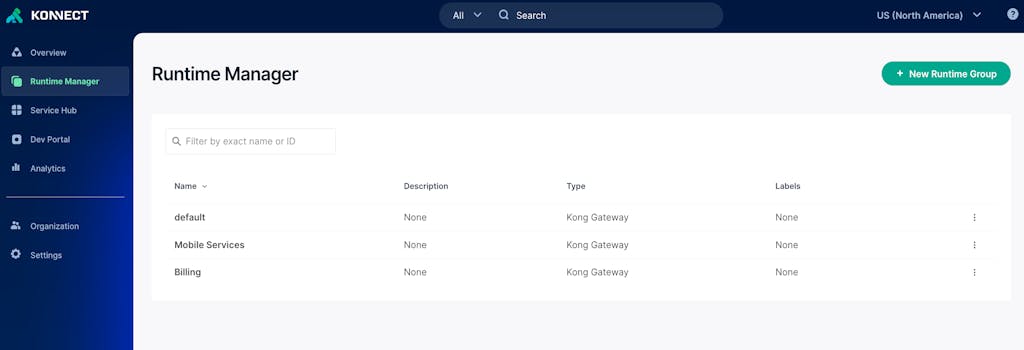
Once in Konnect, select Runtime Manager and identify or create a new Runtime Group for the migration. For example, the “default” Runtime Group.
Next, let’s generate a Personal Access Token (PAT) that we can use with decK for the migration. Click your account name in the lower left corner of the Konnect portal, select “Personal Access Tokens” and click generate token. For our example, we have placed the generated token in a file called “kpat.txt” to more securely reference it.
Let’s go ahead and validate decK can communicate with Konnect using the generated PAT:
Next, let’s run the decK diff command to preview the changes that will be migrated and then run a decK sync to apply the changes. The output from these two commands will generally look the same, the difference is the sync command applies the changes to the Runtime Group.
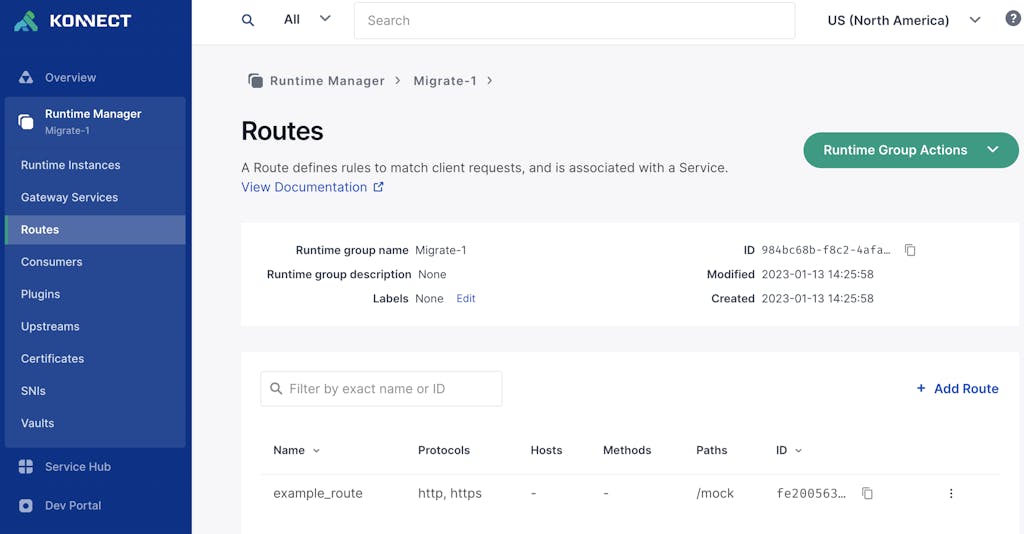
You can verify the creation of the entities by checking the GUI in the Konnect SaaS portal, selecting the Runtime Group in Runtime Manager and selecting Gateway Services and Routes.
At this point, we have successfully migrated the configuration from our Kong OSS Gateway instance to Konnect.
Let’s now get a runtime instance registered with Konnect.
Create a Runtime Instance
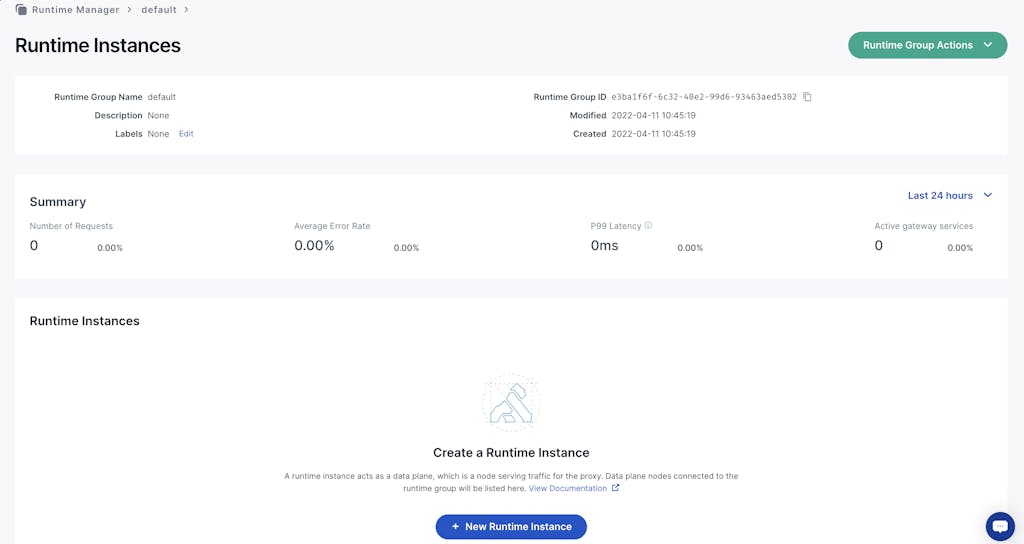
Within the Konnect Runtime Manager, choose Runtime Instances and then the "+ New Runtime Instance" button to see instructions to add a new runtime.
For this example, we will use a basic Ubuntu Linux instance. The links in Konnect first direct us to install Kong software for Ubuntu using the instructions [here](https://docs.konghq.com/gateway/3.1.x/install/linux/ubuntu/)here. To install Kong Gateway on a new Ubuntu 20.04 instance in AWS, we execute the following commands:
First we updated the Ubuntu OS:
## shell
sudoapt update
## shell
sudoapt upgrade -y
Then run the following command to resolve a Kong dependency in newer versions of Ubuntu:
## shell
sudoaptinstall zlib1g-dev
Then download and run the dpkg install as described in documentation:
The Konnect “Create Runtime Instance” page includes a button to automatically generate a certificate and key for the new instance to establish a TLS connection to Konnect. You can also upload a certificate you’ve generated. Executing this, we used the contents to create two separate text files with the certificate and key, and placed them in the /etc/kong directory. Then we create a minimal kong.conf file to use for the instance using the example provided by Konnect with our two filenames substituted for the cluster_cert and cluster_cert_key. Our kong.conf file looks like below. Make sure to make the necessary updates to your kong.conf file based on your environment.
## shell
role = data_plane
database = off
cluster_mtls = pki
cluster_control_plane = 2f4xxxxxxx.us.cp0.konghq.com:443
cluster_server_name = 2f4xxxxxxx.us.cp0.konghq.com
cluster_telemetry_endpoint = 2f4xxxxxxx.us.tp0.konghq.com:443
cluster_telemetry_server_name = 2f4xxxxxxx.us.tp0.konghq.com
cluster_cert = /etc/kong/cluster.crt
cluster_cert_key = /etc/kong/cluster.key
lua_ssl_trusted_certificate = system
konnect_mode = on
vitals = off
Then we started the Kong Runtime:
## shell
sudo kong restart
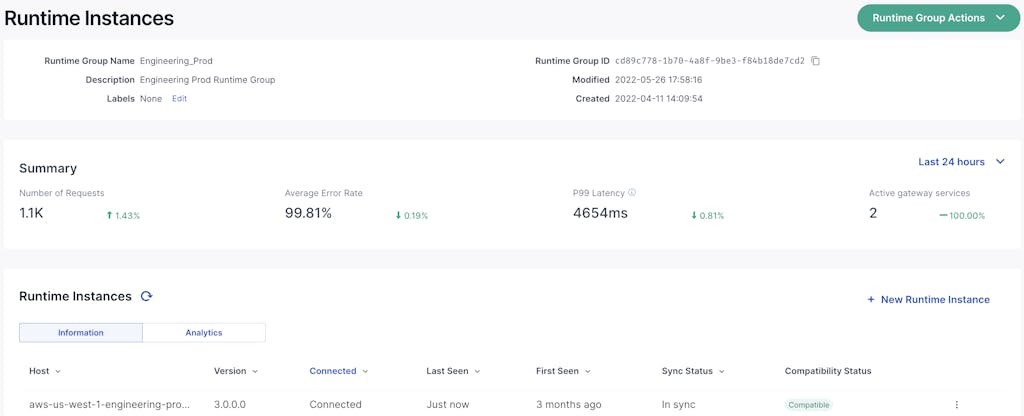
As the runtime registers, you will see the new Kong Runtime instance in Runtime Manager with a status of Connected and Compatible at which point the runtime is ready.
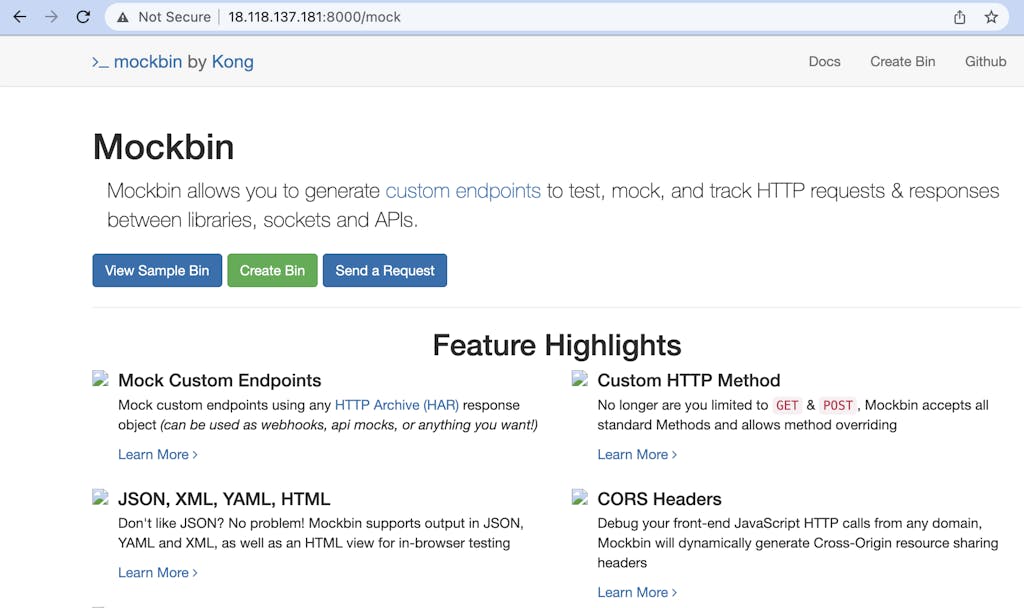
Let’s verify the runtime can successfully proxy requests to the migrated services, in our case the mock route and mocking service.
Success! Our Konnect runtime instance is now up and serving the same gateway services as our Kong OSS gateway. Any updates to the configuration in Konnect will be automatically pushed down to the runtimes. As new runtimes are deployed, Konnect will deploy the configuration.
In Closing
Konnect provides the benefits of simplified operations, enhanced governance and additional capabilities like a service catalog, analytics and more. In this article we’ve outlined how straight forward it is for OSS users to migrate to Konnect in three (3) simple steps:
Extract the existing configuration from Kong OSS via deck dump
Select or create a Runtime Group and sync the exported configuration to Konnect via deck sync
Register the runtime instance with Konnect via Runtime Manager
Once leveraging Konnect you can now deploy runtime instances to any environment or regions, on-prem or cloud and centrally manage them. Additionally, you can create different Runtime Groups, runtime instances and apply different sets of configuration to support multiple teams or departments.
What You'll Build
To explore the new integration, I'll build a realistic API platform workflow using Konnect, Kong Gateway, and Insomnia.
By the end of this tutorial, I'll have:
A Konnect Control Plane (KongAir Dev)
A local Kong Gateway Data Pl
Juhi Singh
# Hello World: Meet the Engineers Behind Kong Konnect
Today we’re launching the Kong Konnect Engineering Tech Blog, dedicated to exploring the technology challenges and solutions we’ve encountered. The objective? To offer valuable technical content that enables our readers to broaden their engineering
Danny Freese
# Kong Konnect is now available on the Google Cloud Marketplace
Now you can find and purchase Kong Konnect through the Google Cloud Marketplace! Kong Konnect is the unified API platform that allows you to manage multiple gateways across service meshes, ingress, cloud, and Kubernetes providers no matter where t
Erin Choi
# Kong Konnect Runtime Instance and Konnect-KIC AWS EKS Terraform Blueprints Addons
With our AWS partnership, we jointly created two Kong Konnect AWS EKS Terraform Blueprints AddOns, eks-blueprint-konnect-runtime-instance and eks-blueprint-konnect-kic, to help bootstrap your Kong Konnect instances on EKS. In this post, we'll discu
Danny Freese
# Build with Confidence: Beta API Specs Available Now
Few things are more frustrating than encountering a product with either no documentation or worse: documentation that leads you astray. When it comes to developing APIs, schemas typically define how requests and responses are formatted and guide how
Angel Guarisma
# Use ChatGPT to Develop a SOAP/XML Custom Kong Konnect Plugin
Today, APIs are based on modern communication patterns: REST, GraphQL, or gRPC. But two decades ago, the majority of Web Services were developed with SOAP/XML.
In this blog, we’ll explain how Kong Konnect can manage SOAP/XML Web Services by creat
In this Kong Konnect tutorial, you'll learn how to leverage the platform to manage your API ecosystem from a single easy-to-use interface. We’ll run through how to: Use Konnect Runtime Manager to set up your own Kong Gateway runtime instance i
Adam Bauman
# How to Test Gateway APIs Directly from Kong Konnect with Insomnia
What You'll Build
To explore the new integration, I'll build a realistic API platform workflow using Konnect, Kong Gateway, and Insomnia.
By the end of this tutorial, I'll have:
A Konnect Control Plane (KongAir Dev)
A local Kong Gateway Data Pl
Juhi Singh
# Hello World: Meet the Engineers Behind Kong Konnect
Today we’re launching the Kong Konnect Engineering Tech Blog, dedicated to exploring the technology challenges and solutions we’ve encountered. The objective? To offer valuable technical content that enables our readers to broaden their engineering
Danny Freese
# Kong Konnect is now available on the Google Cloud Marketplace
Now you can find and purchase Kong Konnect through the Google Cloud Marketplace! Kong Konnect is the unified API platform that allows you to manage multiple gateways across service meshes, ingress, cloud, and Kubernetes providers no matter where t
Erin Choi
# Kong Konnect Runtime Instance and Konnect-KIC AWS EKS Terraform Blueprints Addons
With our AWS partnership, we jointly created two Kong Konnect AWS EKS Terraform Blueprints AddOns, eks-blueprint-konnect-runtime-instance and eks-blueprint-konnect-kic, to help bootstrap your Kong Konnect instances on EKS. In this post, we'll discu
Danny Freese
# Build with Confidence: Beta API Specs Available Now
Few things are more frustrating than encountering a product with either no documentation or worse: documentation that leads you astray. When it comes to developing APIs, schemas typically define how requests and responses are formatted and guide how
Angel Guarisma
# Use ChatGPT to Develop a SOAP/XML Custom Kong Konnect Plugin
Today, APIs are based on modern communication patterns: REST, GraphQL, or gRPC. But two decades ago, the majority of Web Services were developed with SOAP/XML.
In this blog, we’ll explain how Kong Konnect can manage SOAP/XML Web Services by creat
In this Kong Konnect tutorial, you'll learn how to leverage the platform to manage your API ecosystem from a single easy-to-use interface. We’ll run through how to: Use Konnect Runtime Manager to set up your own Kong Gateway runtime instance i
Adam Bauman
# How to Test Gateway APIs Directly from Kong Konnect with Insomnia
What You'll Build
To explore the new integration, I'll build a realistic API platform workflow using Konnect, Kong Gateway, and Insomnia.
By the end of this tutorial, I'll have:
A Konnect Control Plane (KongAir Dev)
A local Kong Gateway Data Pl
Juhi Singh
# Hello World: Meet the Engineers Behind Kong Konnect
Today we’re launching the Kong Konnect Engineering Tech Blog, dedicated to exploring the technology challenges and solutions we’ve encountered. The objective? To offer valuable technical content that enables our readers to broaden their engineering
Danny Freese
# Kong Konnect is now available on the Google Cloud Marketplace
Now you can find and purchase Kong Konnect through the Google Cloud Marketplace! Kong Konnect is the unified API platform that allows you to manage multiple gateways across service meshes, ingress, cloud, and Kubernetes providers no matter where t
Erin Choi
# Kong Konnect Runtime Instance and Konnect-KIC AWS EKS Terraform Blueprints Addons
With our AWS partnership, we jointly created two Kong Konnect AWS EKS Terraform Blueprints AddOns, eks-blueprint-konnect-runtime-instance and eks-blueprint-konnect-kic, to help bootstrap your Kong Konnect instances on EKS. In this post, we'll discu
Danny Freese
# Build with Confidence: Beta API Specs Available Now
Few things are more frustrating than encountering a product with either no documentation or worse: documentation that leads you astray. When it comes to developing APIs, schemas typically define how requests and responses are formatted and guide how
Angel Guarisma
# Use ChatGPT to Develop a SOAP/XML Custom Kong Konnect Plugin
Today, APIs are based on modern communication patterns: REST, GraphQL, or gRPC. But two decades ago, the majority of Web Services were developed with SOAP/XML.
In this blog, we’ll explain how Kong Konnect can manage SOAP/XML Web Services by creat
In this Kong Konnect tutorial, you'll learn how to leverage the platform to manage your API ecosystem from a single easy-to-use interface. We’ll run through how to: Use Konnect Runtime Manager to set up your own Kong Gateway runtime instance i
Adam Bauman
## Ready to see Kong in action?
Get a personalized walkthrough of Kong's platform tailored to your architecture, use cases, and scale requirements.