# Model Context Protocol (MCP) Security: How to Restrict Tool Access Using AI Gateways
Deepak Grewal
Staff Solutions Engineer
For too long, the [Model Context Protocol (MCP)](https://konghq.com/blog/learning-center/what-is-mcp)Model Context Protocol (MCP) has operated on a principle of open access: connect an AI agent to an MCP server, and it gets access to every single tool that server offers. While this approach is simple for initial experimentation, it quickly becomes a liability in production. Exposing unneeded tools to an agent creates a significant security risk from over-permissioned agents and a severe performance hit known as "Context Rot" that degrades an LLM's ability to reliably select the right tool.
This post breaks down why traditional prompt-injection defenses miss the more fundamental issue of tool governance, and introduces a robust, gateway-level solution for implementing tool-specific Access Control Lists (ACLs), ensuring your AI agents only see — and can only use — the capabilities they absolutely need.
## TL;DR?
[MCP servers](https://konghq.com/blog/engineering/mcp-servers-guide)MCP servers expose all tools by default. There are two problems with this: security (agents get capabilities they shouldn't have) and performance (too many tools degrade LLM tool selection). The solution? Put a gateway between agents and MCP servers that filters tools based on who's asking. Default deny, role-based access, credential isolation.
Who this is for:
- Platform engineers deploying AI agents to production
- Anyone connecting agents to multiple MCP servers
- Teams hitting context limits or seeing degraded tool selection
- People who want gateway-level security patterns for MCP
Skip this if:
- You're experimenting with MCP locally
- Your agents use 1-2 MCP servers with <20 tools total
- You're looking for prompt injection mitigations (not covered here)
## Understanding MCP tool exposure
MCP servers expose tools by default — all of them. Connect an agent to an MCP server, and it gets access to every capability that server offers. No scoping, no filtering, no restrictions.
This is fine for experimentation. It's a problem in production.
GitHub's MCP server exposes 40+ tools. Jira, Confluence, Slack — each adds more. Connect an agent to three or four MCP servers, and you're easily looking at 100+ tools loaded into context before your agent does anything useful.
Most MCP security discussions focus on prompt injection and tool poisoning. Important threats, but they miss something more immediate: what happens when you hand an AI agent a toolbox it can't effectively use?
This post covers why restricting MCP tools matters for security and performance and how to implement tool-level access control at the gateway layer.
## The dual problem: AI agent security and context window limits
Restricting tools solves two distinct problems:
Security: Over-permissioned agents
An AI agent with access to merge_pull_request can merge code. An agent with delete_repository can delete repositories. Most agents don't need these capabilities, but MCP servers expose everything by default.
This creates shadow tooling—capabilities your agents technically have but shouldn't use. Traditional API security solved this with scopes and permissions. MCP needs the same treatment.
Efficiency: Context rot
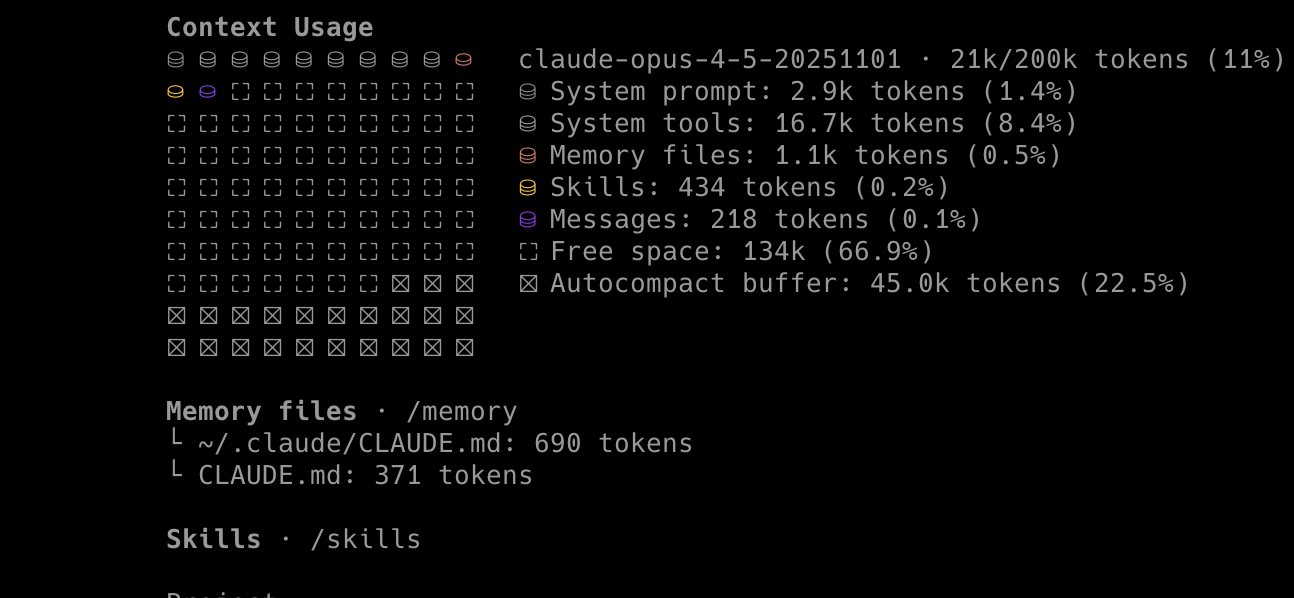
Every tool you expose to an agent consumes context. The tool name, description, parameter schema — it all goes into the prompt. Load 40 tools, and you've burned thousands of tokens before the agent does anything useful.
Worse, the agent's ability to select the right tool degrades as options increase.
## Context rot: Context window optimization research
Context rot refers to performance degradation when LLMs process increasingly long inputs. As context grows, models don't degrade gracefully — they become unreliable. They hallucinate parameters, call the wrong tools, and miss instructions.
Anthropic's guidance indicates that tool selection accuracy degrades significantly beyond 30-50 tools. In practice, using Claude Opus 4.5 with its 200K context window, I've observed reliability beginning to decline around 60% context utilization.
Claude can dynamically discover and load tools on-demand
Tools aren't loaded into context upfront
This is the right direction. But it's Claude-specific. If your agents use multiple models, you need:
Tool governance that works across OpenAI, Gemini, and open-source models
Centralized control, not per-agent configuration
That's where gateway-level control comes in.
## The solution: AI gateway tool access control
The pattern is straightforward: put an MCP gateway between your agents and MCP servers. The gateway intercepts tool lists and filters them based on who's asking.
About the examples below
The examples throughout this post use GitHub's MCP server as the backend, though the patterns apply to any MCP server.
Routes - URL paths that agents use to access services
Plugins - policies applied to requests (authentication, transformation, ACLs)
Consumer groups - categories of agents with different permissions
You can apply these patterns with other gateways, but the specific syntax will differ.
Kong consumer groups primer
Consumer groups are Kong's mechanism for categorizing API consumers. The key pattern:
Identity first - Identify who's making the request (via JWT token validation)
Map to group - Extract a claim from the token that specifies the consumer group
Apply ACLs - Filter tools based on the consumer group's permissions
This means ACLs are attached to groups, not individual consumers. You define groups once, configure their tool access, then map any number of consumers to those groups via JWT claims.
Progressive security model
Kong's MCP gateway implements tool governance as a progressive security model with four layers:
Gateway proxies requests to MCP servers. Agents still provide their own credentials. You get centralized logging and analytics but no access control yet.
Not every use case requires the gateway to manage MCP credentials. If your agents connect to multiple backend MCP servers—each with individual, user-specific access—you may want the gateway to handle authentication and governance while letting credentials pass through to the backend.
In this model:
The gateway validates the agent's identity via JWT
Tool-level ACLs still apply based on consumer group
The agent provides its own credentials for the specific MCP server
Credentials pass through to the backend unchanged
This is useful when users have varying access levels across different MCP servers, or when centralizing credential management isn't practical. The gateway still provides authentication, tool filtering, logging, and rate limiting—just not credential injection.
Layer 4: Tool-level ACLs
┌─────────┐      ┌─────────────────────┐      ┌────────────┐
│  Agent  │ ───► │       Gateway       │ ───► │ MCP Server │
└─────────┘      │                     │      └────────────┘
     │           │ 1. Validate token   │           │
     │           │ 2. Map to consumer  │           │
     │           │    group via claims │           │
     │           │ 3. Filter tools     │           │
     │           │    by ACL           │           │
     │           └─────────────────────┘           │
     │                                             │
     └── Sees only allowed tools ──────────────────┘
         (e.g., 2 tools instead of 40)
Based on JWT claims, the gateway maps agents to consumer groups and filters which tools each group can see.
The github-mcp-access claim contains the consumer group name. When this token hits the gateway, the agent gets mapped to github-cicd-agents and sees only the tools allowed for that group.
Kong configuration:
## yaml
consumer_groups:-name: github-cicd-agents
-name: github-code-reviewers
-name: github-security-scanner
plugins:-name: openid-connect
config:issuer: https://your-idp.com/.well-known/openid-configuration
auth_methods:- bearer
consumer_groups_claim:- github-mcp-access # JWT claim that maps to consumer group-name: ai-mcp-proxy
config:mode: passthrough-listener
include_consumer_groups:true# Deny by default for all groupsdefault_acl:-scope: tools
allow:nulldeny:- github-cicd-agents
- github-code-reviewers
- github-security-scanner
tools:-name: search_code
acl:allow:- github-cicd-agents
- github-code-reviewers
- github-security-scanner
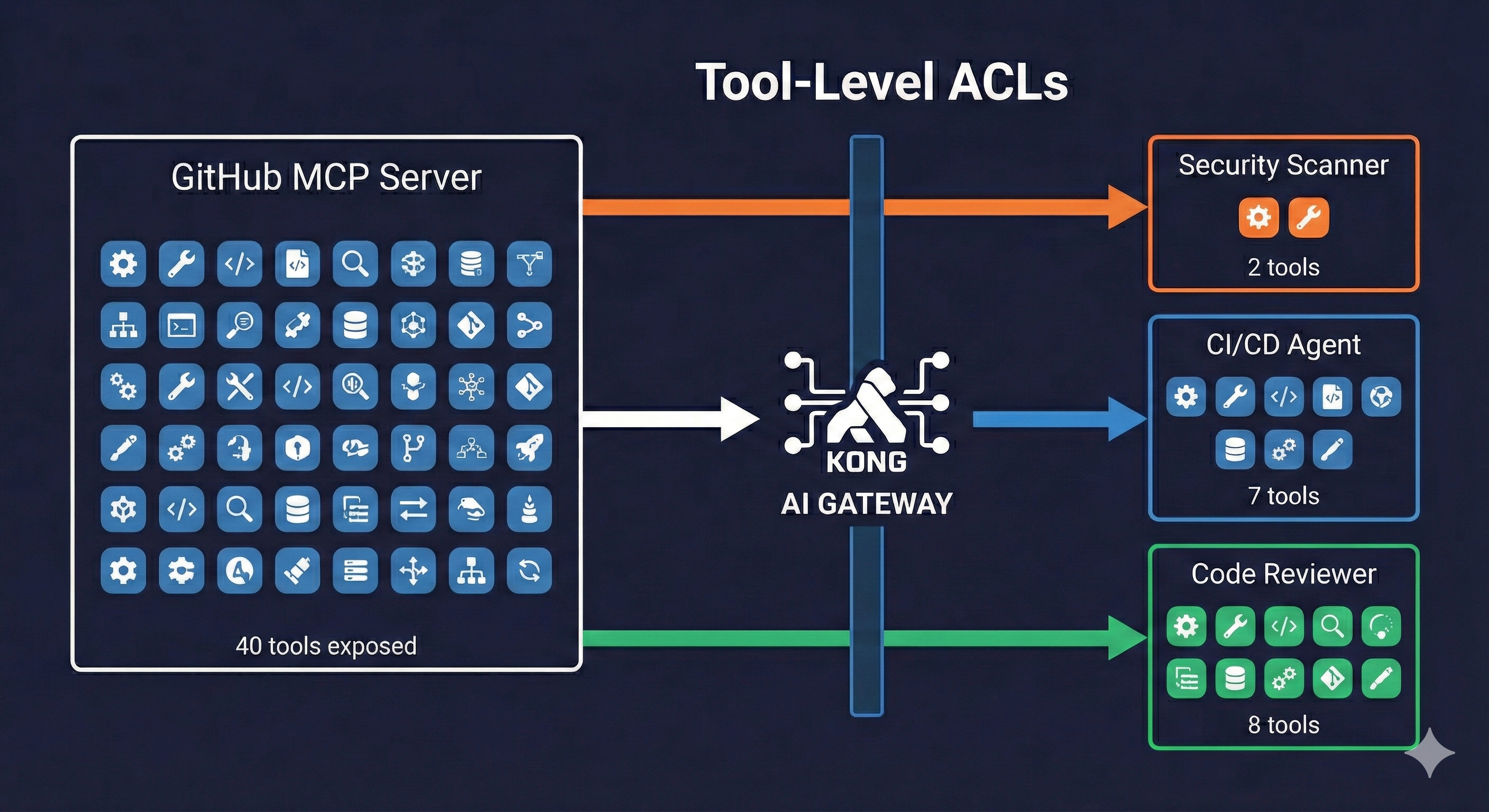
The key insight: the tool list terminates at the gateway. The backend MCP server might expose 40 tools, but your security-scanner agent only sees 2.
## Implementing MCP tool restrictions
The `ai-mcp-proxy` plugin supports multiple approaches to restricting tools:
Option 1: Consumer groups with JWT claim mapping
Your identity provider includes a claim (e.g., github-mcp-access) that specifies which consumer group the agent belongs to. The gateway maps this automatically.
## yaml
-name: openid-connect
config:consumer_groups_claim:- github-mcp-access # Claim value becomes consumer group name
Option 2: Static consumer assignment
Define consumers explicitly and assign them to groups. Useful when agents use API keys instead of JWT tokens. These keys are generated and managed by the gateway—essentially virtual credentials that never touch your backend systems.
Create separate routes for different agent types, each with its own tool configuration. Simpler to reason about, but requires agents to know which endpoint to use.
The common thread: default deny. Tools not explicitly listed in the tools array with an allow ACL are blocked.
## Practical example: GitHub MCP with three agent personas
Here's a real scenario. You have GitHub's MCP server with 40+ tools. You want three types of AI agents to use it:
Note: Tool names are illustrative and may differ from the actual GitHub MCP server implementation.
Notice what's missing: merge_pull_request, push_files, delete_file. No AI agent gets these. Human-in-the-loop by design.
Full configuration:
## yaml
_format_version:'3.0'consumer_groups:# CI/CD Pipeline Agents - Can read PRs and add status comments-name: github-cicd-agents
# Code Review Assistants - Can review code and leave feedback-name: github-code-reviewers
# Security Scanner - Ultra-restricted, only search code and create issues-name: github-security-scanner
services:-name: GitHub-MCP-Service
url: https://api.githubcopilot.com/mcp/
routes:-name: GitHub-MCP-route
paths:- /mcp/github
plugins:# Strip incoming auth, inject GitHub token from vault-name: request-transformer-advanced
config:remove:headers:-'Authorization'add:headers:-'{vault://secrets/github-token}'# Require valid IDP token, map claims to consumer groups-name: openid-connect
config:issuer: https://your-idp.com/.well-known/openid-configuration
auth_methods:- bearer
consumer_groups_claim:- github-mcp-access
# MCP proxy with tool-level ACLs-name: ai-mcp-proxy
config:mode: passthrough-listener
include_consumer_groups:true# Deny by default for all groupsdefault_acl:-scope: tools
allow:nulldeny:- github-cicd-agents
- github-code-reviewers
- github-security-scanner
tools:# Security scanner: minimal access (2 tools)-name: search_code
description: Search code across repositories
acl:allow:- github-cicd-agents
- github-code-reviewers
- github-security-scanner
-name: issue_write
description: Create or update issues (for security findings)
acl:allow:- github-security-scanner
# CI/CD and reviewers: read access-name: get_file_contents
acl:allow:- github-cicd-agents
- github-code-reviewers
-name: pull_request_read
acl:allow:- github-cicd-agents
- github-code-reviewers
-name: list_pull_requests
acl:allow:- github-cicd-agents
- github-code-reviewers
# CI/CD only: status updates-name: add_issue_comment
acl:allow:- github-cicd-agents
-name: update_pull_request_branch
acl:allow:- github-cicd-agents
# Code reviewers only: review capabilities-name: pull_request_review_write
acl:allow:- github-code-reviewers
-name: add_comment_to_pending_review
acl:allow:- github-code-reviewers
# BLOCKED FOR ALL (not listed = denied by default):# - merge_pull_request# - push_files# - delete_file# - create_repository
When the security scanner connects and requests the tool list, it sees exactly two tools. The CI/CD agent sees seven. The code reviewer sees eight. The backend GitHub MCP server still has 40+, but agents only see what they need.
## Credential isolation for AI agent security
There's a secondary benefit to gateway-managed credentials: agents never see your GitHub token.
Without gateway:
┌─────────┐                    ┌────────────┐
│  Agent  │ ─── GitHub PAT ──► │ MCP Server │
└─────────┘                    └────────────┘
     │
     └── Agent config contains the credential
         (compromised agent = exposed token)

With gateway:
┌─────────┐      ┌─────────┐      ┌────────────┐
│  Agent  │ ───► │ Gateway │ ───► │ MCP Server │
└─────────┘      └─────────┘      └────────────┘
     │                │
     │                └── GitHub PAT injected
     │                    from vault
     └── IDP token only (scoped to agent's permissions)
Even if an agent is compromised, the attacker gets an IDP token scoped to that agent's consumer group—not your GitHub PAT with repo admin access.
## When to implement MCP tool restrictions
Don't wait until you have 40 tools. Start with these principles:
From day one:
Default deny on all tool ACLs
Gateway-managed credentials (agents don't hold backend secrets)
Logging enabled (you'll want the audit trail)
Gateway overhead for tool filtering is typically sub-10ms
As you scale:
Define consumer groups by agent function, not by team
Use JWT claims mapping if your agents already carry role information
Kong AI Gateway handles the traffic patterns production agent systems depend on. The Straiker integration can be applied to configured traffic so the relevant request context is evaluated before the action continues. For LLM traffic, Straiker evalua
Parth Shah
# Governing Claude Code: How To Secure Agent Harness Rollouts with Kong AI Gateway
Claude Code is Anthropic's agentic coding and agent harness tool. Unlike traditional code-completion assistants that suggest the next line in an editor, Claude Code operates as an autonomous agent that reads entire codebases, edits files across mult
Alex Drag
# Your Multi-Agent System Is Only as Reliable as Its Context Layer
Multi-agent workflows live and die on context. Every agent-to-agent call and every agent-to-tool call is either a retrieval — fetching information the agent needs — or a mutation — changing state that downstream agents will depend on. At prototype s
Hugo Guerrero
# The Architecture Decision Your Multi-Agent System Will Live With
Multi-agent systems are, at their core, context distribution systems. Every agent in your workflow is a consumer and producer of context. The interesting architectural questions are all about how that context moves. Two operations drive everything:
Hugo Guerrero
# AI Agent Platforms Are Getting Hacked. Here's What's Missing.
The Langflow CVEs and Dify Vulnerabilities: What Actually Happened
Langflow's security problems arrived in waves. CVE-2025-3248 introduced a code injection vulnerability allowing remote code execution through unsanitized user input \10\]. Months la
Kong
# LiteLLM vs Kong: Choosing the Right Enterprise AI Gateway for Production
For many buyers, this is where the evaluation begins: the part of the stack responsible for controlling, shaping, and observing AI traffic as it moves between applications and AI models. Once the baseline requirements are met, the question then shif
Adam Jiroun
# AI Gateway vs. Direct LLM API Integration: The Architecture Decision Defining Your AI Strategy
Most teams start the same way. A developer creates an API key, calls OpenAI or Anthropic, and ships a prototype. The problems surface when that prototype becomes five production services calling three providers. Hardcoded provider dependencies are
Kong
# Kong and Straiker: Runtime Security and Agent-Level Control for AI Agents
Kong AI Gateway handles the traffic patterns production agent systems depend on. The Straiker integration can be applied to configured traffic so the relevant request context is evaluated before the action continues. For LLM traffic, Straiker evalua
Parth Shah
# Governing Claude Code: How To Secure Agent Harness Rollouts with Kong AI Gateway
Claude Code is Anthropic's agentic coding and agent harness tool. Unlike traditional code-completion assistants that suggest the next line in an editor, Claude Code operates as an autonomous agent that reads entire codebases, edits files across mult
Alex Drag
# Your Multi-Agent System Is Only as Reliable as Its Context Layer
Multi-agent workflows live and die on context. Every agent-to-agent call and every agent-to-tool call is either a retrieval — fetching information the agent needs — or a mutation — changing state that downstream agents will depend on. At prototype s
Hugo Guerrero
# The Architecture Decision Your Multi-Agent System Will Live With
Multi-agent systems are, at their core, context distribution systems. Every agent in your workflow is a consumer and producer of context. The interesting architectural questions are all about how that context moves. Two operations drive everything:
Hugo Guerrero
# AI Agent Platforms Are Getting Hacked. Here's What's Missing.
The Langflow CVEs and Dify Vulnerabilities: What Actually Happened
Langflow's security problems arrived in waves. CVE-2025-3248 introduced a code injection vulnerability allowing remote code execution through unsanitized user input \10\]. Months la
Kong
# LiteLLM vs Kong: Choosing the Right Enterprise AI Gateway for Production
For many buyers, this is where the evaluation begins: the part of the stack responsible for controlling, shaping, and observing AI traffic as it moves between applications and AI models. Once the baseline requirements are met, the question then shif
Adam Jiroun
# AI Gateway vs. Direct LLM API Integration: The Architecture Decision Defining Your AI Strategy
Most teams start the same way. A developer creates an API key, calls OpenAI or Anthropic, and ships a prototype. The problems surface when that prototype becomes five production services calling three providers. Hardcoded provider dependencies are
Kong
# Kong and Straiker: Runtime Security and Agent-Level Control for AI Agents
Kong AI Gateway handles the traffic patterns production agent systems depend on. The Straiker integration can be applied to configured traffic so the relevant request context is evaluated before the action continues. For LLM traffic, Straiker evalua
Parth Shah
# Governing Claude Code: How To Secure Agent Harness Rollouts with Kong AI Gateway
Claude Code is Anthropic's agentic coding and agent harness tool. Unlike traditional code-completion assistants that suggest the next line in an editor, Claude Code operates as an autonomous agent that reads entire codebases, edits files across mult
Alex Drag
# Your Multi-Agent System Is Only as Reliable as Its Context Layer
Multi-agent workflows live and die on context. Every agent-to-agent call and every agent-to-tool call is either a retrieval — fetching information the agent needs — or a mutation — changing state that downstream agents will depend on. At prototype s
Hugo Guerrero
# The Architecture Decision Your Multi-Agent System Will Live With
Multi-agent systems are, at their core, context distribution systems. Every agent in your workflow is a consumer and producer of context. The interesting architectural questions are all about how that context moves. Two operations drive everything:
Hugo Guerrero
# AI Agent Platforms Are Getting Hacked. Here's What's Missing.
The Langflow CVEs and Dify Vulnerabilities: What Actually Happened
Langflow's security problems arrived in waves. CVE-2025-3248 introduced a code injection vulnerability allowing remote code execution through unsanitized user input \10\]. Months la
Kong
# LiteLLM vs Kong: Choosing the Right Enterprise AI Gateway for Production
For many buyers, this is where the evaluation begins: the part of the stack responsible for controlling, shaping, and observing AI traffic as it moves between applications and AI models. Once the baseline requirements are met, the question then shif
Adam Jiroun
# AI Gateway vs. Direct LLM API Integration: The Architecture Decision Defining Your AI Strategy
Most teams start the same way. A developer creates an API key, calls OpenAI or Anthropic, and ships a prototype. The problems surface when that prototype becomes five production services calling three providers. Hardcoded provider dependencies are
Kong
## Ready to see Kong in action?
Get a personalized walkthrough of Kong's platform tailored to your architecture, use cases, and scale requirements.