Blog
  • AI Gateway
  • AI Security
  • AIOps
  • API Security
  • API Gateway
    • API Management
    • API Development
    • API Design
    • Automation
    • Service Mesh
    • Insomnia
    • View All Blogs
  1. Home
  2. Blog
  3. Engineering
  4. Applying Authorization Code Flow With Kong and Okta
Engineering
May 27, 2021
3 min read

Applying Authorization Code Flow With Kong and Okta

Claudio Acquaviva
Principal Architect, Kong
Topics
Kong KonnectOAuthOpen Source
Share on Social

More on this topic

Reports

Kong Konnect

Videos

Service Catalog with Traceable AI

See Kong in action

Accelerate deployments, reduce vulnerabilities, and gain real-time visibility. 

Get a Demo

In our second Kong and Okta tutorial, we'll go through the authorization code flow applied to user authentication processes. This series will show you how to implement service authentication and authorization for Kong Konnect and Okta using the OpenID Connect (OIDC) plugin. Parts 1, 3 and 4 cover:

  • Implementing client credentials flow for application authentication
  • Integral introspection for token validation (coming soon)
  • Access control based on Okta's groups and planes (coming soon)

Konnect and Okta Integration Topology

The Konnect control plane creates new APIs and policies and publishes them to the data plane running as a Docker container in an AWS EC2 instance.
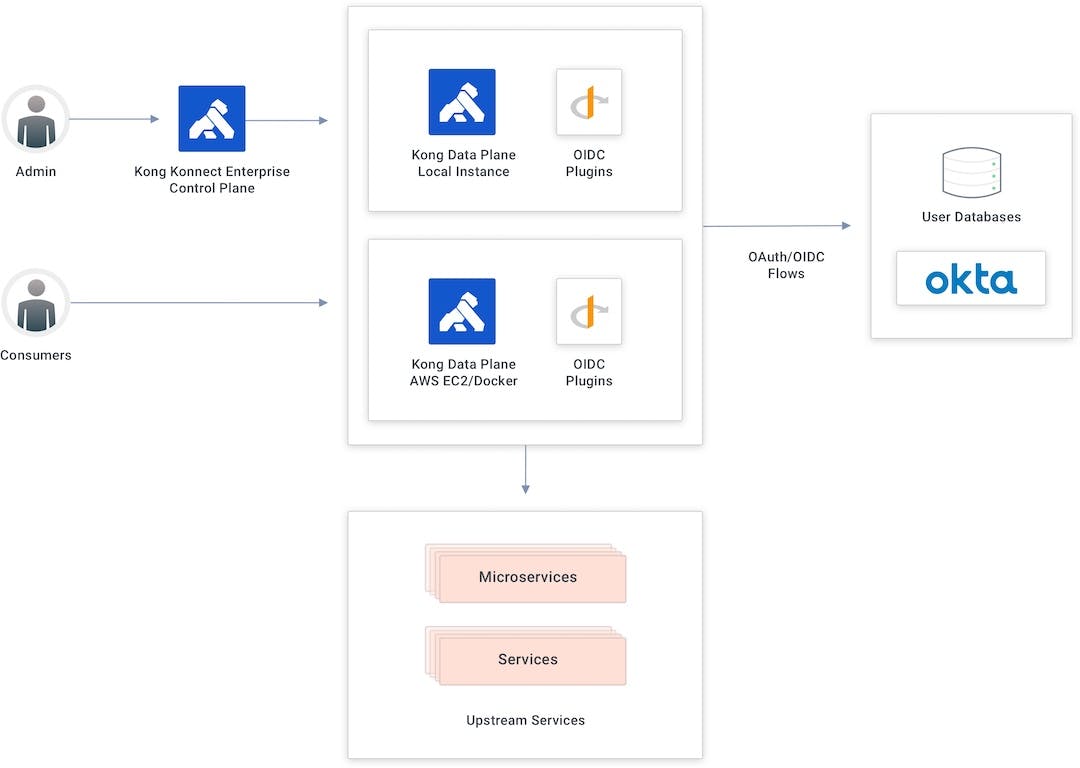
Kong Konnect and Okta Integration Topology

Authorization Code Flow

The authorization code flow goes through the following steps:

  1. A user tries to consume the API.
  2. If the user doesn’t have a token injected, Kong redirects the user to Okta, the identity provider.
  3. The user authenticates on Okta and is sent back to Kong with an authorization code token.
  4. Kong validates the parameters and exchanges the authorization code token by calling Okta’s token endpoint.

OpenID Connect Sign In

Add Your Services and Routes to Konnect

In Konnect's ServiceHub, I have a service created already. Follow along in our Getting Started with Konnect tutorial to learn how to create a service and routes.

My service has two routes defined already. I used the first service in the previous Kong and Okta tutorial to show the client credentials flow. In this tutorial, I'll use the second service to apply the OIDC plugin utilizing the authorization code flow.

Kong Konnect OIDC Authorization Code Flow Route

Set Up the Okta Application

In Okta, I prepared an application to implement the authorization flow already. In the Kong authorization code application, we’re going to use the configured OIDC plugin in addition to the client ID and client secret.

Kong and Okta OIDC Application Authorization Code Flow


The app has the authorization code option turned on and the signing redirect URI set with the route available in my data plane. That means the authorization code is accepted for this URI only.

Kong and Okta Authorization Code Flow Application Settings

Consume the Route Without a Policy

Any user is free to consume the route right now since there's no policy to control it.

Kong Konnect route with no OIDC policy

Apply the OpenID Connect Plugin

Just like we did for the client credentials flow tutorial, let’s go back to the Konnect control plane to apply the OIDC plugin and then implement the authorization code flow.

  1. Set the Config.Client ID.Kong OIDC Client ID Setup
  2. Enter the Config.Client Secret.Kong OIDC client secret setup
  3. Add Okta’s Config.Issuer endpoint.Kong OIDC issuer setup
  4. Click Create to enable the OIDC plugin to the route.

Test the OpenID Connect Plugin

If we try to consume the route again, Kong redirects us to Okta’s user interface to present our credentials.

Okta user credential sign on

Once we have presented our correct credentials, Okta authenticates and redirects us back to the API gateway. At this time, we’ll consume the API because we got the identity token injected inside our request.

Kong and Okta Identity Token

Then we go to jwt.io to check the token.

JWT check Kong and Okta OIDC token

Protect Your Applications With Kong Konnect and Okta

Start a free trial, or contact us if you have any questions as you're getting set up.

Once you've set up Konnect and Okta authorization code flow for user authentication, you may find these other tutorials helpful:

  • 3 Ways Kong Helps With API Gateway Governance
  • Getting Started with Kong Mesh and Open Policy Agent
  • Protect Your APIs With Kong Konnect and Fastly (Signal Sciences)

Topics
Kong KonnectOAuthOpen Source
Share on Social
Claudio Acquaviva
Principal Architect, Kong

Recommended posts

Unlocking API Analytics for Product Managers

Kong Logo
EngineeringSeptember 9, 2025

Meet Emily. She’s an API product manager at ACME, Inc., an ecommerce company that runs on dozens of APIs. One morning, her team lead asks a simple question: “Who’s our top API consumer, and which of your APIs are causing the most issues right now?”

Christian Heidenreich

Kong Acquires OpenMeter to Bring API and AI Monetization to the Agentic Era

Kong Logo
NewsSeptember 3, 2025

Today, we’re announcing that Kong has acquired  OpenMeter , the open source and SaaS leader for real-time usage metering and billing. OpenMeter’s capabilities will be integrated into Kong Konnect, enabling usage-based pricing, entitlements, and invo

Saju Pillai

Announcing terraform-provider-konnect v3

Kong Logo
Product ReleasesAugust 22, 2025

It’s been almost a year since we released our  Konnect Terraform provider . In that time we’ve seen over 300,000 installs, have 1.7 times as many resources available, and have expanded the provider to include data sources to enable federated managem

Michael Heap

How to Build a Multi-LLM AI Agent with Kong AI Gateway and LangGraph

Kong Logo
EngineeringJuly 31, 2025

In the last two parts of this series, we discussed How to Strengthen a ReAct AI Agent with Kong AI Gateway and How to Build a Single-LLM AI Agent with Kong AI Gateway and LangGraph . In this third and final part, we're going to evolve the AI Agen

Claudio Acquaviva

How to Build a Single LLM AI Agent with Kong AI Gateway and LangGraph

Kong Logo
EngineeringJuly 24, 2025

In my previous post, we discussed how we can implement a basic AI Agent with Kong AI Gateway. In part two of this series, we're going to review LangGraph fundamentals, rewrite the AI Agent and explore how Kong AI Gateway can be used to protect an LLM

Claudio Acquaviva

Announcing Kubernetes Ingress Controller 3.5

Kong Logo
Product ReleasesJuly 17, 2025

We're happy to announce the 3.5 release of Kong Ingress Controller (KIC).  This release includes the graduation of combined services to General Availability, support for connection draining, as well as the start of deprecating support for some Ingre

Justin Davies

How to Strengthen a ReAct AI Agent with Kong AI Gateway

Kong Logo
EngineeringJuly 15, 2025

This is part one of a series exploring how Kong AI Gateway can be used in an AI Agent development with LangGraph. The series comprises three parts: Basic ReAct AI Agent with Kong AI Gateway Single LLM ReAct AI Agent with Kong AI Gateway and LangGr

Claudio Acquaviva

Ready to see Kong in action?

Get a personalized walkthrough of Kong's platform tailored to your architecture, use cases, and scale requirements.

Get a Demo
Powering the API world

Increase developer productivity, security, and performance at scale with the unified platform for API management, AI gateways, service mesh, and ingress controller.

Sign up for Kong newsletter

Platform
Kong KonnectKong GatewayKong AI GatewayKong InsomniaDeveloper PortalGateway ManagerCloud GatewayGet a Demo
Explore More
Open Banking API SolutionsAPI Governance SolutionsIstio API Gateway IntegrationKubernetes API ManagementAPI Gateway: Build vs BuyKong vs PostmanKong vs MuleSoftKong vs Apigee
Documentation
Kong Konnect DocsKong Gateway DocsKong Mesh DocsKong AI GatewayKong Insomnia DocsKong Plugin Hub
Open Source
Kong GatewayKumaInsomniaKong Community
Company
About KongCustomersCareersPressEventsContactPricing
  • Terms•
  • Privacy•
  • Trust and Compliance•
  • © Kong Inc. 2025